<?xml version="1.0" encoding="utf-8"?><feed xmlns="http://www.w3.org/2005/Atom" xml:lang="en-gb"><generator uri="https://gohugo.io/" version="0.101.0">Hugo</generator><title type="html">Rowan’s Blog | Rowan Manning</title><link href="https://rowanmanning.com/posts/" rel="alternate" type="text/html"/><link href="https://sample-feeds.rowanmanning.com/real-world/6769a7aac9914f98016cb5d26eef1939/feed.xml" rel="self" type="application/atom+xml"/><id>https://rowanmanning.com/posts/</id><rights>Copyright © 2024, Rowan Manning</rights><author><name>Rowan Manning</name><uri>https://rowanmanning.com/</uri></author><updated>2022-11-04T11:22:00+00:00</updated><entry><title type="html">Operational excellence: one year on</title><link href="https://rowanmanning.com/posts/operational-excellence-one-year-on/" rel="alternate" type="text/html"/><link href="https://rowanmanning.com/posts/operational-excellence-one-year-on/reliability-kit-error.jpg" rel="enclosure" type="image/jpeg" title="A JSON-based error log containing app details (e.g. commit hash, name, Node.js version) and error information (e.g. message, code, stack trace, and related systems)"/><id>https://rowanmanning.com/posts/operational-excellence-one-year-on/</id><author><name>Rowan Manning</name><uri>https://rowanmanning.com/</uri></author><published>2022-11-04T11:22:00+00:00</published><updated>2022-11-04T11:22:00+00:00</updated><content type="html"><![CDATA[<p>A year ago, <a href="https://medium.com/ft-product-technology/next-chapter-on-our-journey-to-achieve-and-maintain-operational-excellence-of-ft-com-7dd9c7871347">Nayana wrote a blog post</a> outlining some changes to the way we support FT.com. As well as giving an excellent overview of what our “OpsCop” team did, it set out some changes that we intended to make. We wanted to stop being reactive and start <em>proactively</em> finding ways to enable operational excellence on FT.com.</p>
<p>I’ve been working on the new team for about a year and I think the change in focus has been a huge success. We are now a team of three permanent senior engineers, a technical product manager, and a delivery manager. We recently renamed ourselves to the Reliability Team to better reflect the long-term vision of the team, our expertise, and our changing role in the organisation.</p>
<h2 id="how-the-team-works">How the team works</h2>
<h3 id="we-still-triage-issues">We still triage issues</h3>
<p>We’re still the team responsible for triaging issues that come into FT.com, however, this is now only a small part of what we do. Nayana said in her original post:</p>
<blockquote>
<p>“Our vision is to get to a place where the ft.com team in partnership with the stream-aligned product teams and the platform team spend 90% of their time improving the overall reliability aspects of ft.com and only spend 10% of their time on triaging issues that the group has never seen before.”</p>
</blockquote>
<p>We’ve met Nayana’s original target, dropping from <strong>~90%</strong> to <strong>~10%</strong> of our time spent on triage. Lower-severity issues now get sent directly to the owner of the system without ever reaching our team, this gives us space to focus on more critical underlying issues.</p>
<p>There’s definitely <a href="https://sre.google/sre-book/eliminating-toil/">less toil</a> than there used to be, and we’re focused more on actionable outcomes of an incident. A recent example is the FT.com site navigation going down and managing to take out several applications. We identified the root cause as well as some other improvements we could make to increase the resilience of this service. We spent a week <a href="https://en.wikipedia.org/wiki/Mob_programming">mobbing</a> with the team who own this system, increased knowledge of how it fits into our other systems, and fixed some fairly critical issues. Previously we would not have had the capacity to make those underlying changes, especially in such a short period of time.</p>
<p>Another thing that we’re now doing with our issue triage is trying to spot patterns over time. For example, in early 2022 we were seeing quite a few issues related to our membership services. On the customer-facing website, these are presented as error pages, and our customer care team would often bring these issues directly to us. Rather than continue to react to these issues when they came up, we built some tools to help us quickly identify and route these issues to the team responsible for billing and subscribers.</p>
<h3 id="we-proactively-seek-out-potential-issues">We proactively seek out potential issues</h3>
<p>A key point made in Nayana’s original post was around being proactive rather than reactive.</p>
<blockquote>
<p>“We believe that this would help <strong>reduce the reactive operational work</strong> that teams have to do giving us more time as a group to focus on the <strong>proactive, preventive and predictive maintenance</strong> of ft.com systems and services.”</p>
</blockquote>
<p>This is something that we’ve made a clear focus over the last year, as the reactive approach was not scalable: more FT subscribers lead to more issues and support requests, which then require more engineering effort.</p>
<p>We all had some assumptions about which parts of the FT.com stack were less-than-reliable because we’ve always had relatively good monitoring. What we didn’t know was the <em>why</em>; whether there were any common issues we see across all of our systems.</p>
<p>We did a lot of investigating: picking apart our error logs to look for patterns, digging into the code for different systems to find common issues, reviewing the root causes of incidents to see if there are any shortfalls in the way we design software. We did some deep dives into one or two of our more problematic systems and wrote down everything we found. This put us in a good position to make recommendations to our teams, and we’ve been rolling out some changes based on this research.</p>
<h3 id="we-own-code-and-systems">We own code and systems</h3>
<p>We gave ourselves a few months’ grace period for the team to bed in, but then we started taking ownership of all the libraries and systems related to the reliability and stability of FT.com. This gave us the ability to make improvements without relying on other teams and also took the pressure off some of the product teams who just don’t have as much time to focus on this area.</p>
<p>We’re still slowly ramping up but we’re now at 16 repos, all of which we understand well enough to reliably support.</p>
<p>As well as taking ownership of existing code, we’ve also been looking at how we can produce new software to improve FT.com’s reliability. After identifying some areas we could clearly improve, we released <a href="https://github.com/Financial-Times/dotcom-reliability-kit#readme">Reliability Kit</a>, a suite of Node.js libraries and guides that will help us standardise errors and logging. We’re slowly migrating our applications to this. It’s an area we previously under-invested in and we’re already seeing some big improvements to the observability and reliability of the systems which have adopted it.</p>


<figure class="image">
	<a href="/posts/operational-excellence-one-year-on/reliability-kit-error.jpg">
		<img
			
				srcset="
					https://rowanmanning.com/posts/operational-excellence-one-year-on/reliability-kit-error_hu00da04ed0eb8646d73e7650ca68172b5_127860_720x0_resize_q75_box.jpg,
					https://rowanmanning.com/posts/operational-excellence-one-year-on/reliability-kit-error.jpg 1.5x,
					https://rowanmanning.com/posts/operational-excellence-one-year-on/reliability-kit-error.jpg 2x
				"
			
			src="https://rowanmanning.com/posts/operational-excellence-one-year-on/reliability-kit-error.jpg"
			alt="A JSON-based error log containing app details (e.g. commit hash, name, Node.js version) and error information (e.g. message, code, stack trace, and related systems)"
			width="1070"
			height="1094"
			loading="lazy"
		/>
	</a>
	
		<figcaption class="image__caption">An example of the improved error logging we’ve rolled out with Reliability Kit</figcaption>
	
</figure>

<h2 id="are-we-solving-the-problems-of-one-year-ago">Are we solving the problems of one year ago?</h2>
<p>Nayana highlighted several key issues in her original blog post.</p>
<h3 id="no-metrics-and-service-level-agreements-for-incoming-issues">No metrics and Service Level Agreements for incoming issues</h3>
<p>We’re on our way to solving this; we’re definitely focused on reducing recurring issues and we have a better process for fixing incoming issues. We haven’t <em>quite</em> got there with SLAs (service level agreements) but some work has been done on adding SLOs (service level objectives) for systems.</p>
<h3 id="some-large-operational-issues-without-a-clear-owner-to-drive-strategic-changes">Some large operational issues without a clear owner to drive strategic changes</h3>
<p>As discussed already, we’re now investigating the broader operational issues that impact FT.com and owning the work to address them. We’re able to focus on some large technical challenges that previously wouldn’t have been possible.</p>
<h3 id="no-systematic-process-for-creating-a-shared-sense-of-ownership-across-ftcom">No systematic process for creating a shared sense of ownership across ft.com</h3>
<p>We don’t yet have a systematic process, but we’re going to investigate supporting engineers seconding into our team. We’re also very open and visible in the work we’re doing — we’re sharing regular internal blog posts, design docs, and the results of our investigations.</p>
<h2 id="what-are-the-new-problems">What are the new problems?</h2>
<p>A year is a long time in software development, and we’re always identifying new problems to solve. These will help us decide what the team should be doing going forward.</p>
<h3 id="we-could-support-our-customer-care-team-far-better-than-we-do">We could support our customer care team far better than we do</h3>
<p>Our customer care colleagues aren’t being set up for success when it comes to supporting our customers. They’re given little direction from FT.com engineering on how our systems fit together and we could be doing a far better job at sending them to the right team.</p>
<p>We’re looking at how we can give them the tools they need for this, firstly with some better error signposting on FT.com. This will reduce the time between a user calling customer care and getting a fix rolled out, and it’ll further reduce our time spent on triage.</p>
<h3 id="theres-not-a-lot-of-shared-ownership-of-site-performance">There’s not a lot of shared ownership of site performance</h3>
<p>We’re investigating how we can improve performance across the whole of FT.com. We’re currently not doing <em>badly</em>, but we don’t have all the tools in place to ensure that we don’t take steps back in terms of web performance. This could easily become a future issue.</p>
<h3 id="were-focused-a-lot-on-the-website">We’re focused a lot on the website</h3>
<p>Customer Products is the group that looks after both FT.com and our mobile apps. As you can probably tell from reading this post, there’s been more of a focus on the website from our team for now. Having a shared centralised team to focus on the reliability of the website <em>and</em> the apps is something we’d like to explore.</p>
<h2 id="heres-to-another-year">Here’s to another year</h2>
<p>We’re excited to have made it to a full year, and we’re really proud of some of our achievements. I’m sure there will be a lot more to come over the next year.</p>
<p>Thanks for reading</p>
]]></content><category scheme="https://rowanmanning.com/tags/operational-excellence/" term="operational-excellence" label="Operational Excellence"/></entry><entry><title type="html">Halving my GitHub Pages Build Time</title><link href="https://rowanmanning.com/posts/halving-my-github-pages-build-time/" rel="alternate" type="text/html"/><id>https://rowanmanning.com/posts/halving-my-github-pages-build-time/</id><author><name>Rowan Manning</name><uri>https://rowanmanning.com/</uri></author><published>2022-08-21T10:35:00+01:00</published><updated>2022-08-21T10:35:00+01:00</updated><content type="html"><![CDATA[<p>Recently I spent some time overhauling the build process for this website because it was <em>really</em> slow. After <a href="/weeknotes/">nearly 100 weeknotes</a> (including a lot of images to resize) my build/deploy process was taking 6–7 minutes. Locally my entire site builds in 500–800ms so I decided to investigate where my performance issues were.</p>
<p>The TL;DR here is that my builds have dropped to ~3 minutes, more than half my original times. I&rsquo;ve also removed some uncertainty about exactly <em>when</em> my site will get deployed. Here are the steps I went through:</p>
<ol>
<li>
<p>I realised that I wasn&rsquo;t caching <a href="https://gohugo.io/">Hugo</a>&rsquo;s build or <code>resources/_gen</code> folders in CI, which meant that the entire site had to be built every time. No wonder this was slow! Caching these folders based on a hash of the <code>config</code>, <code>content</code>, <code>data</code>, and <code>themes</code> folder reduced build times by a lot and I&rsquo;m now taking full advantage of how fast Hugo is. Here&rsquo;s the step I defined:</p>
<div class="highlight"><pre tabindex="0" class="chroma"><code class="language-yaml" data-lang="yaml"><span class="line"><span class="cl"><span class="w"> </span>- <span class="nt">name</span><span class="p">:</span><span class="w"> </span><span class="l">Cache built website</span><span class="w">
</span></span></span><span class="line"><span class="cl"><span class="w">   </span><span class="nt">uses</span><span class="p">:</span><span class="w"> </span><span class="l">actions/cache@v3</span><span class="w">
</span></span></span><span class="line"><span class="cl"><span class="w">   </span><span class="nt">env</span><span class="p">:</span><span class="w">
</span></span></span><span class="line"><span class="cl"><span class="w">     </span><span class="nt">cache-name</span><span class="p">:</span><span class="w"> </span><span class="l">cache-website-v1</span><span class="w">
</span></span></span><span class="line"><span class="cl"><span class="w">   </span><span class="nt">with</span><span class="p">:</span><span class="w">
</span></span></span><span class="line"><span class="cl"><span class="w">     </span><span class="nt">path</span><span class="p">:</span><span class="w"> </span><span class="p">|</span><span class="sd">
</span></span></span><span class="line"><span class="cl"><span class="sd">       build
</span></span></span><span class="line"><span class="cl"><span class="sd">       resources/_gen</span><span class="w">       
</span></span></span><span class="line"><span class="cl"><span class="w">     </span><span class="nt">key</span><span class="p">:</span><span class="w"> </span><span class="l">${{ runner.os }}-build-${{ env.cache-name }}-${{ hashFiles(&#39;config&#39;, &#39;content&#39;, &#39;data&#39;, &#39;themes&#39;) }}</span><span class="w">
</span></span></span><span class="line"><span class="cl"><span class="w">     </span><span class="nt">restore-keys</span><span class="p">:</span><span class="w"> </span><span class="p">|</span><span class="sd">
</span></span></span><span class="line"><span class="cl"><span class="sd">       ${{ runner.os }}-build-${{ env.cache-name }}-
</span></span></span><span class="line"><span class="cl"><span class="sd">       ${{ runner.os }}-build-
</span></span></span><span class="line"><span class="cl"><span class="sd">       ${{ runner.os }}-</span><span class="w">       
</span></span></span></code></pre></div></li>
<li>
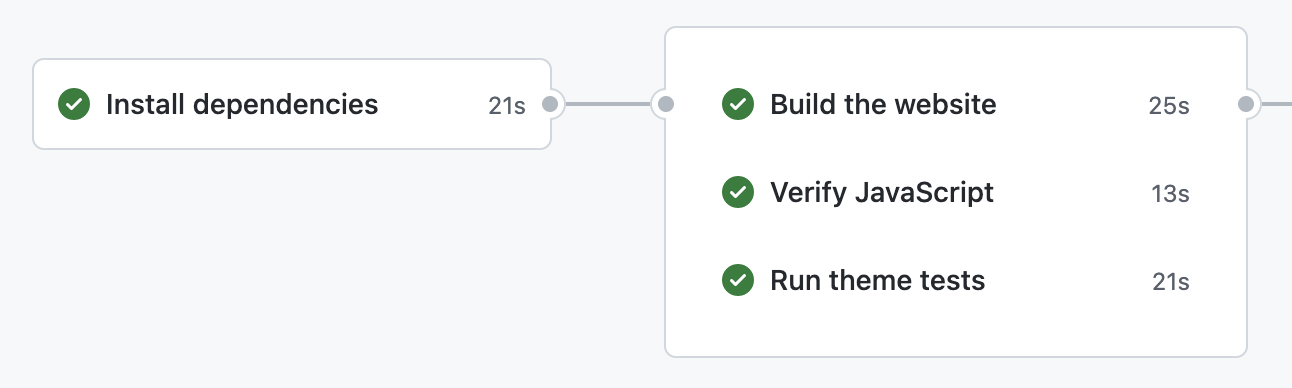
<p>I wasn&rsquo;t taking advantage of GitHub Actions&rsquo; ability to run jobs in parallel at all, I was waiting for the linting to pass before running tests, and then waiting for the tests to pass before building the site.</p>
<p>The linter, tests, and build have absolutely no shared tasks except that they all have the need to use Node.js and npm. I moved this to a new <code>install</code> job and made the linting, testing, and build happen in parallel. The final <code>deploy</code> job relies on all three of these passing. This gave me <em>so much</em> more speed.</p>

      
      <figure class="image">
      	<a href="https://github.com/rowanmanning/rowanmanning.com/actions/runs/2897812350">
      		<img
      			
      				srcset="
      					https://rowanmanning.com/posts/halving-my-github-pages-build-time/workflow-in-parallel_hue637fd86fc9e86c49a6b762d82aa9dc7_45632_720x0_resize_box_3.png,
      					https://rowanmanning.com/posts/halving-my-github-pages-build-time/workflow-in-parallel_hue637fd86fc9e86c49a6b762d82aa9dc7_45632_1080x0_resize_box_3.png 1.5x,
      					https://rowanmanning.com/posts/halving-my-github-pages-build-time/workflow-in-parallel.png 2x
      				"
      			
      			src="https://rowanmanning.com/posts/halving-my-github-pages-build-time/workflow-in-parallel.png"
      			alt="A screenshot of the parallel jobs on GitHub: install flows into build, verify, and test jobs"
      			width="1292"
      			height="388"
      			loading="lazy"
      		/>
      	</a>
      	
      </figure>

</li>
<li>
<p>One large bottleneck was the way I was deploying. Until very recently the only way to build GitHub pages with Hugo was to push to a separate branch or folder then a <em>separate</em> GitHub action would do the deploy under the hood. So, no matter how fast my own workflow was, I was still having to wait for a second one to trigger.</p>
<p>Very recently <a href="https://github.blog/changelog/2022-07-27-github-pages-custom-github-actions-workflows-beta/">GitHub launched a beta for deploying to GitHub Pages from your <em>own</em> GitHub Action</a>. This is game-changing for me because I have full control over the zipped artefact that gets deployed. No more waiting for GitHub to decide when to deploy my pages, I can trigger it myself immediately after the build 🎉</p>
<p>The GitHub Actions starter workflows repo contains <a href="https://github.com/actions/starter-workflows/tree/main/pages">examples</a> of how to do this with many other static site generators.</p>
<p>The new steps used are:</p>
<ul>
<li><a href="https://github.com/actions/configure-pages"><code>actions/configure-pages</code></a></li>
<li><a href="https://github.com/actions/upload-pages-artifact"><code>actions/upload-pages-artifact</code></a></li>
<li><a href="https://github.com/actions/deploy-pages"><code>actions/deploy-pages</code></a></li>
</ul>
</li>
</ol>
<p>These three steps had a huge impact, reducing my build and deploy times by more than half. Some of the issues were me writing suboptimal actions originally, but it&rsquo;s also been massively helped by the new GitHub features.</p>
<p><a href="https://github.com/rowanmanning/rowanmanning.com/actions/runs/2897812350">You can view an example run on my website repo here</a> and you can see <a href="https://github.com/rowanmanning/rowanmanning.com/blob/main/.github/workflows/build-deploy.yml">my full GitHub Actions workflow here</a>.</p>
]]></content><category scheme="https://rowanmanning.com/tags/hugo/" term="hugo" label="Hugo"/><category scheme="https://rowanmanning.com/tags/github/" term="github" label="GitHub"/><category scheme="https://rowanmanning.com/tags/side-projects/" term="side-projects" label="Side Projects"/></entry><entry><title type="html">Webmentions for your Static Site</title><link href="https://rowanmanning.com/posts/webmentions-for-your-static-site/" rel="alternate" type="text/html"/><link href="https://rowanmanning.com/posts/webmentions-for-your-static-site/response-icon.png" rel="enclosure" type="image/png" title="Response Icon"/><id>https://rowanmanning.com/posts/webmentions-for-your-static-site/</id><author><name>Rowan Manning</name><uri>https://rowanmanning.com/</uri></author><published>2021-07-06T22:45:00+01:00</published><updated>2021-07-06T22:45:00+01:00</updated><content type="html"><![CDATA[<p>Some time ago, my friend and colleague chee <a href="https://chee.party/2021/05/16/sunday-16th-may-2021/">told me about Webmentions</a>. I&rsquo;ll be honest, I didn&rsquo;t fully understand what they were. It took me about a month to actually look into them, and wow it&rsquo;s been a while since I&rsquo;ve been this excited about a technology!</p>
<p>I&rsquo;m very late to the party, <a href="https://indieweb.org/Webmention#History">which started back in 2012</a>, but now I&rsquo;ve arrived I&rsquo;m ready to fully commit (whatever the web dev equivalent of drinking <abbr title="White Wine and Monster Ultra White">Kalimotxo Blondes</abbr>
 and dancing to Old Town Road is). After reading this post, I&rsquo;m hoping that you will:</p>
<ul>
<li>Be at least half as excited about Webmentions as I am,</li>
<li>Have some idea how to implement Webmentions on a static website,</li>
<li>Try sending a Webmention to this page just to <a href="#responses">see your comments appear below</a>.</li>
</ul>
<p>This post assumes some knowledge of web technologies and that you&rsquo;re able to publish your own website.</p>
<h2 id="what-are-webmentions">What are Webmentions?</h2>
<p>For the uninitiated, I should probably attempt to explain what Webmentions are. If you know this part then <a href="#static-site-difficulties">feel free to skip ahead</a>.</p>
<p>Webmention is a <a href="https://www.w3.org/TR/webmention/">web standard</a> for mentions, conversations, and other social interactions (such as likes and reposts). It defines a way for these interactions to happen across different websites without the need for a central server, allowing for decentralized interactions with other people on the web. At its core, a Webmention is a notification from one site to another that says &ldquo;Hi, somebody linked to your website from this one&rdquo;.</p>
<h3 id="webmention-flow">Webmention Flow</h3>
<p>A typical Webmention flow might look like this, for example:</p>
<ol>
<li>
<p>Kara writes an interesting post on her website (which is set up to receive Webmentions).</p>
</li>
<li>
<p>Simon reads Kara&rsquo;s post and links to it in a new post on his <em>own</em> site.</p>
</li>
<li>
<p>Simon&rsquo;s publishing software sees this link and sends a Webmention to Kara&rsquo;s website. This Webmention lets Kara know that her interesting post has been linked to, including the URL of Simon&rsquo;s post.</p>
</li>
<li>
<p>Kara&rsquo;s website checks that Simon&rsquo;s post actually contains a link to her post, and then it includes this information on her site.</p>
</li>
</ol>
<p>The end result of this flow is that Simon&rsquo;s post links to Kara&rsquo;s, and Kara&rsquo;s now links back to Simon&rsquo;s. The information can be displayed in any way and, in this scenario, Kara might want to display Simon&rsquo;s post as a comment on her post. They have achieved this and avoided many of the issues with centralized commenting systems:</p>
<ul>
<li>
<p>The commentary on Kara&rsquo;s post is decentralized – it is stored on Simon and Kara&rsquo;s websites, rather than relying on a third-party server. Both people <em>own</em> all the content they&rsquo;ve written.</p>
</li>
<li>
<p>Neither person has had to hand their personal information over to a third party.</p>
</li>
<li>
<p>Kara does not need to maintain a &ldquo;comments&rdquo; form or any kind of sign in for people who want to comment on her posts.</p>
</li>
</ul>
<p>So that&rsquo;s webmentions! If you need more of a deep dive than this, then <a href="https://alistapart.com/article/webmentions-enabling-better-communication-on-the-internet/">I recommend starting with this article</a>.</p>
<h2 id="static-site-difficulties">Static Site Difficulties</h2>
<p>In my previous example, I talked about servers being able to send and receive webmentions. With a <a href="https://en.wikipedia.org/wiki/Static_web_page">static website</a> (one that is plain HTML or is built from a Static Site Generator), there is no server involved. This means that both sending and receiving webmentions require a few more hoops to jump through:</p>
<ul>
<li>
<p>Receiving webmentions isn&rsquo;t possible without <em>some</em> kind of server, you need a URL that can receive <code>source</code> and <code>target</code> URLs and store the result somewhere and this isn&rsquo;t possible with plain old HTML.</p>
</li>
<li>
<p>Sending webmentions manually is possible, but it adds a new step for you to complete every time you publish content. It&rsquo;s possible to fully automate sending during the build step of your static site.</p>
</li>
<li>
<p>Displaying webmentions requires you to store them somewhere, which means you need a <a href="https://jamstack.org/generators/">static site generator</a> that supports rendering content from data files (e.g. JSON), or you need to accept that you can only render webmentions with JavaScript on the client.</p>
</li>
</ul>
<h2 id="receiving-webmentions">Receiving Webmentions</h2>
<p>As mentioned above, you need some kind of server to receive webmentions. Luckily there are a few <a href="https://webmention.net/implementations/#services">services</a> which can do this for you. I opted for <a href="https://webmention.io/">Webmention.io</a> which is a free hosted service. To set up the basics of receiving webmentions, you&rsquo;ll need to:</p>
<ul>
<li>
<p>Set up <a href="https://indieweb.org/IndieAuth">IndieAuth</a> for your website:</p>
<ul>
<li>
<p>Make sure a social profile of yours (e.g. Twitter, GitHub) links to the home page of your website. You can do this via the edit profile page of these services (<a href="https://twitter.com/settings/profile">Twitter&rsquo;s is here</a> and <a href="https://github.com/settings/profile">GitHub&rsquo;s is here</a>).</p>
</li>
<li>
<p>Make sure that your home page includes a link to the same social profile page with a <code>rel=&quot;me&quot;</code> attribute. I have these links in my site header, but they could go anywhere:</p>
<div class="highlight"><pre tabindex="0" class="chroma"><code class="language-html" data-lang="html"><span class="line"><span class="cl"><span class="p">&lt;</span><span class="nt">a</span> <span class="na">href</span><span class="o">=</span><span class="s">&#34;https://twitter.com/rowanmanning&#34;</span> <span class="na">rel</span><span class="o">=</span><span class="s">&#34;me&#34;</span><span class="p">&gt;</span>
</span></span><span class="line"><span class="cl">    @rowanmanning on Twitter
</span></span><span class="line"><span class="cl"><span class="p">&lt;/</span><span class="nt">a</span><span class="p">&gt;</span>
</span></span></code></pre></div></li>
<li>
<p>Because both the user profile page on the third party website and your website now include <code>rel=&quot;me&quot;</code> links pointing to each other, IndieAuth can verify that you are who you say you are. <a href="http://microformats.org/wiki/RelMeAuth">The standard behind this is called RelMeAuth</a>.</p>
</li>
</ul>
</li>
<li>
<p>Sign into <a href="https://webmention.io/">Webmention.io</a> using your newly configured IndieAuth website. You&rsquo;ll need to authenticate via one of the third parties you linked to.</p>
</li>
<li>
<p>Add a <code>&lt;link&gt;</code> element to the <code>&lt;head&gt;</code> of every page on your website where you want to receive webmentions – I just added it to every page. This link acts as an instruction to other Webmention-enabled sites that you&rsquo;re using Webmention.io and that they should send webmentions here:</p>
<div class="highlight"><pre tabindex="0" class="chroma"><code class="language-html" data-lang="html"><span class="line"><span class="cl"><span class="p">&lt;</span><span class="nt">link</span>
</span></span><span class="line"><span class="cl">    <span class="na">rel</span><span class="o">=</span><span class="s">&#34;webmention&#34;</span>
</span></span><span class="line"><span class="cl">    <span class="na">href</span><span class="o">=</span><span class="s">&#34;https://webmention.io/YOURDOMAIN.COM/webmention&#34;</span>
</span></span><span class="line"><span class="cl"><span class="p">/&gt;</span>
</span></span></code></pre></div></li>
</ul>
<p>Now you&rsquo;re ready to receive webmentions! If somebody who publishes webmentions links to your website, it will appear on your Webmention.io dashboard for you to see.</p>
<p>An additional step for me was that I wanted to capture interactions on social websites like Twitter. The large social sites don&rsquo;t implement Webmention themselves, however, another third party service can be used to watch for social interactions on other sites and publish webmentions on their behalf.</p>
<p>Setting up <a href="https://brid.gy/">Bridgy</a> was relatively quick, and it can connect to many social sites and forward on any interactions with your content as webmentions. I added Twitter, which means that any time someone tweets a link to my content, or likes/retweets links to my content, I&rsquo;m notified and can display it on my website.</p>


<figure class="image">
	<a href="/posts/webmentions-for-your-static-site/twitter-vs-website.png">
		<img
			
				srcset="
					https://rowanmanning.com/posts/webmentions-for-your-static-site/twitter-vs-website_huebe806ca99ace6c9c71e805d182b6dc9_63634_720x0_resize_box_3.png,
					https://rowanmanning.com/posts/webmentions-for-your-static-site/twitter-vs-website_huebe806ca99ace6c9c71e805d182b6dc9_63634_1080x0_resize_box_3.png 1.5x,
					https://rowanmanning.com/posts/webmentions-for-your-static-site/twitter-vs-website.png 2x
				"
			
			src="https://rowanmanning.com/posts/webmentions-for-your-static-site/twitter-vs-website.png"
			alt="Two comparison screenshots, showing likes of one of my tweets on one side, and the equivalent likes on my website on the other"
			width="1200"
			height="240"
			loading="lazy"
		/>
	</a>
	
		<figcaption class="image__caption">The same two likes displayed on Twitter (left) and my website (right)</figcaption>
	
</figure>

<h2 id="storing-webmentions">Storing Webmentions</h2>
<p>So now you&rsquo;re receiving webmentions, it&rsquo;s time to store them alongside your website code so that we can move onto the next step, displaying them. For this, you&rsquo;ll need for your website to include a build step, which is already needed for many Static Site generators.</p>
<p>My website is built with <a href="https://gohugo.io/">Hugo</a> and is hosted on GitHub Pages, so I already have a <a href="https://github.com/rowanmanning/rowanmanning.com/blob/main/.github/workflows/build-deploy.yml">build step</a> that uses GitHub Actions to automatically generate the static HTML and deploy it via the <code>build</code> branch.</p>
<p>Hugo allows for your website to access JSON files in the <code>data</code> folder so, for me, it makes sense for my build step to fetch webmentions from Webmention.io via their API and store them in this folder for use later.</p>
<p>I won&rsquo;t document the entire script that I wrote, but I went with the approach of <a href="https://github.com/rowanmanning/rowanmanning.com/blob/main/.github/workflows/fetch-webmentions.yml">fetching new webmentions every 30 minutes using GitHub Actions scheduling</a>. You can find <a href="https://docs.github.com/en/actions/reference/events-that-trigger-workflows#scheduled-events">documentation on scheduled actions here</a>.</p>
<p>My script started out pretty much like this (you can get your own Webmention.io API key from your <a href="https://webmention.io/settings">settings page</a>):</p>
<div class="highlight"><pre tabindex="0" class="chroma"><code class="language-js" data-lang="js"><span class="line"><span class="cl"><span class="kr">const</span> <span class="nx">got</span> <span class="o">=</span> <span class="nx">require</span><span class="p">(</span><span class="s1">&#39;got&#39;</span><span class="p">);</span>
</span></span><span class="line"><span class="cl">
</span></span><span class="line"><span class="cl"><span class="kr">const</span> <span class="nx">response</span> <span class="o">=</span> <span class="kr">await</span> <span class="nx">got</span><span class="p">(</span><span class="s1">&#39;https://webmention.io/api/mentions.jf2&#39;</span><span class="p">,</span> <span class="p">{</span>
</span></span><span class="line"><span class="cl">    <span class="nx">responseType</span><span class="o">:</span> <span class="s1">&#39;json&#39;</span><span class="p">,</span>
</span></span><span class="line"><span class="cl">    <span class="nx">searchParams</span><span class="o">:</span> <span class="p">{</span>
</span></span><span class="line"><span class="cl">        <span class="nx">domain</span><span class="o">:</span> <span class="s1">&#39;rowanmanning.com&#39;</span><span class="p">,</span>
</span></span><span class="line"><span class="cl">        <span class="s1">&#39;per-page&#39;</span><span class="o">:</span> <span class="mi">1000</span><span class="p">,</span>
</span></span><span class="line"><span class="cl">        <span class="nx">token</span><span class="o">:</span> <span class="nx">process</span><span class="p">.</span><span class="nx">env</span><span class="p">.</span><span class="nx">WEBMENTION_API_KEY</span>
</span></span><span class="line"><span class="cl">    <span class="p">}</span>
</span></span><span class="line"><span class="cl"><span class="p">});</span>
</span></span><span class="line"><span class="cl">
</span></span><span class="line"><span class="cl"><span class="nx">console</span><span class="p">.</span><span class="nx">log</span><span class="p">(</span><span class="s1">&#39;Webmentions!&#39;</span><span class="p">,</span> <span class="nx">response</span><span class="p">.</span><span class="nx">body</span><span class="p">.</span><span class="nx">children</span><span class="p">);</span>
</span></span></code></pre></div><p>It got complicated fairly quickly. The things I added were:</p>
<ul>
<li>Storing the last time we fetched webmentions to reduce unnecessary work,</li>
<li>Converting the webmention URL to a safe filename, e.g. <code>/weeknotes/36/</code> to <code>/data/webmentions/weeknotes--36.json</code>,</li>
<li>Saving each of the webmentions for a specific URL into the relevant JSON file,</li>
<li>Committing these new files and pushing them to the repo so that we don&rsquo;t need to fetch webmentions on every build.</li>
</ul>
<p>You can look at the <a href="https://github.com/rowanmanning/rowanmanning.com/blob/main/scripts/site-wm-fetch.js">full script here</a>, and you can also see an example of these saved JSON files on GitHub: <a href="https://github.com/rowanmanning/rowanmanning.com/blob/main/data/webmentions/raw/posts--yeehaw.json">here&rsquo;s the JSON file</a> for my <a href="/posts/yeehaw/">Yeehaw blog post</a>.</p>
<p>So now that we&rsquo;re storing our webmentions alongside our website content, the next step is displaying them on each of the pages.</p>
<h2 id="displaying-webmentions">Displaying Webmentions</h2>
<p>With webmentions saved as JSON, the next thing we need is to display them alongside the content they link to. This step will differ depending on which static site generator you&rsquo;re using. For my site, built with Hugo, it meant adding something like this to my page templates:</p>
<div class="highlight"><pre tabindex="0" class="chroma"><code class="language-go-html-template" data-lang="go-html-template"><span class="line"><span class="cl"><span class="cm">{{/* Replace &#34;/&#34; in the relative permalink of the post with &#34;--&#34; */}}</span>
</span></span><span class="line"><span class="cl"><span class="cm">{{/* this matches the file names of our JSON files */}}</span>
</span></span><span class="line"><span class="cl"><span class="cp">{{</span><span class="w">
</span></span></span><span class="line"><span class="cl"><span class="w">  </span><span class="nx">$slug</span><span class="w"> </span><span class="o">:=</span><span class="w"> </span><span class="na">.RelPermalink</span><span class="w">
</span></span></span><span class="line"><span class="cl"><span class="w">    </span><span class="o">|</span><span class="w"> </span><span class="nx">replaceRE</span><span class="w"> </span><span class="s">&#34;^/|/$&#34;</span><span class="w"> </span><span class="s">&#34;&#34;</span><span class="w">
</span></span></span><span class="line"><span class="cl"><span class="w">    </span><span class="o">|</span><span class="w"> </span><span class="nx">replaceRE</span><span class="w"> </span><span class="s">&#34;/&#34;</span><span class="w"> </span><span class="s">&#34;--&#34;</span><span class="w">
</span></span></span><span class="line"><span class="cl"><span class="w"></span><span class="cp">}}</span>
</span></span><span class="line"><span class="cl">
</span></span><span class="line"><span class="cl"><span class="cm">{{/* Access Site.Data.webmentions[slug] */}}</span>
</span></span><span class="line"><span class="cl"><span class="cm">{{/* which is the JSON file matching our page */}}</span>
</span></span><span class="line"><span class="cl"><span class="cm">{{/* default to an empty array if no mentions exist */}}</span>
</span></span><span class="line"><span class="cl"><span class="cp">{{</span><span class="w">
</span></span></span><span class="line"><span class="cl"><span class="w">  </span><span class="nx">$webmentions</span><span class="w"> </span><span class="o">:=</span><span class="w"> </span><span class="k">index</span><span class="w"> </span><span class="na">$.Site.Data.webmentions</span><span class="w"> </span><span class="nx">$slug</span><span class="w">
</span></span></span><span class="line"><span class="cl"><span class="w">    </span><span class="o">|</span><span class="w"> </span><span class="nx">default</span><span class="w"> </span><span class="nx">slice</span><span class="w">
</span></span></span><span class="line"><span class="cl"><span class="w"></span><span class="cp">}}</span>
</span></span><span class="line"><span class="cl">
</span></span><span class="line"><span class="cl"><span class="cm">{{/* ...loop over webmentions and display them */}}</span>
</span></span><span class="line"><span class="cl"><span class="p">&lt;</span><span class="nt">ul</span><span class="p">&gt;</span>
</span></span><span class="line"><span class="cl">  <span class="cp">{{</span><span class="w"> </span><span class="k">range</span><span class="w"> </span><span class="nx">$webmentions</span><span class="w"> </span><span class="cp">}}</span>
</span></span><span class="line"><span class="cl">    <span class="p">&lt;</span><span class="nt">li</span><span class="p">&gt;</span>
</span></span><span class="line"><span class="cl">      Mentioned on
</span></span><span class="line"><span class="cl">      <span class="p">&lt;</span><span class="nt">a</span> <span class="na">href</span><span class="o">=</span><span class="s">&#34;</span><span class="cp">{{</span><span class="w"> </span><span class="na">.source</span><span class="w"> </span><span class="cp">}}</span><span class="s">&#34;</span><span class="p">&gt;</span><span class="cp">{{</span><span class="w"> </span><span class="na">.source</span><span class="w"> </span><span class="cp">}}</span><span class="p">&lt;/</span><span class="nt">a</span><span class="p">&gt;</span>:
</span></span><span class="line"><span class="cl">      <span class="cp">{{</span><span class="w"> </span><span class="na">.content</span><span class="w"> </span><span class="o">|</span><span class="w"> </span><span class="nx">safeHTML</span><span class="w"> </span><span class="cp">}}</span>
</span></span><span class="line"><span class="cl">    <span class="p">&lt;/</span><span class="nt">li</span><span class="p">&gt;</span>
</span></span><span class="line"><span class="cl">  <span class="cp">{{</span><span class="w"> </span><span class="k">end</span><span class="w"> </span><span class="cp">}}</span>
</span></span><span class="line"><span class="cl"><span class="p">&lt;/</span><span class="nt">ul</span><span class="p">&gt;</span>
</span></span></code></pre></div><p>Webmention as a standard doesn&rsquo;t specify how you should display webmentions on your website. It also doesn&rsquo;t advise on how to <em>safely</em> include other peoples&rsquo; content on your website. The above code by itself is an attack vector because it will inject any HTML sent as part of a webmention. This could include malicious <code>&lt;script&gt;</code> elements, adverts, or styles that might break your page or trick your visitors onto malware sites.</p>
<p>With this in mind, the next step is to add in a script that processes the raw webmentions and makes sure that their content is safe to display.</p>
<p><a href="https://github.com/rowanmanning/rowanmanning.com/blob/main/scripts/site-wm-process.js">My script</a> is more complex than you might need, but it does the following to make things safer:</p>
<ul>
<li>
<p>It filters webmentions to make sure that they have author details. A lack of author details makes them pretty useless and I decided to exclude them as they most often indicate spam.</p>
</li>
<li>
<p>If a webmention includes HTML, it runs it through <a href="https://github.com/cure53/DOMPurify">DOMPurify</a> with some custom settings. This strips out any elements that could be easily used maliciously – iframes, scripts, styles, etc.</p>
</li>
<li>
<p>It truncates content intelligently, so that super long HTML doesn&rsquo;t break my pages. I look for the specific link that led to the webmention being sent and truncate text on either side of it.</p>
</li>
<li>
<p>It turns images and videos into links – I just don&rsquo;t feel like I can trust incoming images to be safe to display on my website and it feels like there&rsquo;s potential for abuse. I might revise this later and introduce trusted sources for image and video content.</p>
</li>
<li>
<p>It normalises webmention types and adds metadata (like whether the mention is from Twitter) so that I can choose to display these differently on the website.</p>
</li>
</ul>
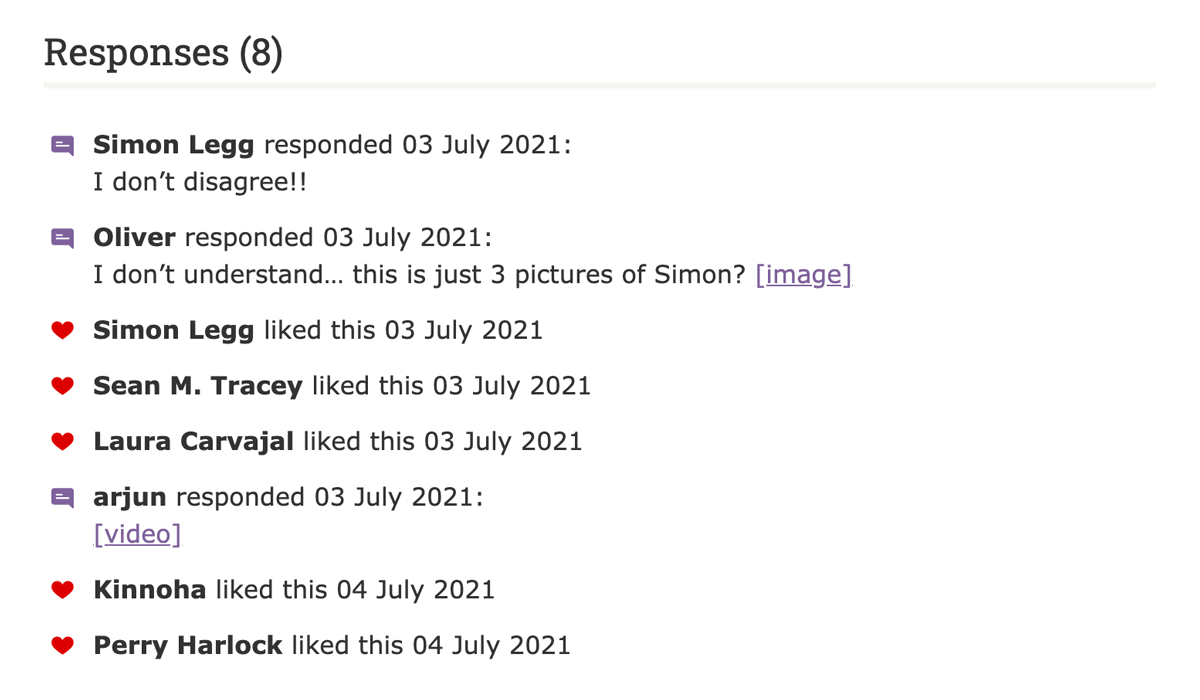
<p>You can view the way that webmentions display on my site by looking at the <a href="/weeknotes/36/#responses">responses section</a> of many of my weeknotes and posts. You could stop here, but sending webmentions to your friends is also fun.</p>


<figure class="image">
	<a href="/weeknotes/36/#responses">
		<img
			
				srcset="
					https://rowanmanning.com/posts/webmentions-for-your-static-site/responses-styled_hu260615037ace7cee4028c4eefb192504_112414_720x0_resize_box_3.png,
					https://rowanmanning.com/posts/webmentions-for-your-static-site/responses-styled_hu260615037ace7cee4028c4eefb192504_112414_1080x0_resize_box_3.png 1.5x,
					https://rowanmanning.com/posts/webmentions-for-your-static-site/responses-styled.png 2x
				"
			
			src="https://rowanmanning.com/posts/webmentions-for-your-static-site/responses-styled.png"
			alt="A screenshot of the responses on one of my weeknotes"
			width="1200"
			height="700"
			loading="lazy"
		/>
	</a>
	
</figure>

<h2 id="sending-webmentions">Sending Webmentions</h2>
<p>Now that your site is receiving webmentions, it&rsquo;s time to start alerting other people when you link to their content! I found the process of sending a Webmention to be tougher to implement, and it feels a little more disjointed than my approach to receiving.</p>
<p>This section is split into multiple headings because there&rsquo;s some preparatory work we need to do to the site HTML before we can send webmentions.</p>
<h3 id="webmention-markup">Webmention Markup</h3>
<p>The page which is sending a Webmention must mark up content in a way that indicates which part of the page is content, which is author information, which is the title, etc. You can also specify what type of Webmention should be sent – because the spec and the flow are relatively light, there&rsquo;s scope for a Webmention to handle almost any web-based social interaction, which is really cool.</p>
<p>The way that you specify which part of the page is content and what kind of Webmention to send is by using <a href="https://microformats.org/">Microformats</a> in your HTML, specifically <a href="https://microformats.org/wiki/h-entry">h-entry</a> and <a href="https://microformats.org/wiki/h-card">h-card</a>. Microformats help machines to understand your content, they&rsquo;re less scary than they sound.</p>
<p>So for example if you have a blog post which looks like this:</p>
<div class="highlight"><pre tabindex="0" class="chroma"><code class="language-html" data-lang="html"><span class="line"><span class="cl"><span class="p">&lt;</span><span class="nt">article</span><span class="p">&gt;</span>
</span></span><span class="line"><span class="cl">    <span class="p">&lt;</span><span class="nt">header</span><span class="p">&gt;</span>
</span></span><span class="line"><span class="cl">        <span class="p">&lt;</span><span class="nt">h1</span><span class="p">&gt;</span>My First Post<span class="p">&lt;/</span><span class="nt">h1</span><span class="p">&gt;</span>
</span></span><span class="line"><span class="cl">    <span class="p">&lt;/</span><span class="nt">header</span><span class="p">&gt;</span>
</span></span><span class="line"><span class="cl">    <span class="p">&lt;</span><span class="nt">div</span><span class="p">&gt;</span>
</span></span><span class="line"><span class="cl">        <span class="p">&lt;</span><span class="nt">p</span><span class="p">&gt;</span>Post content goes here…<span class="p">&lt;/</span><span class="nt">p</span><span class="p">&gt;</span>
</span></span><span class="line"><span class="cl">    <span class="p">&lt;/</span><span class="nt">div</span><span class="p">&gt;</span>
</span></span><span class="line"><span class="cl">    <span class="p">&lt;</span><span class="nt">footer</span><span class="p">&gt;</span>
</span></span><span class="line"><span class="cl">        Published <span class="p">&lt;</span><span class="nt">time</span> <span class="na">datetime</span><span class="o">=</span><span class="s">&#34;1988-01-26&#34;</span><span class="p">&gt;</span>26th Jan<span class="p">&lt;/</span><span class="nt">time</span><span class="p">&gt;</span>
</span></span><span class="line"><span class="cl">        by <span class="p">&lt;</span><span class="nt">a</span> <span class="na">href</span><span class="o">=</span><span class="s">&#34;https://rowanmanning.com/&#34;</span><span class="p">&gt;</span>Rowan Manning<span class="p">&lt;/</span><span class="nt">a</span><span class="p">&gt;</span>
</span></span><span class="line"><span class="cl">    <span class="p">&lt;/</span><span class="nt">footer</span><span class="p">&gt;</span>
</span></span><span class="line"><span class="cl"><span class="p">&lt;/</span><span class="nt">article</span><span class="p">&gt;</span>
</span></span></code></pre></div><p>Our HTML with added Microformat classes would look like this:</p>
<div class="highlight"><pre tabindex="0" class="chroma"><code class="language-html" data-lang="html"><span class="line"><span class="cl"><span class="p">&lt;</span><span class="nt">article</span> <span class="na">class</span><span class="o">=</span><span class="s">&#34;h-entry&#34;</span><span class="p">&gt;</span>
</span></span><span class="line"><span class="cl">    <span class="p">&lt;</span><span class="nt">header</span><span class="p">&gt;</span>
</span></span><span class="line"><span class="cl">        <span class="p">&lt;</span><span class="nt">h1</span> <span class="na">class</span><span class="o">=</span><span class="s">&#34;p-name&#34;</span><span class="p">&gt;</span>My First Post<span class="p">&lt;/</span><span class="nt">h1</span><span class="p">&gt;</span>
</span></span><span class="line"><span class="cl">    <span class="p">&lt;/</span><span class="nt">header</span><span class="p">&gt;</span>
</span></span><span class="line"><span class="cl">    <span class="p">&lt;</span><span class="nt">div</span> <span class="na">class</span><span class="o">=</span><span class="s">&#34;e-content&#34;</span><span class="p">&gt;</span>
</span></span><span class="line"><span class="cl">        <span class="p">&lt;</span><span class="nt">p</span><span class="p">&gt;</span>Post content goes here…<span class="p">&lt;/</span><span class="nt">p</span><span class="p">&gt;</span>
</span></span><span class="line"><span class="cl">    <span class="p">&lt;/</span><span class="nt">div</span><span class="p">&gt;</span>
</span></span><span class="line"><span class="cl">    <span class="p">&lt;</span><span class="nt">footer</span><span class="p">&gt;</span>
</span></span><span class="line"><span class="cl">        Published <span class="p">&lt;</span><span class="nt">time</span> <span class="na">class</span><span class="o">=</span><span class="s">&#34;dt-published&#34;</span> <span class="na">datetime</span><span class="o">=</span><span class="s">&#34;1988-01-26&#34;</span><span class="p">&gt;</span>26th Jan<span class="p">&lt;/</span><span class="nt">time</span><span class="p">&gt;</span>
</span></span><span class="line"><span class="cl">        by <span class="p">&lt;</span><span class="nt">a</span> <span class="na">class</span><span class="o">=</span><span class="s">&#34;p-author h-card&#34;</span> <span class="na">href</span><span class="o">=</span><span class="s">&#34;https://rowanmanning.com/&#34;</span><span class="p">&gt;</span>Rowan Manning<span class="p">&lt;/</span><span class="nt">a</span><span class="p">&gt;</span>
</span></span><span class="line"><span class="cl">    <span class="p">&lt;/</span><span class="nt">footer</span><span class="p">&gt;</span>
</span></span><span class="line"><span class="cl"><span class="p">&lt;/</span><span class="nt">article</span><span class="p">&gt;</span>
</span></span></code></pre></div><p>Microformats class names help a machine (in this case a Webmention receiver) to parse out the relevant details. These classes start with <code>h-</code>, <code>p-</code>, <code>e-</code>, <code>dt-</code> depending on the property being described, and you can find examples of <a href="https://microformats.org/wiki/h-entry#Properties">all the properties for h-entry here</a>.</p>
<p>Now your web page is ready to be parsed by a Webmention receiver, and you&rsquo;re able to start sending them.</p>
<h3 id="actually-sending-webmentions">Actually Sending Webmentions</h3>
<p>Now that you&rsquo;ve got the markup in place you can already manually send webmentions! You can use <a href="https://indieweb.org/Webmention#Publisher_Services">one of many services</a> to do this (I used <a href="https://telegraph.p3k.io/">Telegraph</a> as a starting point).</p>
<p>However, sending webmentions manually gets old pretty fast, and automating the sending was top of my To-Do list.</p>
<p>Ideally, you should only be automatically sending webmentions for <em>new</em> content on your website, so my dilemma was &ldquo;how do I run something every time new content is published?&rdquo; as there&rsquo;s not a simple way to hook into a new post being published on a static site. I could have spent a long time building a script for this to diff the built website in GitHub Actions, but I wanted something quicker to set up.</p>
<p>I found <a href="https://webmention.app/">Remy Sharp&rsquo;s webmention.app</a> was a great compromise. My website <a href="/posts/i-like-rss/">already has an RSS feed</a> and webmention.app contains a tutorial on how to send webmentions as soon as new content appears in an RSS feed – this meant I didn&rsquo;t need to write something to spot new content myself.</p>
<p>So you&rsquo;ll need:</p>
<ul>
<li>
<p>For your site to be publishing an RSS or Atom feed (most static site generators will make this easy for you).</p>
</li>
<li>
<p>An <a href="https://ifttt.com/">IFTTT</a> account to listen for new items in your feed.</p>
</li>
<li>
<p>A webmention.app token and to have followed <a href="https://webmention.app/docs#using-ifttt-to-trigger-checks">this tutorial</a>.</p>
</li>
</ul>
<p>So now whenever I publish new content on my website, I get a notification from IFTTT to say that it&rsquo;s sent webmentions on my behalf. The process is fully automated and I can focus on writing.</p>
<h2 id="was-it-worth-it">Was it Worth it?</h2>
<p>Yes, absolutely! If for no other reason than I had a lot of fun reading about Webmention and digging into the problem of implementing them on a static website. It&rsquo;s really nice knowing that social interactions with my content will eventually appear on my website and that I control the way everything looks and feels.</p>
<p>Of course, things could be better and I&rsquo;ll probably work to improve this setup over time:</p>
<ul>
<li>
<p>Maybe I&rsquo;ll eventually move away from Webmention.io and try to self-host my Webmention receiver.</p>
</li>
<li>
<p>I&rsquo;m tempted to write a script to automate webmention publishing, rather than relying on two different third parties.</p>
</li>
<li>
<p>I want to make a lot of tweaks to the way that webmentions are displayed on my site, and work out a way to add trusted publishers so that I can display their images and videos.</p>
</li>
</ul>
<p>So in conclusion, you should <em>absolutely</em> join the Webmention hype train (I&rsquo;m looking at you, all the people I occasionally link to in my <a href="/weeknotes/">weeknotes</a>). I think you&rsquo;ll have fun, and I&rsquo;m always gonna be willing to talk about this if you want an excuse to chat technology 🙂</p>
]]></content><category scheme="https://rowanmanning.com/tags/webmention/" term="webmention" label="Webmention"/><category scheme="https://rowanmanning.com/tags/side-projects/" term="side-projects" label="Side Projects"/><category scheme="https://rowanmanning.com/tags/indieweb/" term="indieweb" label="IndieWeb"/></entry><entry><title type="html">Organising a virtual treasure hunt as a team social</title><link href="https://rowanmanning.com/posts/organising-a-virtual-treasure-hunt/" rel="alternate" type="text/html"/><link href="https://rowanmanning.com/posts/organising-a-virtual-treasure-hunt/treasure-hunt-slide.png" rel="enclosure" type="image/png" title="A slide from our presentation, it contains an image of a treasure chest and the words “We’re going to take you on a treasure hunt to commemorate a pretty tough 365 days”"/><id>https://rowanmanning.com/posts/organising-a-virtual-treasure-hunt/</id><author><name>Rowan Manning</name><uri>https://rowanmanning.com/</uri></author><published>2021-05-10T14:00:00+00:00</published><updated>2021-05-10T14:00:00+00:00</updated><content type="html"><![CDATA[<p>On the 12th March 2020, we got an email from Cait, our head of department, which explained that we’d be working remotely for the foreseeable future. At the time we had no idea how long it would last. The months dragged on, and in February 2021 we realised that the anniversary of remote working was rapidly approaching.</p>
<p>Working remotely has been tough, and many of us really miss the social aspect of being in an office – going for team lunches or just chatting while making tea. On top of this, <a href="https://medium.com/ft-product-technology/one-year-later-lessons-learned-from-remote-onboarding-122142e0173c">we’ve hired a lot of new people since the pandemic began</a>, many of whom haven&rsquo;t had a chance to meet their colleagues in less formal settings.</p>
<p>We attempted to combat this throughout 2020 by running remote social events, at a team level and department level. We’ve lost count of the number of quizzes, virtual pictionaries, quizzes, Among Us games, and quizzes attended! We hosted <a href="https://medium.com/ft-product-technology/beyond-quizzes-making-and-streaming-a-radio-show-for-your-team-remote-social-1a061bde47f4">radio shows</a>, we <a href="https://www.cronkshawfoldfarm.co.uk/goatsonzoom">booked goats</a>, and in June 2020 <a href="https://alicebartlett.co.uk/">Alice Bartlett</a> ran a virtual treasure hunt to say goodbye before her shared parental leave.</p>
<p>When we (<a href="http://www.glynnphillips.co.uk/">Glynn Phillips</a> and I) realised that a year of remote working was approaching, we decided to shamelessly steal Alice’s fun treasure hunt idea and expand it to work for the whole department. Once we had Alice’s blessing, we got to organising.</p>
<p>This post tells the story of how much two engineers can overcommit to an idea. It explores the process we went through to create a fun virtual treasure hunt, and some lessons learned along the way.</p>
<h2 id="planning">Planning</h2>
<p>Once we’d decided to do the treasure hunt, we were bursting with ideas. The first step was to get all these ideas down on paper and work out which things were achievable within a month, considering that we both had other work to do too. The brief we’d set ourselves of “virtual treasure hunt” is fairly open and could be interpreted in a bunch of different ways. Alice’s treasure hunt hid clues in Google docs and Slack mostly, and we both knew that we wanted a trail of clues through various virtual spaces like this. The first thing we did was write down a list of all the places we could possibly hide clues that would be accessible to anyone in the department. Our rough list was:</p>
<ul>
<li>Google docs</li>
<li>Old emails</li>
<li>Slack channels/bots</li>
<li>Build a website</li>
<li>Youtube video</li>
<li>Google hangouts</li>
<li>SMS</li>
</ul>
<p>We had more ideas initially but trimmed them down a lot to make sure we would have time to execute everything well. We decided against trying to get a real FT article published containing a clue or secretly committing code to the FT.com codebase because it felt a little risky. We also cut out things that wouldn’t work for everyone in the department, for example, clues hidden in GitHub issues would only be accessible to engineers.</p>
<p>The next thing we needed was some inspiration to start producing clues to add to our hunt. We wanted to use things that were vaguely themed around our year working from home and news events from during the pandemic. We spent some time listing all the possible themes, facts, and figures that we could use in our clues and ended up with a long list of things to draw on.</p>
<p>We had a list of around 30 ideas/themes. We adapted our initial list a little to make sure that we were not excluding our colleagues from Manila or Sofia – being too UK-centric would have made it more difficult for them.</p>
<p>Lastly on planning, we needed to decide on the length of the hunt and how we wanted to structure the teams. We wanted teams of around four people, as this would make it harder to accidentally exclude a team member, and for the hunt to last 30–60 minutes so it was a reasonable thing to do in the middle of the day. We thought 10–15 clues should be enough to get started and do a test run.</p>
<h2 id="hype">Hype</h2>
<p>One of the earliest decisions we made was that we needed to build hype for our treasure hunt. Department socials are optional attendance, and we knew we wanted a good number of people to get excited about it and attend. The very first thing we did was to get something in the calendar a good month in advance. Then we started the hype train with weekly announcements in Slack.</p>


<figure class="image">
	<a href="/posts/organising-a-virtual-treasure-hunt/hype-01.png">
		<img
			
				srcset="
					https://rowanmanning.com/posts/organising-a-virtual-treasure-hunt/hype-01.png,
					https://rowanmanning.com/posts/organising-a-virtual-treasure-hunt/hype-01.png 1.5x,
					https://rowanmanning.com/posts/organising-a-virtual-treasure-hunt/hype-01.png 2x
				"
			
			src="https://rowanmanning.com/posts/organising-a-virtual-treasure-hunt/hype-01.png"
			alt="A Slack message containing a lot of “hype” emoji, and the words “FRIDAY HYPE BUILDING - WFH TREASURE HUNT"
			width="700"
			height="103"
			loading="lazy"
		/>
	</a>
	
</figure>


<figure class="image">
	<a href="/posts/organising-a-virtual-treasure-hunt/hype-02.png">
		<img
			
				srcset="
					https://rowanmanning.com/posts/organising-a-virtual-treasure-hunt/hype-02.png,
					https://rowanmanning.com/posts/organising-a-virtual-treasure-hunt/hype-02.png 1.5x,
					https://rowanmanning.com/posts/organising-a-virtual-treasure-hunt/hype-02.png 2x
				"
			
			src="https://rowanmanning.com/posts/organising-a-virtual-treasure-hunt/hype-02.png"
			alt="A Slack message containing a lot of “treasure chest” emoji, and the words “WFH TREASURE HUNT - TEAMS"
			width="700"
			height="154"
			loading="lazy"
		/>
	</a>
	
</figure>


<figure class="image">
	<a href="/posts/organising-a-virtual-treasure-hunt/hype-03.png">
		<img
			
				srcset="
					https://rowanmanning.com/posts/organising-a-virtual-treasure-hunt/hype-03.png,
					https://rowanmanning.com/posts/organising-a-virtual-treasure-hunt/hype-03.png 1.5x,
					https://rowanmanning.com/posts/organising-a-virtual-treasure-hunt/hype-03.png 2x
				"
			
			src="https://rowanmanning.com/posts/organising-a-virtual-treasure-hunt/hype-03.png"
			alt="A Slack message containing a lot of “hype” and “treasure chest” emoji, and the words “MORE FRIDAY HYPE BUILDING - WFH TREASURE HUNT"
			width="700"
			height="179"
			loading="lazy"
		/>
	</a>
	
</figure>

<p>I think this helped build excitement, and on the day we had pretty good attendance as a result. By the week of the treasure hunt, we even had some of the participants hyping it for us.</p>


<figure class="image">
	<a href="/posts/organising-a-virtual-treasure-hunt/hype-04.png">
		<img
			
				srcset="
					https://rowanmanning.com/posts/organising-a-virtual-treasure-hunt/hype-04.png,
					https://rowanmanning.com/posts/organising-a-virtual-treasure-hunt/hype-04.png 1.5x,
					https://rowanmanning.com/posts/organising-a-virtual-treasure-hunt/hype-04.png 2x
				"
			
			src="https://rowanmanning.com/posts/organising-a-virtual-treasure-hunt/hype-04.png"
			alt="A Slack message which contains only 240 “hype” emoji, posted by a colleague in Slack"
			width="700"
			height="290"
			loading="lazy"
		/>
	</a>
	
</figure>

<h2 id="executing-the-plan">Executing the plan</h2>
<p>Once we had the hype train well and truly running, we started working on the clues. We put together a spreadsheet for planning out the flow between clues. We worked separately on a few clues each so that they could be done in parallel, and then slowly started tying them together with quick Slack discussions.</p>


<figure class="image">
	<a href="/posts/organising-a-virtual-treasure-hunt/planning-spreadsheet.png">
		<img
			
				srcset="
					https://rowanmanning.com/posts/organising-a-virtual-treasure-hunt/planning-spreadsheet_hu13ebc097a6c522b5a36eb7d15722b471_294505_720x0_resize_box_3.png,
					https://rowanmanning.com/posts/organising-a-virtual-treasure-hunt/planning-spreadsheet_hu13ebc097a6c522b5a36eb7d15722b471_294505_1080x0_resize_box_3.png 1.5x,
					https://rowanmanning.com/posts/organising-a-virtual-treasure-hunt/planning-spreadsheet.png 2x
				"
			
			src="https://rowanmanning.com/posts/organising-a-virtual-treasure-hunt/planning-spreadsheet.png"
			alt="A Google Spreadsheet containing columns for clue, answer, hint, where it’s found, and where does it lead. The clues are linked to from this document"
			width="1359"
			height="797"
			loading="lazy"
		/>
	</a>
	
</figure>

<p>We wanted to make sure that there was variety in the clues, for example, we didn’t want people to go through a long series of Google Docs in a row, so we tried to evenly distribute the format of the clues. This meant that we were constantly reshuffling and reworking things for a while.</p>
<p>We also wrote down predetermined hints for each of the clues. We knew that people would get stuck occasionally and having a consistent and fair way to offer help would make things run smoother on the day.</p>
<h3 id="google-docs">Google Docs</h3>
<p>Our Google Docs clues were a sight to behold if I say so myself. Google Slides allowed us to be quite visual and prevented the treasure hunt from becoming a prolonged trivia quiz.
One example is: “Who is <a href="https://www.ft.com/__origami/service/image/v2/images/raw/http%3A%2F%2Fcom.ft.imagepublish.upp-prod-eu.s3.amazonaws.com%2F001e0936-9cd9-11e9-b8ce-8b459ed04726?fit=scale-down&amp;source=next&amp;width=700">JK</a> (our CPO) hanging out with at Cheltenham? Find a Slack channel with the full initials of JK’s companion. The next clue awaits you.”</p>


<figure class="image">
	<a href="/posts/organising-a-virtual-treasure-hunt/find-jk.png">
		<img
			
				srcset="
					https://rowanmanning.com/posts/organising-a-virtual-treasure-hunt/find-jk_hu43adc60df4d7ed8e7a228598d260c4bf_1377042_720x0_resize_box_3.png,
					https://rowanmanning.com/posts/organising-a-virtual-treasure-hunt/find-jk_hu43adc60df4d7ed8e7a228598d260c4bf_1377042_1080x0_resize_box_3.png 1.5x,
					https://rowanmanning.com/posts/organising-a-virtual-treasure-hunt/find-jk.png 2x
				"
			
			src="https://rowanmanning.com/posts/organising-a-virtual-treasure-hunt/find-jk.png"
			alt="A large crowd of people watching the horse race at Cheltenham. Two of the faces have been replaced with our CPO and Donald Trump"
			width="1200"
			height="675"
			loading="lazy"
		/>
	</a>
	
</figure>

<p>We decided that even if a Google Doc <em>is</em> essentially a quiz, then we should make it more engaging by using visual elements that nod to our time in lockdown. For example, the Zoom Maths Quiz asked participants to add up key pandemic statistic, but it was run by famous people in STEM:</p>


<figure class="image">
	<a href="/posts/organising-a-virtual-treasure-hunt/maths-quiz.png">
		<img
			
				srcset="
					https://rowanmanning.com/posts/organising-a-virtual-treasure-hunt/maths-quiz_hu0598baf3bc390d5c5c5c3de0761e0b80_1108011_720x0_resize_box_3.png,
					https://rowanmanning.com/posts/organising-a-virtual-treasure-hunt/maths-quiz_hu0598baf3bc390d5c5c5c3de0761e0b80_1108011_1080x0_resize_box_3.png 1.5x,
					https://rowanmanning.com/posts/organising-a-virtual-treasure-hunt/maths-quiz_hu0598baf3bc390d5c5c5c3de0761e0b80_1108011_1440x0_resize_box_3.png 2x
				"
			
			src="https://rowanmanning.com/posts/organising-a-virtual-treasure-hunt/maths-quiz.png"
			alt="A screenshot of a Zoom chat window, which features Albert Einstein, Ada Lovelace, Alan Turing, and David Blackwell. Einstein is introducing a maths quiz via a drawn on speech bubble"
			width="1600"
			height="900"
			loading="lazy"
		/>
	</a>
	
</figure>

<p>We had great feedback on these more visual clues, and people stayed engaged for longer because of them.</p>
<h3 id="slack">Slack</h3>
<p>We knew we wanted to have some secret Slack channels and messages as part of the hunt, and we were originally thinking of writing a Slack bot that posed questions for people to answer. However, we realised that we may not have enough time for that. We didn’t want to just post messages from me or Glynn, and we wanted them to be obviously part of the treasure hunt, so we opted for setting up a Slack webhook and posting messages as various people via the API.</p>
<p>The results were fun, and they made the Slack parts of the hunt a bit more interesting than just a written clue from one of the organisers.</p>


<figure class="image">
	<a href="/posts/organising-a-virtual-treasure-hunt/donald-and-joe.png">
		<img
			
				srcset="
					https://rowanmanning.com/posts/organising-a-virtual-treasure-hunt/donald-and-joe.png,
					https://rowanmanning.com/posts/organising-a-virtual-treasure-hunt/donald-and-joe.png 1.5x,
					https://rowanmanning.com/posts/organising-a-virtual-treasure-hunt/donald-and-joe.png 2x
				"
			
			src="https://rowanmanning.com/posts/organising-a-virtual-treasure-hunt/donald-and-joe.png"
			alt="A screenshot of a fake Slack conversation between Donald Trump and Joe Exotic"
			width="700"
			height="178"
			loading="lazy"
		/>
	</a>
	
</figure>

<p>To simplify things, we ran the scripts locally on our machines using a Slack API token. For anyone interested in doing something similar, there’s a quick set of scripts <a href="https://github.com/rowanmanning/treasurebot">in this repo</a>.</p>
<h3 id="website">Website</h3>
<p>With Glynn and I rarely getting a chance to work on a brand new website, we knew we had to build one as part of the treasure hunt. It gave us a chance to do things that were a bit more interactive than a Google Doc or Slack message. Glynn did an amazing job of setting this up and he hosted it on Netlify.</p>
<p>To direct people to the website we used a mix of links in Google Docs or Slack, but we also used it as a way to verify answers. For example, the maths quiz included the instruction: “Go to <code>https://our.domain/X</code> where <code>X</code> is the solution to our maths problem.”</p>


<figure class="image">
	<a href="/posts/organising-a-virtual-treasure-hunt/joe-exotic-myspace.png">
		<img
			
				srcset="
					https://rowanmanning.com/posts/organising-a-virtual-treasure-hunt/joe-exotic-myspace_huc5c3d4495ff60a4b9b29e1dfa60e92c5_659084_720x0_resize_box_3.png,
					https://rowanmanning.com/posts/organising-a-virtual-treasure-hunt/joe-exotic-myspace_huc5c3d4495ff60a4b9b29e1dfa60e92c5_659084_1080x0_resize_box_3.png 1.5x,
					https://rowanmanning.com/posts/organising-a-virtual-treasure-hunt/joe-exotic-myspace_huc5c3d4495ff60a4b9b29e1dfa60e92c5_659084_1440x0_resize_box_3.png 2x
				"
			
			src="https://rowanmanning.com/posts/organising-a-virtual-treasure-hunt/joe-exotic-myspace.png"
			alt="A fake MySpace page for Joe Exotic. The background is a tiger print pattern, and there’s a word-search to one side"
			width="1600"
			height="1032"
			loading="lazy"
		/>
	</a>
	
		<figcaption class="image__caption">I think the result was beautiful</figcaption>
	
</figure>

<h3 id="video">Video</h3>
<p>One of the more time-consuming clues we decided to work on was a video. In 2019, the FT’s London office moved from One Southwark Bridge to Bracken House, a 10-minute walk. We decided to film the journey between the offices and asked participants to count things that they saw on the journey.</p>
<p>We thought this would also pad the time a little bit as it required people to watch the same video multiple times to come up with an answer. This mix of short and longer clues worked well for us.</p>
<p>You can <a href="https://www.youtube.com/watch?v=cFXNSm4ja_4">watch the video here</a> but be warned there’s a guest appearance in the middle.</p>
<figure class="embed">
	<iframe
		class="embed__youtube-video"
		src="https://www.youtube.com/embed/cFXNSm4ja_4"
		frameborder="0"
		allowtransparency="true"
		allow="fullscreen"
		title="Watch on YouTube"
	></iframe>
	<figcaption class="embed__caption">Watch on YouTube</figcaption>
</figure>

<h3 id="sms">SMS</h3>
<p>I’ve been looking for a reason to play with SMS, and this seemed like a good opportunity to do so. We signed up for the <a href="https://www.twilio.com/">Twilio</a> API. I expected this part of the treasure hunt to take forever, but it was really quick using Studio which requires no code.</p>
<p>We went for a simple <code>Text &lt;value&gt; to &lt;number&gt;</code> approach, and then the next clue was delivered back in an SMS response. It worked well and added a new format to reduce repetitive Google Docs and Slack channels.</p>


<figure class="image">
	<a href="/posts/organising-a-virtual-treasure-hunt/sms-flow.png">
		<img
			
				srcset="
					https://rowanmanning.com/posts/organising-a-virtual-treasure-hunt/sms-flow_hu0e1f6001e2dc6c5a3b60fb911a0e6810_416184_720x0_resize_box_3.png,
					https://rowanmanning.com/posts/organising-a-virtual-treasure-hunt/sms-flow_hu0e1f6001e2dc6c5a3b60fb911a0e6810_416184_1080x0_resize_box_3.png 1.5x,
					https://rowanmanning.com/posts/organising-a-virtual-treasure-hunt/sms-flow_hu0e1f6001e2dc6c5a3b60fb911a0e6810_416184_1440x0_resize_box_3.png 2x
				"
			
			src="https://rowanmanning.com/posts/organising-a-virtual-treasure-hunt/sms-flow.png"
			alt="A screenshot of a Twilio Studio, with lines connecting an incoming SMS trigger to various automated responses"
			width="1600"
			height="868"
			loading="lazy"
		/>
	</a>
	
</figure>

<h2 id="playtesting">Playtesting</h2>
<p>Once we’d reached 12 clues, we decided it was time to playtest the treasure hunt. We had several willing volunteers thanks to our hype-laden Slack messages, and we invited them to a run-through.</p>
<p>On the day of the hunt we knew we wouldn’t be able to sit with each of the teams and watch them run through, so this was our only valuable opportunity to watch some people work through the clues. We couldn’t have asked for a better group of play-testers, it was a joy to watch <a href="https://www.ft.com/emma-lewis">Emma Lewis</a>, <a href="https://jenjohnson.dev/">Jennifer Johnson</a>, and <a href="https://twitter.com/teachlearncode">Jennifer Shepherd</a> work together and we were super thankful for their time.</p>
<p>We learned a lot from the playtest and made a lot of improvements. For a start, it took them half of their time to work out the first clue, which indicated to us that it was way too difficult. They also breezed through some of the other clues that we thought were much harder. If we’d had more time we would have had several more playtests with different groups, and I don’t recommend building a treasure hunt without at least one trial run.</p>
<h2 id="the-day-of-the-hunt">The day of the hunt</h2>
<p>When the day of the treasure hunt arrived, we posted a few more hype messages and did some final preparations. We made the Google Docs publicly searchable for FT employees and pinned various Slack messages which were required for the clues to work.</p>
<p>We did a final run-through of our introductory slides making sure we knew what we wanted to say, and then sat waiting for people to arrive. We were thrilled when 80 people ended up joining the Google Meet – our hype-building was successful.</p>


<figure class="image">
	<a href="/posts/organising-a-virtual-treasure-hunt/treasure-hunt-slide.png">
		<img
			
				srcset="
					https://rowanmanning.com/posts/organising-a-virtual-treasure-hunt/treasure-hunt-slide.png,
					https://rowanmanning.com/posts/organising-a-virtual-treasure-hunt/treasure-hunt-slide.png 1.5x,
					https://rowanmanning.com/posts/organising-a-virtual-treasure-hunt/treasure-hunt-slide.png 2x
				"
			
			src="https://rowanmanning.com/posts/organising-a-virtual-treasure-hunt/treasure-hunt-slide.png"
			alt="A slide from our presentation, it contains an image of a treasure chest and the words “We’re going to take you on a treasure hunt to commemorate a pretty tough 365 days”"
			width="700"
			height="393"
			loading="lazy"
		/>
	</a>
	
</figure>

<p>We ran through some guidelines in a presentation, people left to join their own team hangouts, and we posted the first clue on Slack.</p>
<p>The next hour was adrenaline-fueled. We divided up helping any teams who were struggling, and we sat in the winners’ video chat which the last clue pointed to, waiting for the first people to arrive. We got ready to record finishing times so that people would know how they did and watched Google Docs to see how far each team had got.</p>
<p>Watching all the treasure hunters trickle into the winners’ chat was super rewarding – everyone seemed to have a lot of fun, and nobody was too angry that we Rick Rolled them in the video clue.</p>
<h3 id="what-went-well">What went well</h3>
<ul>
<li>
<p>Everyone arrived between 20 minutes and an hour from the start, and the number of hints we gave out was pretty even, so I think we gauged the difficulty well</p>
</li>
<li>
<p>None of the clues had technical issues (we were worried about SMS for a while)</p>
</li>
<li>
<p>The social encouraged people to interact a lot in their small teams and work together on the clues, so it didn’t feel like a passive activity</p>
</li>
<li>
<p>People had a lot of fun and we got some lovely feedback, and people noticed the amount of effort we put in. Cait, our CPIO, said: “That was the most fun I have had at work in about a year”</p>
</li>
</ul>
<h3 id="what-went-less-well">What went less well</h3>
<ul>
<li>
<p>We had some issues with breakout rooms in Google Hangouts which delayed the start of the quiz by a panicked 5 minutes. We probably could have tested this part of the hunt a bit more thoroughly</p>
</li>
<li>
<p>We didn’t prepare what we were going to do in the winners chat, and we didn’t communicate that teams can leave once we’ve recorded their time. This meant that we had to awkwardly make small talk while trying to monitor the remaining teams</p>
</li>
</ul>
<h2 id="wrapping-up">Wrapping up</h2>
<p>Once the last team had checked in and left, we breathed a sigh of relief. It was a super fun and rewarding experience, but also exhausting. I thoroughly recommend running something like this if your team or company is working remotely and hope you get some inspiration from this post.</p>
<p>If you do so, we recommend:</p>
<ul>
<li>
<p>Be inclusive - only hide clues in places that everyone will have access to, and think about different backgrounds and cultures when putting together clues. For us, this meant not being too London or Sofia centric</p>
</li>
<li>
<p>Go overboard - adding fun details to your clues is really worth the extra work, people will enjoy your treasure hunt that much more</p>
</li>
<li>
<p>Playtest as much as you can - just like user testing your website, this is invaluable and gives you a lot of insight into any changes you might need to make</p>
</li>
</ul>
<p>Thanks for reading, happy treasure hunting!</p>
]]></content><category scheme="https://rowanmanning.com/tags/social/" term="social" label="Social"/><category scheme="https://rowanmanning.com/tags/team-building/" term="team-building" label="Team Building"/><category scheme="https://rowanmanning.com/tags/treasure/" term="treasure" label="Treasure"/></entry><entry><title type="html">I Like RSS</title><link href="https://rowanmanning.com/posts/i-like-rss/" rel="alternate" type="text/html"/><link href="https://rowanmanning.com/posts/i-like-rss/audrey.png" rel="enclosure" type="image/png" title="A screenshot of the Audrey home page, showing unread entries from my feeds"/><id>https://rowanmanning.com/posts/i-like-rss/</id><author><name>Rowan Manning</name><uri>https://rowanmanning.com/</uri></author><published>2020-12-04T12:35:00+00:00</published><updated>2020-12-04T12:35:00+00:00</updated><content type="html"><![CDATA[<div class="pin pin--right">

<figure class="image">
	<a href="https://en.wikipedia.org/wiki/RSS#/media/File:Feed-icon.svg">
		<img
			
				srcset="
					https://rowanmanning.com/posts/i-like-rss/feed-icon.png,
					https://rowanmanning.com/posts/i-like-rss/feed-icon.png 1.5x,
					https://rowanmanning.com/posts/i-like-rss/feed-icon.png 2x
				"
			
			src="https://rowanmanning.com/posts/i-like-rss/feed-icon.png"
			alt="Feed icon"
			width="100"
			height="100"
			loading="lazy"
		/>
	</a>
	
</figure>
</div>

<p>I first heard about and started using <abbr title="Really Simple Syndication">RSS</abbr>
 in early 2008, it was a huge deal for me – I&rsquo;d been going to individual tech sites to consume my news, and had collected a large set of bookmarks. As I browsed the web I&rsquo;d been dutifully ignoring a little orange icon that would eventually revolutionise the way I read content on the internet.</p>
<p>This post explains RSS for the uninitiated, it talks through the different experiences I&rsquo;ve had with feed readers over the years, and unashamedly promotes my new side project.</p>
<h2 id="what-is-rss">What is RSS?</h2>
<p>I&rsquo;m using the term RSS, when what I really mean is a <a href="https://en.wikipedia.org/wiki/Web_feed">web feed</a>. A web feed is a form of syndication – where content from one website is made available in a machine-readable format so that it can be consumed elsewhere.</p>
<p>So if you have a blog somewhere on the internet, it&rsquo;s likely that your posts (by default) will be presented as HTML. HTML is amazing, but it&rsquo;s a format designed to be read by <em>humans</em>. A machine finds HTML much more difficult to understand when it comes to extracting content from a page because there&rsquo;s a lot of inconsistency in how HTML is written.</p>
<p>For example, my website might have article content in the following markup:</p>
<div class="highlight"><pre tabindex="0" class="chroma"><code class="language-html" data-lang="html"><span class="line"><span class="cl"><span class="p">&lt;</span><span class="nt">article</span> <span class="na">class</span><span class="o">=</span><span class="s">&#34;main-content&#34;</span><span class="p">&gt;</span>
</span></span><span class="line"><span class="cl">    <span class="p">&lt;</span><span class="nt">h1</span><span class="p">&gt;</span>This is my article<span class="p">&lt;/</span><span class="nt">h1</span><span class="p">&gt;</span>
</span></span><span class="line"><span class="cl">    <span class="p">&lt;</span><span class="nt">p</span><span class="p">&gt;</span>Published <span class="p">&lt;</span><span class="nt">time</span> <span class="na">datetime</span><span class="o">=</span><span class="s">&#34;2020-01-26&#34;</span><span class="p">&gt;</span>26th Jan 2020<span class="p">&lt;/</span><span class="nt">time</span><span class="p">&gt;&lt;/</span><span class="nt">p</span><span class="p">&gt;</span>
</span></span><span class="line"><span class="cl">    <span class="p">&lt;</span><span class="nt">p</span><span class="p">&gt;</span> ... <span class="p">&lt;/</span><span class="nt">p</span><span class="p">&gt;</span>
</span></span><span class="line"><span class="cl"><span class="p">&lt;/</span><span class="nt">article</span><span class="p">&gt;</span>
</span></span></code></pre></div><p>Whereas someone else&rsquo;s website might use something more like:</p>
<div class="highlight"><pre tabindex="0" class="chroma"><code class="language-html" data-lang="html"><span class="line"><span class="cl"><span class="p">&lt;</span><span class="nt">div</span> <span class="na">class</span><span class="o">=</span><span class="s">&#34;main-Hi07dOXkA&#34;</span><span class="p">&gt;</span>
</span></span><span class="line"><span class="cl">    <span class="p">&lt;</span><span class="nt">div</span> <span class="na">class</span><span class="o">=</span><span class="s">&#34;article-hoBuu7MMQ&#34;</span><span class="p">&gt;</span>
</span></span><span class="line"><span class="cl">        <span class="p">&lt;</span><span class="nt">div</span> <span class="na">class</span><span class="o">=</span><span class="s">&#34;heading-area-kmcsJQLH5&#34;</span><span class="p">&gt;</span>
</span></span><span class="line"><span class="cl">            <span class="p">&lt;</span><span class="nt">div</span> <span class="na">class</span><span class="o">=</span><span class="s">&#34;heading-cJR9JlGUe&#34;</span><span class="p">&gt;</span>This is my article<span class="p">&lt;/</span><span class="nt">div</span><span class="p">&gt;</span>
</span></span><span class="line"><span class="cl">            <span class="p">&lt;</span><span class="nt">div</span><span class="p">&gt;</span>Posted January 26th 2020<span class="p">&lt;/</span><span class="nt">div</span><span class="p">&gt;</span>
</span></span><span class="line"><span class="cl">            <span class="p">&lt;</span><span class="nt">div</span><span class="p">&gt;</span> ... <span class="p">&lt;/</span><span class="nt">div</span><span class="p">&gt;</span>
</span></span><span class="line"><span class="cl">        <span class="p">&lt;/</span><span class="nt">div</span><span class="p">&gt;</span>
</span></span><span class="line"><span class="cl">    <span class="p">&lt;/</span><span class="nt">div</span><span class="p">&gt;</span>
</span></span><span class="line"><span class="cl"><span class="p">&lt;/</span><span class="nt">div</span><span class="p">&gt;</span>
</span></span></code></pre></div><p>Web feeds help to make content more portable by being <em>strict</em> about how content is organised. The two most common file formats for web feeds are XML-based, and they are <a href="https://en.wikipedia.org/wiki/RSS">RSS</a> and <a href="https://en.wikipedia.org/wiki/Atom_(Web_standard)">Atom</a>.</p>
<p>A blog post in an RSS feed looks something like this, and content <em>has</em> to be represented like this otherwise it&rsquo;s not considered valid RSS:</p>
<div class="highlight"><pre tabindex="0" class="chroma"><code class="language-xml" data-lang="xml"><span class="line"><span class="cl"><span class="nt">&lt;item&gt;</span>
</span></span><span class="line"><span class="cl">    <span class="nt">&lt;title&gt;</span>This is my article<span class="nt">&lt;/title&gt;</span>
</span></span><span class="line"><span class="cl">    <span class="nt">&lt;description&gt;</span> ... <span class="nt">&lt;/description&gt;</span>
</span></span><span class="line"><span class="cl">    <span class="nt">&lt;link&gt;</span>https://www.example.com/blog/post<span class="nt">&lt;/link&gt;</span>
</span></span><span class="line"><span class="cl">    <span class="nt">&lt;pubDate&gt;</span>Sun, 26 Jan 2020 01:37:00 +0000<span class="nt">&lt;/pubDate&gt;</span>
</span></span><span class="line"><span class="cl">    ...
</span></span><span class="line"><span class="cl"><span class="nt">&lt;/item&gt;</span>
</span></span></code></pre></div><p>These strict formats mean that machines have a much easier time processing content, and that content can be easily consumed by an application called a feed reader, or <a href="https://en.wikipedia.org/wiki/News_aggregator">news aggregator</a>. A feed reader takes a collection of RSS or Atom feeds, curated by you, and presents the content uniformly in a single interface.</p>
<p>So if you&rsquo;re consuming all your web content via a feed reader, you no longer have to maintain a list of websites to check back on – the process of fetching new content is automated by a machine and you can just enjoy reading it.</p>
<h2 id="google-reader-20082013">Google Reader (2008–2013)</h2>
<p>Back in 2008, when I finally tried clicking on one of those orange buttons, a very popular feed reader was owned by Google. It was called Google Reader.</p>
<div class="pin pin--left">

<figure class="image">
	<a href="https://en.wikipedia.org/wiki/Google_Reader#/media/File:Google_Reader_interface.png">
		<img
			
				srcset="
					https://rowanmanning.com/posts/i-like-rss/google-reader_hu80fdb8fe8fdcb180a078159b06ba22a7_77205_240x0_resize_box_3.png,
					https://rowanmanning.com/posts/i-like-rss/google-reader_hu80fdb8fe8fdcb180a078159b06ba22a7_77205_360x0_resize_box_3.png 1.5x,
					https://rowanmanning.com/posts/i-like-rss/google-reader.png 2x
				"
			
			src="https://rowanmanning.com/posts/i-like-rss/google-reader.png"
			alt="A screenshot of the Google Reader interface"
			width="387"
			height="257"
			loading="lazy"
		/>
	</a>
	
		<figcaption class="image__caption">This extremely low resolution screenshot is the best I could do, I&#39;m sorry</figcaption>
	
</figure>
</div>

<p>This is what I decided to use to read content, because a feed reader owned by such a large company is probably the most stable and long-lasting choice, right?</p>
<p>I think this was the golden age of my content consumption. Google Reader fit really nicely into my daily workflow, and I knew the program inside out.</p>
<p>Then, in 2013, <a href="https://googleblog.blogspot.com/2013/03/a-second-spring-of-cleaning.html">Google decided to retire the product</a>. It was a bummer.</p>
<p>Google at least let people take some of their data with them, it was possible to export your list of feeds so that you could take them to a different reader. I downloaded my list of feeds and went in search of a new home.</p>
<h2 id="fever-20132016">Fever (2013–2016)</h2>
<p>After being burned by Google Reader shutting down, I wanted some guaranteed stability. I decided the best way to ensure this would be to pay money for a feed reader. I settled on <a href="https://feedafever.com/">Fever</a>.</p>
<p>What I loved about Fever at the time is that it learned what content I liked to read and ordered the list of unread items by how much I might enjoy them, it was also self-hosted. The benefits of a self-hosted feed reader are:</p>
<ul>
<li>If the software is discontinued, you still have a copy of it and can probably continue running it (at least for a while)</li>
<li>I can run it on my own server, or on a cloud provider like Heroku. Normally this means I can choose to pay if I want more stability or I can stick with a free tier if that&rsquo;s all I need for now</li>
<li>If I have the time and energy, I can make tweaks to the software to make it better suit my needs</li>
</ul>
<p>Despite all this my reading did tail off, and Fever failed to enter my daily workflow in the same way that Google Reader did, despite having paid $30 for it. My use of it had already dropped to nothing by 2016, and Fever&rsquo;s maintainer discontinuing the project was the final nail in the coffin.</p>
<h2 id="stringer-20162017">Stringer (2016–2017)</h2>
<div class="pin pin--right">

<figure class="image">
	<a href="/posts/i-like-rss/stringer.png">
		<img
			
				srcset="
					https://rowanmanning.com/posts/i-like-rss/stringer_hu13130cfc7d4a901736fc28bd8e287c43_139287_240x0_resize_box_3.png,
					https://rowanmanning.com/posts/i-like-rss/stringer_hu13130cfc7d4a901736fc28bd8e287c43_139287_360x0_resize_box_3.png 1.5x,
					https://rowanmanning.com/posts/i-like-rss/stringer_hu13130cfc7d4a901736fc28bd8e287c43_139287_720x0_resize_box_3.png 2x
				"
			
			src="https://rowanmanning.com/posts/i-like-rss/stringer.png"
			alt="A screenshot of the Stringer interface"
			width="1138"
			height="882"
			loading="lazy"
		/>
	</a>
	
		<figcaption class="image__caption">The Stringer interface is really simple and stripped back compared to my previous readers</figcaption>
	
</figure>
</div>

<p>After Fever, I thought maybe I could kickstart my reading again with a shiny new interface. I got rid of most of my feeds as the sheer volume of content had become too much for me and started fresh with <a href="https://github.com/swanson/stringer#readme">Stringer</a>.</p>
<p>Stringer was also self-hosted, and I enjoyed the simplicity of it – a minimally styled single-column list of content was all I really needed, especially as the number of feeds I was subscribed to was at an all time low. I think my consistent reading lasted a few months at best.</p>
<p>By mid-2017 I was reading next to nothing about tech, and Stringer was abandoned by me. I turned it off without a replacement. When I came back a few years later to have a look at the project, it had been archived on GitHub so that&rsquo;s yet another dead feed reader.</p>
<h2 id="the-time-between-20172019">The Time Between (2017–2019)</h2>
<p>I spent a good few years really not reading anything or blogging myself, this coincided with a lull in my side project and open source work, because I&rsquo;d burned myself out and fallen out of love with tech as an industry. But that&rsquo;s a story for another day, the gist is I didn&rsquo;t read anything for a pretty long time.</p>
<h2 id="feedly-20192020">Feedly (2019–2020)</h2>
<div class="pin pin--left">

<figure class="image">
	<a href="/posts/i-like-rss/feedly.png">
		<img
			
				srcset="
					https://rowanmanning.com/posts/i-like-rss/feedly_hu29515fdbcc016279d7698aba46675e53_141753_240x0_resize_box_3.png,
					https://rowanmanning.com/posts/i-like-rss/feedly_hu29515fdbcc016279d7698aba46675e53_141753_360x0_resize_box_3.png 1.5x,
					https://rowanmanning.com/posts/i-like-rss/feedly_hu29515fdbcc016279d7698aba46675e53_141753_720x0_resize_box_3.png 2x
				"
			
			src="https://rowanmanning.com/posts/i-like-rss/feedly.png"
			alt="A screenshot of the Feedly interface"
			width="1200"
			height="664"
			loading="lazy"
		/>
	</a>
	
		<figcaption class="image__caption">Feedly has some similarities to Google reader, but there&#39;s some stuff there I&#39;ll never actually use</figcaption>
	
</figure>
</div>

<p>In 2019 I made a conscious effort to read a bit more. I&rsquo;d been a line manager for a while at this point, and although I&rsquo;d done some training, I was lacking the reading that had really boosted my early development career. I decided that rather than trying to set up an open source feed reader again, the quickest thing to do would be to use something commercial.</p>
<p>I set up <a href="https://feedly.com/">Feedly</a>, intending on upgrading away from their free tier if I liked it.</p>
<p>I didn&rsquo;t. There&rsquo;s something about Feedly&rsquo;s interface I just can&rsquo;t get behind, there&rsquo;s noise I don&rsquo;t need like all the social buttons, as well as recommended content. I also found that the way feeds are managed didn&rsquo;t gel with how I want to read. Maybe some of these things could be solved by paying for it, but I really don&rsquo;t like it enough to do that.</p>
<h2 id="audrey-2020">Audrey (2020–???)</h2>
<p>I didn&rsquo;t really read a lot through the pandemic, but through October and November my reading increased markedly. Several of my friends and colleagues are publishing Weeknotes, and I was feeling left out. <a href="https://rowanmanning.com/weeknotes/">I started publishing my own</a>, and at the same time my reading massively increased. I don&rsquo;t yet know whether this is sustainable, but I used that and <a href="/posts/yeehaw">my recent enjoyment of side projects</a> to do something inadvisable.</p>
<p>I built my own feed reader and named it <a href="https://github.com/rowanmanning/audrey#readme">Audrey</a>.</p>


<figure class="image">
	<a href="https://github.com/rowanmanning/audrey#readme">
		<img
			
				srcset="
					https://rowanmanning.com/posts/i-like-rss/audrey_hu1a446d20d5ef139479a17a791d276ef8_163376_720x0_resize_box_3.png,
					https://rowanmanning.com/posts/i-like-rss/audrey_hu1a446d20d5ef139479a17a791d276ef8_163376_1080x0_resize_box_3.png 1.5x,
					https://rowanmanning.com/posts/i-like-rss/audrey_hu1a446d20d5ef139479a17a791d276ef8_163376_1440x0_resize_box_3.png 2x
				"
			
			src="https://rowanmanning.com/posts/i-like-rss/audrey.png"
			alt="A screenshot of the Audrey home page, showing unread entries from my feeds"
			width="2824"
			height="1589"
			loading="lazy"
		/>
	</a>
	
		<figcaption class="image__caption">Audrey&#39;s interface is stripped back, similar to Stringer. I&#39;d like to keep it this way</figcaption>
	
</figure>

<p>This was a fun project to work on, and regardless of whether I stick with it, for now I have a feed reader that does things <em>exactly</em> the way I want them:</p>
<ul>
<li>The interface is simple and minimal</li>
<li>I can host it wherever I want (it&rsquo;s on Heroku at the moment)</li>
<li>There are no algorithms suggesting content to me</li>
<li>There are no advertisements</li>
<li>There&rsquo;s nothing tracking me</li>
<li>I can add <a href="https://github.com/rowanmanning/audrey/issues">new features</a> as and when I need them</li>
</ul>
<p>It&rsquo;s not finished yet, I&rsquo;m considering it a beta, but it&rsquo;s stable enough that I&rsquo;m using it as my every-day feed reader. If you&rsquo;re interested in a feed reader that meets the above requirements, please give Audrey a go – <a href="https://github.com/rowanmanning/audrey#readme">the docs are pretty great</a> and you can host it for free using <a href="https://www.mongodb.com/cloud/atlas">MongoDB Atlas</a> and <a href="https://www.heroku.com/">Heroku</a>.</p>
<p>I&rsquo;d really appreciate bug reports if you find any. Also let me know if you&rsquo;re interested in a follow-up to this post explaining the architectural decisions I made 🙂</p>
]]></content><category scheme="https://rowanmanning.com/tags/side-projects/" term="side-projects" label="Side Projects"/><category scheme="https://rowanmanning.com/tags/rss/" term="rss" label="RSS"/><category scheme="https://rowanmanning.com/tags/audrey/" term="audrey" label="Audrey"/></entry><entry><title type="html">Yeehaw!</title><link href="https://rowanmanning.com/posts/yeehaw/" rel="alternate" type="text/html"/><link href="https://rowanmanning.com/posts/yeehaw/demo.gif" rel="enclosure" type="image/gif" title="Four horse racing emoji race across the screen from right to left, reaching the finish line in turn"/><id>https://rowanmanning.com/posts/yeehaw/</id><author><name>Rowan Manning</name><uri>https://rowanmanning.com/</uri></author><published>2020-11-20T11:50:00+00:00</published><updated>2020-11-20T11:50:00+00:00</updated><content type="html"><![CDATA[<p>Way back in March this year, early on in lockdown, I had a burst of inspiration and a desire to build something silly. I don&rsquo;t really build serious open-source things any more because tbh it&rsquo;s a pretty thankless task and my free time is too valuable. However when there&rsquo;s an opportunity to get a quick laugh from a friend by spending several solid evenings coding, sign me up!</p>
<p>This idea came out of a Slack conversation with <a href="https://twitter.com/keirog">Leaf</a>, I don&rsquo;t remember why or which channel, but for some reason it made sense for two horse emoji to race across the screen which Leaf did by repeatedly editing a message until they reached the finish line. It was <em>gripping</em>, and while I was watching the two little 🏇 step along my Slack window I made a mental note that this joy could be replicated using computers.</p>
<p><a href="https://github.com/rowanmanning/yeehaw#readme">I got it finished</a>, which isn&rsquo;t the actual point of this post (though you should definitely go and try it if you use Slack). This post explores the process I go through when I&rsquo;m attempting a fun side project; I&rsquo;ve outlined several tips which have helped me to make sure:</p>
<ol>
<li>I finish the project (because otherwise how will I make my friends laugh?)</li>
<li>I actually enjoy building it (because otherwise why bother?)</li>
</ol>


<figure class="image">
	<a href="https://github.com/rowanmanning/yeehaw#readme">
		<img
			
				srcset="
					https://rowanmanning.com/posts/yeehaw/demo.gif,
					https://rowanmanning.com/posts/yeehaw/demo.gif 1.5x,
					https://rowanmanning.com/posts/yeehaw/demo.gif 2x
				"
			
			src="https://rowanmanning.com/posts/yeehaw/demo.gif"
			alt="Four horse racing emoji race across the screen from right to left, reaching the finish line in turn"
			width="640"
			height="334"
			loading="lazy"
		/>
	</a>
	
</figure>

<h2 id="tip-1-define-goals">Tip #1: Define Goals</h2>
<p>I find it really easy to go off on tangents when I&rsquo;m building something in my spare time. In my day job it&rsquo;s easier to stay focused because a company is paying for my time and I don&rsquo;t want to waste it; also I&rsquo;m normally working alongside people in dedicated product and delivery roles. On side projects, I&rsquo;m a bad product person, a bad delivery manager, and I find it very easy to waste <em>my</em> time.</p>
<p>Defining a clear end goal helps me here, something short like: <em>&ldquo;Make it so that people can easily race horses in Slack&rdquo;</em>.</p>
<p>I try to periodically check that whatever I&rsquo;m working on moves me closer to that goal, and if the answer is no then I drop what I&rsquo;m doing and refocus. This can be easier said than done, so I find setting an actual reminder every hour or so is a good shout, or having a post-it displayed clearly nearby.</p>
<p>You don&rsquo;t need to drop the extra things <em>forever</em>: if you think the idea you got side-tracked on is worth adding later then write it down and add it after you&rsquo;ve shipped a version 1.</p>
<p>Another thing I find useful when setting my goal is to give myself an explicit list of limitations – things that my project definitely will not do. Sometimes these are things that I suspect I&rsquo;ll get stuck on, for example many of my projects get abandoned mid-way through trying to create my own user system. Other times these are things that I think will make the project less fun or useful. It helps me to write these down, for Yeehaw they were:</p>
<ul>
<li>It will not have a racing interface other than Slack (it was tempting to also build a web version at first)</li>
<li>It will not waste the productive time of my colleagues too much (I don&rsquo;t like getting in trouble)</li>
<li>It will not ask for permission to read Slack messages (I didn&rsquo;t want to have to deal with potential privacy/security issues)</li>
</ul>
<h2 id="tip-2-use-familiar-technology">Tip #2: Use Familiar Technology</h2>
<p>Something I used to say a lot is &ldquo;I&rsquo;m going to use this side project to learn X new technology&rdquo;. This is fine and might work well for you, but for me it has resulted in a vast graveyard of abandoned projects. If learning is part of the <em>end goal</em> you defined above then definitely make learning a priority, but for Yeehaw my priority was to get it finished and make some people laugh.</p>
<p>I have a list of go-to technologies when it comes to getting a project built quickly. I have my own reasoning for each of these which may apply to you, but it&rsquo;s best to stick with what you&rsquo;re comfortable using if you just want to get the thing finished. If you&rsquo;re not a big side-project person then this might be the same stack you use at work.</p>
<dl>
<dt>Server-side Languages: JavaScript via <a href="https://nodejs.org/">Node.js</a></dt>
<dd>I write JavaScript faster than I write any other programming language; it&rsquo;s familiar and I know how to get things done using it. In comparison if I&rsquo;m writing in something typed then I get really caught up in defining everything perfectly.</dd>
<dt>Server-side Frameworks: <a href="https://expressjs.com/">Express</a></dt>
<dd>I&rsquo;ve been using Express for years, so again it&rsquo;s really familiar. It&rsquo;s also so commonplace that you can find the answer to almost any question quickly. I appreciate the flexibility of being able to dump everything in one file or split it up as appropriate. I don&rsquo;t have a templating engine I use commonly, though I enjoyed using <a href="https://github.com/developit/htm">htm</a> with <a href="https://github.com/i-like-robots/hyperons">Hyperons</a> recently.</dd>
<dt>Database: <a href="https://www.mongodb.com/">MongoDB</a></dt>
<dd>Tech bros on the internet seem to <em>hate</em> MongoDB. I&rsquo;ve never bothered to find out why, but that alone is a great reason to use it for every project. I find MongoDB to be super quick to get set up in comparison to other databases. I can&rsquo;t be bothered with migrations for a side project, and mine are never going to be high traffic enough to warrant worrying about performance or anything.</dd>
<dt>Client-side Languages: JavaScript and <a href="https://sass-lang.com/">Sass</a></dt>
<dd>I avoid client-side JavaScript as much as possible; normally I build something with progressive enhancement in mind and then when it comes to the &ldquo;enhance with JavaScript&rdquo; bit I just can&rsquo;t be bothered. I still use Sass, but it feels like I&rsquo;m getting closer to a time where I don&rsquo;t need a preprocessor for most things.</dd>
<dt>Client-side Frameworks:</dt>
<dd>I still haven&rsquo;t learned how to do a React because who needs more Facebook in their life? See above note on progressive enhancement and client-side JavaScript, but I&rsquo;m sure at some point I&rsquo;ll learn something and update the way I do things.</dd>
<dt>Hosting:</dt>
<dd>I use <a href="https://www.heroku.com/">Heroku</a> as a starting point for most projects because it doesn&rsquo;t require me to do anything very ops-like. Heroku means I can have something deployed early, the free tier is fine for most things, and $7 per month isn&rsquo;t <em>prohibitively</em> expensive for me if I need to have something running more reliably (though most of the time I end up paying for a month or two while the project is still interesting to me, then revert back to the free tier).</dd>
</dl>
<h2 id="tip-3-get-it-in-production-early">Tip #3: Get It in Production Early</h2>
<p>I try to get something running in production as quickly as possible, normally a page that only says &ldquo;Hello World&rdquo;. I also make sure that I have the pipeline from development to production set up early so that my changes are live almost as soon as I&rsquo;ve pushed them.</p>
<p>This isn&rsquo;t a concept I made up, lots of engineering teams use <a href="https://en.wikipedia.org/wiki/Continuous_deployment">Continuous Deployment</a>, but why only reap the benefits on work projects?</p>
<p>For most of my Heroku-based projects, my process is:</p>
<ol>
<li>Create an empty repo on GitHub (normally private to start with) and push my starting-point &ldquo;Hello World&rdquo; code</li>
<li>Create a Heroku app and <a href="https://devcenter.heroku.com/articles/github-integration">connect it to the repo</a>, automatically deploying whenever a commit is pushed to the <code>main</code> branch</li>
</ol>
<p>I do this because I&rsquo;ve been burned <em>a lot of times</em> by getting a project most of the way done and then realising that I&rsquo;ve gone down a rabbit-hole that makes production a pain in the ass to set up. Also, if every commit you push ends up on a public URL then you know that your project will work when you&rsquo;re finally ready to go live; the final fun step of showing people what you built is so much easier, as is getting early feedback.</p>
<h2 id="tip-4-write-documentation">Tip #4: Write Documentation</h2>
<p>I will die on this hill. The smallest side project deserves some documentation, at least on how to get it running locally. Trust me, if you take a pause and come back to your project a week or month later you&rsquo;re going to love your past self if you left instructions. A <a href="/posts/writing-a-friendly-readme/">README</a> will do most of the time.</p>
<p>Yeehaw requires a lot of fiddly setup, including having to create your own distributed Slack app if you want to run it locally. With some <a href="https://github.com/rowanmanning/yeehaw#slack-app-setup">clear documentation</a> on this, I know that next time I want to work on the project I won&rsquo;t spend hours trying to remember how it works.</p>
<h2 id="tip-5-when-the-fun-stops-stop">Tip #5: When the Fun Stops, Stop</h2>
<p>If I&rsquo;m spending my precious spare time writing code, I sure as hell better be enjoying myself. It&rsquo;s not worth the hit to your mental health to try and push through when you&rsquo;re no longer enjoying working on a side project. I&rsquo;ve only got good at taking this advice from myself relatively recently; I used to force myself to continue working on things because of the sunk cost.</p>
<p>Now if I sense that a side project has become a grind, perhaps I&rsquo;ve bitten off more than I chew or my original idea just doesn&rsquo;t strike me as fun any more, I just stop. It&rsquo;s not a waste of time if you learned even a small thing, and maybe a bit of code you wrote somewhere in the project will be useful another time.</p>
<h2 id="recap">Recap</h2>
<p>So to recap, when I decide a side project is worthy of my precious free time, I use the following tips to help me either get it finished or avoid burning out:</p>
<ol>
<li>
<p>I <strong>define some goals</strong> to keep me focused</p>
</li>
<li>
<p>I <strong>use familiar technology</strong> so that I can work faster and reduce the chance of abandoning my project</p>
</li>
<li>
<p>I use <strong>Continuous Deployment</strong> so that I know my project works in production</p>
</li>
<li>
<p>I <strong>write documentation</strong> so that I can pick up the project after a break</p>
</li>
<li>
<p>If I&rsquo;m not enjoying working on a project any more, I <strong>just stop</strong></p>
</li>
</ol>
<p>I&rsquo;m sure mine isn&rsquo;t a comprehensive list of ways to manage side projects, I&rsquo;m interested to hear yours. Tweet me about it below, or share your own tips. Also, <a href="https://github.com/rowanmanning/yeehaw#readme">go and try out Yeehaw</a>!</p>
]]></content><category scheme="https://rowanmanning.com/tags/side-projects/" term="side-projects" label="Side Projects"/><category scheme="https://rowanmanning.com/tags/yeehaw/" term="yeehaw" label="Yeehaw"/></entry><entry><title type="html">A New Home For Pa11y</title><link href="https://rowanmanning.com/posts/a-new-home-for-pa11y/" rel="alternate" type="text/html"/><link href="https://rowanmanning.com/posts/a-new-home-for-pa11y/pa11y-logo.png" rel="enclosure" type="image/png" title="The Pa11y logo, a P character in multiple colours"/><id>https://rowanmanning.com/posts/a-new-home-for-pa11y/</id><author><name>Rowan Manning</name><uri>https://rowanmanning.com/</uri></author><published>2016-05-23T18:30:00+00:00</published><updated>2016-05-23T18:30:00+00:00</updated><content type="html"><![CDATA[<p>I&rsquo;m out of breath because I practically ran home to write this post. I&rsquo;m excited because, as of today, <a href="https://github.com/pa11y/pa11y">Pa11y</a> and all of the projects around it have moved to a <a href="https://github.com/pa11y">new GitHub organisation</a>.</p>
<p>This is an important step for us, we&rsquo;re moving towards being a self-governing team and away from any one company. We believe this will help us better achieve our goal – to help make the web more accessible for everyone.</p>
<p>We&rsquo;re extremely grateful to both Nature Publishing Group and, later, Springer Nature for guiding Pa11y through the early years. We&rsquo;d also like to thank Springer Nature for transferring the repositories over to the new organisation.</p>
<h2 id="what-does-this-mean">What Does This Mean?</h2>
<p>For users of Pa11y, you&rsquo;ll continue to be fully supported. In fact our level of support is getting better as more contributors join the project. Springer Nature will continue to sponsor the projects with developer time; the move allows other companies to do the same without their developers contributing to repos in another company’s organisation on work time.</p>
<p>For contributors it means that we&rsquo;ll be able to start giving out write access, and you can help to govern the projects. We&rsquo;ve seen more and more contributions from people all over the world, and we&rsquo;re excited to be able to work more closely with you all!</p>
<h2 id="the-future">The Future</h2>
<p>This is the part of this post I&rsquo;m most enthused about! We have so many plans for the months ahead, which we can now share with you all.</p>
<h3 id="the-team">The Team</h3>
<p>The core team has grown and we now have more people supporting the various projects day to day. This means faster response times to issues and way better communication on all fronts.</p>
<ul>
<li><a href="https://twitter.com/pa11yorg">We&rsquo;re now on Twitter</a></li>
<li>We&rsquo;re announcing releases and writing up release notes</li>
<li>We&rsquo;re in the process of setting up a community chat for the projects</li>
</ul>
<p>We&rsquo;ll start to introduce core team members soon via the new website. Which brings me nicely onto the next announcement…</p>
<h3 id="a-new-website">A New Website</h3>
<p>We&rsquo;re working on a <a href="http://pa11y.github.io/">brand new website</a> for Pa11y which will act as a central point for all of the projects. Our current website does little for us, and we&rsquo;re aiming to make it more useful to users and contributors alike.</p>
<ul>
<li>We&rsquo;re finally adopting a <a href="http://pa11y.github.io/contributing/code-of-conduct/">code of conduct</a></li>
<li>We&rsquo;ve written an extensive <a href="http://pa11y.github.io/contributing/">contributors guide</a></li>
<li>We&rsquo;re making it easier to <a href="http://pa11y.github.io/contact/">contact us</a></li>
</ul>
<p>We&rsquo;d really love your feedback on the new site. It&rsquo;s not ready for prime-time yet, but it&rsquo;ll get closer with your help :)</p>
<h3 id="pa11y-sidekick">Pa11y Sidekick</h3>
<p>The Pa11y team is very excited to announce plans for our next project. We&rsquo;re code-naming this project &ldquo;Sidekick&rdquo;.</p>
<p>What is <a href="https://github.com/pa11y/sidekick">Pa11y Sidekick</a> going to do? Still to be defined, but our rough proposal at this stage: &ldquo;like Travis, but for a11y testing, and with graphs&rdquo;. A spangly replacement for <a href="https://github.com/pa11y/pa11y-dashboard">pa11y-dashboard</a> and <a href="https://github.com/pa11y/pa11y-webservice">pa11y-webservice</a>.</p>
<ul>
<li><a href="https://github.com/pa11y/sidekick/blob/master/PROPOSAL.md">Read the proposal for Pa11y Sidekick</a></li>
<li><a href="https://github.com/pa11y/sidekick/issues">Suggest features</a>, you will definitely have ideas that we didn&rsquo;t consider!</li>
<li>Let us know what you think! The project will be much better with your ideas and feedback</li>
</ul>
<h2 id="thank-you">Thank You</h2>
<p>Thank you for reading up on Pa11y, thank you for using it, and thank you for contributing. Together we&rsquo;re going to improve the accessibility of the web for everyone!</p>
<p>Rowan, and the Pa11y team ❤️</p>
]]></content><category scheme="https://rowanmanning.com/tags/accessibility/" term="accessibility" label="Accessibility"/><category scheme="https://rowanmanning.com/tags/pa11y/" term="pa11y" label="Pa11y"/></entry><entry><title type="html">Writing a Friendly README</title><link href="https://rowanmanning.com/posts/writing-a-friendly-readme/" rel="alternate" type="text/html"/><id>https://rowanmanning.com/posts/writing-a-friendly-readme/</id><author><name>Rowan Manning</name><uri>https://rowanmanning.com/</uri></author><published>2016-03-14T17:25:00+00:00</published><updated>2016-03-14T17:25:00+00:00</updated><content type="html"><![CDATA[<p>Your project&rsquo;s README is pretty important; it&rsquo;s often the first thing that a person new to your project will see, and is frequently the only source of documentation. Your README does the same job for your open source project as a website does for a company, and while websites get a lot of user-experience attention, our README files are rarely even considered from a user perspective.</p>
<p>This post will guide us through writing a friendly README – one that will be helpful and meet developers&rsquo; (our users) needs, whether they&rsquo;re new to the project or know it well, whether they&rsquo;re a veteran developer or a newcomer.</p>
<p>We&rsquo;ll be tackling this in sections, using a pretend library called &ldquo;Paddington&rdquo; as an example. Let&rsquo;s start from the top.</p>
<h2 id="project-heading">Project Heading</h2>
<p>While the existence of <a href="http://iampaddy.com/lifebelow600/">&ldquo;the fold&rdquo; is debatable</a>, it&rsquo;s fairly widely agreed that the top part of a website should be used to display the <em>most</em> important information. We can apply the same principle to our README.</p>
<p>So what are the most important things? The project name is pretty important, as is what it actually <em>does</em>. So let&rsquo;s ease ourselves in by adding those:</p>


<figure class="image">
	<a href="https://gist.github.com/rowanmanning/77f31b2392dda1b58674#file-heading-01-md">
		<img
			
				srcset="
					https://rowanmanning.com/posts/writing-a-friendly-readme/heading-01_huf8f15c0bd20e94d6ead012f903852849_10465_720x0_resize_box_3.png,
					https://rowanmanning.com/posts/writing-a-friendly-readme/heading-01_huf8f15c0bd20e94d6ead012f903852849_10465_1080x0_resize_box_3.png 1.5x,
					https://rowanmanning.com/posts/writing-a-friendly-readme/heading-01_huf8f15c0bd20e94d6ead012f903852849_10465_1440x0_resize_box_3.png 2x
				"
			
			src="https://rowanmanning.com/posts/writing-a-friendly-readme/heading-01.png"
			alt="Project heading with name and description"
			width="1956"
			height="372"
			loading="lazy"
		/>
	</a>
	
		<figcaption class="image__caption">Project heading with name and description</figcaption>
	
</figure>

<p>The above mostly caters for new users, but this top part of the README should help our existing users too; they have a few easy-to-answer questions. When I visit a project that I&rsquo;m familiar with, I want to know:</p>
<ul>
<li>What&rsquo;s the latest version?</li>
<li>Is the build passing?</li>
</ul>
<p>As a new user, I have a few easy-to-answer questions as well:</p>
<ul>
<li>What language is it written in?</li>
<li>What versions of that language does it support?</li>
<li>Is it tested?</li>
<li>What&rsquo;s the license?</li>
</ul>
<p>We can answer all of these questions with <strong>badges</strong>! 🎉</p>
<p>I opt for a row of badges just beneath the project description. A single row doesn&rsquo;t occupy a lot of space and can convey an awful lot of information:</p>


<figure class="image">
	<a href="https://gist.github.com/rowanmanning/77f31b2392dda1b58674#file-heading-02-md">
		<img
			
				srcset="
					https://rowanmanning.com/posts/writing-a-friendly-readme/heading-02_hu7e2929c5d891ce13ae74a5df9f948028_20940_720x0_resize_box_3.png,
					https://rowanmanning.com/posts/writing-a-friendly-readme/heading-02_hu7e2929c5d891ce13ae74a5df9f948028_20940_1080x0_resize_box_3.png 1.5x,
					https://rowanmanning.com/posts/writing-a-friendly-readme/heading-02_hu7e2929c5d891ce13ae74a5df9f948028_20940_1440x0_resize_box_3.png 2x
				"
			
			src="https://rowanmanning.com/posts/writing-a-friendly-readme/heading-02.png"
			alt="Project heading with badges added"
			width="1956"
			height="458"
			loading="lazy"
		/>
	</a>
	
		<figcaption class="image__caption">Project heading with badges added</figcaption>
	
</figure>

<p>Aren&rsquo;t they beautiful? I use a <a href="http://shields.io/">service called shields.io</a> which provides consistent badge images as well as a way to add custom badges for license information etc.</p>
<p>Lastly as part of the heading section, if the project or library is simple enough to allow it, we can add a quick usage example. This really helps new users understand what your project does and can be just as helpful as the description.</p>


<figure class="image">
	<a href="https://gist.github.com/rowanmanning/77f31b2392dda1b58674#file-heading-03-md">
		<img
			
				srcset="
					https://rowanmanning.com/posts/writing-a-friendly-readme/heading-03_hu109b92e17f2a43ea4e4a397d135aba6a_32690_720x0_resize_box_3.png,
					https://rowanmanning.com/posts/writing-a-friendly-readme/heading-03_hu109b92e17f2a43ea4e4a397d135aba6a_32690_1080x0_resize_box_3.png 1.5x,
					https://rowanmanning.com/posts/writing-a-friendly-readme/heading-03_hu109b92e17f2a43ea4e4a397d135aba6a_32690_1440x0_resize_box_3.png 2x
				"
			
			src="https://rowanmanning.com/posts/writing-a-friendly-readme/heading-03.png"
			alt="Full project heading with an example"
			width="1956"
			height="674"
			loading="lazy"
		/>
	</a>
	
		<figcaption class="image__caption">Full project heading with an example</figcaption>
	
</figure>

<p>We&rsquo;ve covered a lot in our top section in a relatively small amount of space. Well done, us! Now we need to move on to some of the more meaty questions that users have. Our README is going to get longer and potentially difficult to navigate, a sensible thing to do now would be to add a table of contents.</p>
<h2 id="table-of-contents">Table of Contents</h2>
<p>A table of contents is useful even in a relatively short README. It eases the pain of having to search for information, and gives the user some helpful jump-links to different parts of your documentation.</p>


<figure class="image">
	<a href="https://gist.github.com/rowanmanning/77f31b2392dda1b58674#file-table-of-contents-01-md">
		<img
			
				srcset="
					https://rowanmanning.com/posts/writing-a-friendly-readme/table-of-contents-01_hu700d217d9fd6a88b96cb42ae123b0743_13584_720x0_resize_box_3.png,
					https://rowanmanning.com/posts/writing-a-friendly-readme/table-of-contents-01_hu700d217d9fd6a88b96cb42ae123b0743_13584_1080x0_resize_box_3.png 1.5x,
					https://rowanmanning.com/posts/writing-a-friendly-readme/table-of-contents-01_hu700d217d9fd6a88b96cb42ae123b0743_13584_1440x0_resize_box_3.png 2x
				"
			
			src="https://rowanmanning.com/posts/writing-a-friendly-readme/table-of-contents-01.png"
			alt="A nicely linked table of contents"
			width="1956"
			height="548"
			loading="lazy"
		/>
	</a>
	
		<figcaption class="image__caption">A nicely linked table of contents</figcaption>
	
</figure>

<p>If the user just wants to check the usage guide then why should they have to scroll through the installation instructions, which are potentially only useful the first time somebody uses your project?</p>
<h2 id="requirements">Requirements</h2>
<p>Now we&rsquo;ve reached a part of the documentation which is more useful to new users than anyone else, let&rsquo;s be really friendly and make sure they get what they need. This is the place to add all of the requirements your project has: language, language versions, package managers, operating systems. Anything that isn&rsquo;t covered as part of the project&rsquo;s actual installation.</p>


<figure class="image">
	<a href="https://gist.github.com/rowanmanning/77f31b2392dda1b58674#file-requirements-01-md">
		<img
			
				srcset="
					https://rowanmanning.com/posts/writing-a-friendly-readme/requirements-01_huc5526279f1d21e2f551e2d4459fa59e9_15045_720x0_resize_box_3.png,
					https://rowanmanning.com/posts/writing-a-friendly-readme/requirements-01_huc5526279f1d21e2f551e2d4459fa59e9_15045_1080x0_resize_box_3.png 1.5x,
					https://rowanmanning.com/posts/writing-a-friendly-readme/requirements-01_huc5526279f1d21e2f551e2d4459fa59e9_15045_1440x0_resize_box_3.png 2x
				"
			
			src="https://rowanmanning.com/posts/writing-a-friendly-readme/requirements-01.png"
			alt="Project requirements"
			width="1956"
			height="482"
			loading="lazy"
		/>
	</a>
	
		<figcaption class="image__caption">Project requirements</figcaption>
	
</figure>

<p>This can be written in prose or as a list, as long as it&rsquo;s abundantly clear. This helps you too – it means fewer issues being opened asking why somebody can&rsquo;t get your project running.</p>
<p>You should also assume zero prior knowledge when documenting requirements. Make sure you add links to the language and package managers required, you may be aiding a user who&rsquo;s completely new to these.</p>
<h2 id="usage">Usage</h2>
<p>Your usage documentation is probably the most important part of your README, without it very few people are going to trawl through your code to get it working.</p>
<p>Depending on the kind of project you&rsquo;re writing a README for, this section could take many forms. You might need documentation for a programmatic API, a web interface, a web API, or a command-line tool; sometimes several of these. The guidelines below reference a JavaScript API, but you can apply them to other interfaces as well.</p>
<p>Firstly we need to mention how to get hold of the code, whether it&rsquo;s by cloning the repo or installing through a package manager. Don&rsquo;t forget to link out to anything useful, to prevent anyone from getting stuck.</p>


<figure class="image">
	<a href="https://gist.github.com/rowanmanning/77f31b2392dda1b58674#file-usage-01-md">
		<img
			
				srcset="
					https://rowanmanning.com/posts/writing-a-friendly-readme/usage-01_huf05aecbc0709f8f7b9f5306d9fa1c734_21952_720x0_resize_box_3.png,
					https://rowanmanning.com/posts/writing-a-friendly-readme/usage-01_huf05aecbc0709f8f7b9f5306d9fa1c734_21952_1080x0_resize_box_3.png 1.5x,
					https://rowanmanning.com/posts/writing-a-friendly-readme/usage-01_huf05aecbc0709f8f7b9f5306d9fa1c734_21952_1440x0_resize_box_3.png 2x
				"
			
			src="https://rowanmanning.com/posts/writing-a-friendly-readme/usage-01.png"
			alt="How to install Paddington"
			width="1956"
			height="704"
			loading="lazy"
		/>
	</a>
	
		<figcaption class="image__caption">How to install Paddington</figcaption>
	
</figure>

<p>When documenting an API, keep it clear and simple. This means documenting the majority use-case first, your happy path. This keeps everything nicely focused for first-time users. In our case, we outline the method arguments and return values, ideally with examples. The less ambiguous this is, the fewer questions you&rsquo;ll get.</p>


<figure class="image">
	<a href="https://gist.github.com/rowanmanning/77f31b2392dda1b58674#file-usage-02-md">
		<img
			
				srcset="
					https://rowanmanning.com/posts/writing-a-friendly-readme/usage-02_hu7afed9ad5669527ed3058e7cc628afe4_52599_720x0_resize_box_3.png,
					https://rowanmanning.com/posts/writing-a-friendly-readme/usage-02_hu7afed9ad5669527ed3058e7cc628afe4_52599_1080x0_resize_box_3.png 1.5x,
					https://rowanmanning.com/posts/writing-a-friendly-readme/usage-02_hu7afed9ad5669527ed3058e7cc628afe4_52599_1440x0_resize_box_3.png 2x
				"
			
			src="https://rowanmanning.com/posts/writing-a-friendly-readme/usage-02.png"
			alt="How to use Paddington"
			width="1956"
			height="878"
			loading="lazy"
		/>
	</a>
	
		<figcaption class="image__caption">How to use Paddington</figcaption>
	
</figure>

<p>Once we&rsquo;ve covered our happy path, it&rsquo;s also useful to document any errors that a user might come across as well as edge-cases. This can form a sub-section towards the end of your usage documentation, and is geared towards people who have already installed and used your project. Try to include a few keywords that stuck or confused users might search for.</p>


<figure class="image">
	<a href="https://gist.github.com/rowanmanning/77f31b2392dda1b58674#file-usage-03-md">
		<img
			
				srcset="
					https://rowanmanning.com/posts/writing-a-friendly-readme/usage-03_hu615aa003c2d8aede945bd8926c4d9144_28856_720x0_resize_box_3.png,
					https://rowanmanning.com/posts/writing-a-friendly-readme/usage-03_hu615aa003c2d8aede945bd8926c4d9144_28856_1080x0_resize_box_3.png 1.5x,
					https://rowanmanning.com/posts/writing-a-friendly-readme/usage-03_hu615aa003c2d8aede945bd8926c4d9144_28856_1440x0_resize_box_3.png 2x
				"
			
			src="https://rowanmanning.com/posts/writing-a-friendly-readme/usage-03.png"
			alt="Edge-cases and errors"
			width="1956"
			height="664"
			loading="lazy"
		/>
	</a>
	
		<figcaption class="image__caption">Edge-cases and errors</figcaption>
	
</figure>

<h2 id="contributing">Contributing</h2>
<p>This part of your README is important, and can make a difference as to whether a user will become a contributor. Even if you have a <a href="https://help.github.com/articles/setting-guidelines-for-repository-contributors/"><code>CONTRIBUTING</code> file</a>, assuming no prior knowledge of GitHub and open source, a user might not find it. This section should cover the basics and then link out to your <code>CONTRIBUTING</code> file if you have one.</p>
<p>You can help yourself here too, add short instructions on how to run the tests and the criteria for accepting pull requests. This means that your review and acceptance process will be as frictionless as possible.</p>
<p>This is also where you should add a link to your code of conduct, if you have one. You can make new contributors feel more comfortable, and assure them that any issues they have will be resolved. A good code of conduct to use is the <a href="http://contributor-covenant.org/">Contributor Covenant</a>.</p>


<figure class="image">
	<a href="https://gist.github.com/rowanmanning/77f31b2392dda1b58674#file-contributing-01-md">
		<img
			
				srcset="
					https://rowanmanning.com/posts/writing-a-friendly-readme/contributing-01_hu8858d30676629a73581fba626a08c618_34309_720x0_resize_box_3.png,
					https://rowanmanning.com/posts/writing-a-friendly-readme/contributing-01_hu8858d30676629a73581fba626a08c618_34309_1080x0_resize_box_3.png 1.5x,
					https://rowanmanning.com/posts/writing-a-friendly-readme/contributing-01_hu8858d30676629a73581fba626a08c618_34309_1440x0_resize_box_3.png 2x
				"
			
			src="https://rowanmanning.com/posts/writing-a-friendly-readme/contributing-01.png"
			alt="Contribution guidelines"
			width="1956"
			height="656"
			loading="lazy"
		/>
	</a>
	
		<figcaption class="image__caption">Contribution guidelines</figcaption>
	
</figure>

<h2 id="support-and-migration">Support and Migration</h2>
<p>A section on the support status of your project is very helpful, especially once you&rsquo;ve released a few different major versions. This section is mostly useful to existing users who may need some hand-holding through a migration between major versions of your project.</p>
<p>A full migration guide might be a bit long to add to your README, I use a <code>MIGRATION</code> file in the root of my project repositories and link to it from this section (<a href="https://github.com/springernature/pa11y/blob/master/MIGRATION.md">see pa11y for an example</a>).</p>
<p>If you have a support plan for older versions, outline it here. Also you can use a simple table to document the major releases and their end-of-support dates.</p>


<figure class="image">
	<a href="https://gist.github.com/rowanmanning/77f31b2392dda1b58674#file-support-and-migration-01-md">
		<img
			
				srcset="
					https://rowanmanning.com/posts/writing-a-friendly-readme/support-and-migration-01_hu1b5aba6fbac7c8c0133f5f9565526fb3_52132_720x0_resize_box_3.png,
					https://rowanmanning.com/posts/writing-a-friendly-readme/support-and-migration-01_hu1b5aba6fbac7c8c0133f5f9565526fb3_52132_1080x0_resize_box_3.png 1.5x,
					https://rowanmanning.com/posts/writing-a-friendly-readme/support-and-migration-01_hu1b5aba6fbac7c8c0133f5f9565526fb3_52132_1440x0_resize_box_3.png 2x
				"
			
			src="https://rowanmanning.com/posts/writing-a-friendly-readme/support-and-migration-01.png"
			alt="Support and migration"
			width="1956"
			height="950"
			loading="lazy"
		/>
	</a>
	
		<figcaption class="image__caption">Support and migration</figcaption>
	
</figure>

<h2 id="license">License</h2>
<p>Lastly you should add a copyright notice and a link to the license that your project is released under. Without this information a lot of users, especially working in larger organisations, won&rsquo;t be able to use your project. Even if you distribute your project with a <code>LICENSE</code> file, it&rsquo;s helpful to include a link to it here.</p>


<figure class="image">
	<a href="https://gist.github.com/rowanmanning/77f31b2392dda1b58674#file-license-01-md">
		<img
			
				srcset="
					https://rowanmanning.com/posts/writing-a-friendly-readme/license-01_huea17619e38e093ad7eb4bbde586afa8c_11749_720x0_resize_box_3.png,
					https://rowanmanning.com/posts/writing-a-friendly-readme/license-01_huea17619e38e093ad7eb4bbde586afa8c_11749_1080x0_resize_box_3.png 1.5x,
					https://rowanmanning.com/posts/writing-a-friendly-readme/license-01_huea17619e38e093ad7eb4bbde586afa8c_11749_1440x0_resize_box_3.png 2x
				"
			
			src="https://rowanmanning.com/posts/writing-a-friendly-readme/license-01.png"
			alt="License and copyright information"
			width="1956"
			height="398"
			loading="lazy"
		/>
	</a>
	
		<figcaption class="image__caption">License and copyright information</figcaption>
	
</figure>

<h2 id="other-sections">Other Sections</h2>
<p>What we&rsquo;ve covered here is by no means all that your README could document. Other sections I&rsquo;ve used in my projects include:</p>
<dl>
<dt><a href="https://github.com/rowanmanning/proclaim#why">Why?</a></dt>
<dd>If your project does something already catered for by another project or is particularly complex, it&rsquo;s useful to provide some justification.</dd>
<dt><a href="https://github.com/springernature/pa11y#common-questions">Common Questions</a></dt>
<dd>A place for frequently asked questions, to reduce duplicate issues being opened.</dd>
<dt><a href="https://github.com/rowanmanning/commandeer#examples">Examples</a></dt>
<dd>Links out to example code or pointers on getting example applications running.</dd>
<dt><a href="https://github.com/rowanmanning/joblint#thanks">Thanks</a></dt>
<dd>A section listing and thanking people who contributed to the project in a non-technical capacity.</dd>
<dt>Changelog</dt>
<dd>A description of and a link to your project&rsquo;s change log.</dd>
</dl>
<h2 id="the-full-readme">The Full README</h2>
<p>Now we have a friendly README! You can <a href="https://gist.github.com/rowanmanning/77f31b2392dda1b58674#file-readme-md">view the whole thing here</a>.</p>
<p>I&rsquo;m hoping more people think about the user&rsquo;s needs when writing documentation, and please let me know if you think I&rsquo;ve missed anything. I&rsquo;m interested to hear your tips and opinions on what constitutes a helpful README.</p>
]]></content><category scheme="https://rowanmanning.com/tags/open-source/" term="open-source" label="Open-Source"/><category scheme="https://rowanmanning.com/tags/writing/" term="writing" label="Writing"/><category scheme="https://rowanmanning.com/tags/documentation/" term="documentation" label="Documentation"/></entry><entry><title type="html">An Evolving Website</title><link href="https://rowanmanning.com/posts/an-evolving-website/" rel="alternate" type="text/html"/><link href="https://rowanmanning.com/posts/an-evolving-website/2010.jpg" rel="enclosure" type="image/jpeg" title="2010 Design"/><id>https://rowanmanning.com/posts/an-evolving-website/</id><author><name>Rowan Manning</name><uri>https://rowanmanning.com/</uri></author><published>2016-03-07T20:15:00+00:00</published><updated>2016-03-07T20:15:00+00:00</updated><content type="html"><![CDATA[<p>In an attempt to encourage myself to post more, I&rsquo;ve given my website a design refresh! Whether this tactic works or not remains to be seen, but it prompted me to look through all of my old site designs. I thought it&rsquo;d be fun to post them here.</p>
<h2 id="2010-aka-corners-and-shadows">2010 aka &ldquo;Corners and Shadows&rdquo;</h2>
<p>Diagonal Lines! Border Radius! Box Shadows! Bright Colours! I think this design <a href="http://theoatmeal.com/comics/design_hell">really pops</a>, don&rsquo;t you? Just look at those icons. Yes, that <em>is</em> Google Buzz (I guess I was optimistic).</p>
<p>Here&rsquo;s a fun fact which embarrasses me now: several interviewers said that mentioning beer on my CV/website is part of the reason I got an interview. Bro.</p>


<figure class="image">
	<a href="/posts/an-evolving-website/2010.jpg">
		<img
			
				srcset="
					https://rowanmanning.com/posts/an-evolving-website/2010_hu1863c4c95fd50f6ec0702dc714901923_116342_720x0_resize_q75_box.jpg,
					https://rowanmanning.com/posts/an-evolving-website/2010.jpg 1.5x,
					https://rowanmanning.com/posts/an-evolving-website/2010.jpg 2x
				"
			
			src="https://rowanmanning.com/posts/an-evolving-website/2010.jpg"
			alt="2010 Design"
			width="800"
			height="438"
			loading="lazy"
		/>
	</a>
	
</figure>

<h2 id="2011-aka-jaunty-angles">2011 aka &ldquo;Jaunty Angles&rdquo;</h2>
<p>Look at those images! They&rsquo;re not straight, and I&rsquo;m doing it with <em>CSS</em>! This design reminds me of a wallpapered wall with a border, but in the house of somebody with no style. Thumbnails defining me include:</p>
<ul>
<li>Me with my head in my hands. Yep, still applies</li>
<li>A design for a project that never got finished. Yep, still happens</li>
<li>Me with my cats. Yep</li>
</ul>


<figure class="image">
	<a href="/posts/an-evolving-website/2011.jpg">
		<img
			
				srcset="
					https://rowanmanning.com/posts/an-evolving-website/2011_hu034e65f0c04b49e657c45e591d8195e6_155894_720x0_resize_q75_box.jpg,
					https://rowanmanning.com/posts/an-evolving-website/2011.jpg 1.5x,
					https://rowanmanning.com/posts/an-evolving-website/2011.jpg 2x
				"
			
			src="https://rowanmanning.com/posts/an-evolving-website/2011.jpg"
			alt="2011 Design"
			width="800"
			height="438"
			loading="lazy"
		/>
	</a>
	
</figure>

<h2 id="2012-aka-birth-of-a-blog">2012 aka &ldquo;Birth of a Blog&rdquo;</h2>
<p>Finally, my site does something more than advertise the fact that I like beer! Actually this is the point where my current green colour entered the scene, as well as that bar across the top.</p>
<p>One aspect of this site needs tearing down. <strong>Look at that profile picture</strong>. <abbr title="Be right back">BRB</abbr>
 – I&rsquo;m going to curl up in a ball for a while. I oddly decided that for a home page, this image and some &ldquo;about me&rdquo; text was more important than the posts.</p>


<figure class="image">
	<a href="/posts/an-evolving-website/2012.jpg">
		<img
			
				srcset="
					https://rowanmanning.com/posts/an-evolving-website/2012_hubf5e89cb462f70728f9a8f40b6f9e04f_176414_720x0_resize_q75_box.jpg,
					https://rowanmanning.com/posts/an-evolving-website/2012.jpg 1.5x,
					https://rowanmanning.com/posts/an-evolving-website/2012.jpg 2x
				"
			
			src="https://rowanmanning.com/posts/an-evolving-website/2012.jpg"
			alt="2012 Design"
			width="800"
			height="438"
			loading="lazy"
		/>
	</a>
	
</figure>

<h2 id="2013-aka-what-the-pinky-cream">2013 aka &ldquo;What the Pinky Cream?&rdquo;</h2>
<p>OK what&rsquo;s going on here? &ldquo;What&rsquo;s with the pinky cream?&rdquo;, I yell at past-Rowan. At least in this design I&rsquo;ve switched the ordering/priority of blog posts and bio.</p>
<p>The pinky cream isn&rsquo;t <em>that</em> far from <abbr title="Financial Times">FT</abbr>
 pink. If I believed in anything supernatural I might read this as a sign that I was destined to work there.</p>


<figure class="image">
	<a href="/posts/an-evolving-website/2013.jpg">
		<img
			
				srcset="
					https://rowanmanning.com/posts/an-evolving-website/2013_hu8e4d4a983a0481c80dfbb5c39f3ef81a_197120_720x0_resize_q75_box.jpg,
					https://rowanmanning.com/posts/an-evolving-website/2013.jpg 1.5x,
					https://rowanmanning.com/posts/an-evolving-website/2013.jpg 2x
				"
			
			src="https://rowanmanning.com/posts/an-evolving-website/2013.jpg"
			alt="2013 Design"
			width="800"
			height="438"
			loading="lazy"
		/>
	</a>
	
</figure>

<h2 id="2014-aka-boxes-and-projects">2014 aka &ldquo;Boxes and Projects&rdquo;</h2>
<p>Here&rsquo;s where I got carried away with <a href="https://jekyllrb.com/">Jekyll</a> and decided that I had to use <em>all</em> the features. Adding projects just overcomplicated everything. I still like the individual post colours, and I&rsquo;m glad the pinky cream has been tamed into slightly less pink boxes.</p>
<p>The green bar at the top just keeps growing, and this is the first design to not display my age anywhere.</p>


<figure class="image">
	<a href="/posts/an-evolving-website/2014.jpg">
		<img
			
				srcset="
					https://rowanmanning.com/posts/an-evolving-website/2014_hu0e77d94071aa7cd5a31d67bed0b0377a_118891_720x0_resize_q75_box.jpg,
					https://rowanmanning.com/posts/an-evolving-website/2014.jpg 1.5x,
					https://rowanmanning.com/posts/an-evolving-website/2014.jpg 2x
				"
			
			src="https://rowanmanning.com/posts/an-evolving-website/2014.jpg"
			alt="2014 Design"
			width="800"
			height="438"
			loading="lazy"
		/>
	</a>
	
</figure>

<h2 id="2015-aka-spring-clean">2015 aka &ldquo;Spring Clean&rdquo;</h2>
<p>Projects are dead! There&rsquo;s a lot less competing for your attention now, and I think that&rsquo;s a good thing. This is probably the smallest design iteration there has been, which might mean I&rsquo;m settling on something?</p>


<figure class="image">
	<a href="/posts/an-evolving-website/2015.jpg">
		<img
			
				srcset="
					https://rowanmanning.com/posts/an-evolving-website/2015_hu053a37feda0d3c24844df63d3ba30dff_94474_720x0_resize_q75_box.jpg,
					https://rowanmanning.com/posts/an-evolving-website/2015.jpg 1.5x,
					https://rowanmanning.com/posts/an-evolving-website/2015.jpg 2x
				"
			
			src="https://rowanmanning.com/posts/an-evolving-website/2015.jpg"
			alt="2015 Design"
			width="800"
			height="438"
			loading="lazy"
		/>
	</a>
	
</figure>

<h2 id="2016-aka-stripped-back">2016 aka &ldquo;Stripped Back&rdquo;</h2>
<p>And here we are with the new design! I&rsquo;ve continued what I was doing with the 2015 spring clean and really stripped back the home page to just blog posts.</p>
<p>I&rsquo;ve kept some of the things that I now consider almost signatures of my site: the green header bar, and the post colours. I&rsquo;m pretty pleased with the outcome! Fingers crossed I&rsquo;ll start writing again.</p>


<figure class="image">
	<a href="/posts/an-evolving-website/2016.jpg">
		<img
			
				srcset="
					https://rowanmanning.com/posts/an-evolving-website/2016_hu98fc5c3a0f49cf892f209d2f5ffee0ff_75395_720x0_resize_q75_box.jpg,
					https://rowanmanning.com/posts/an-evolving-website/2016.jpg 1.5x,
					https://rowanmanning.com/posts/an-evolving-website/2016.jpg 2x
				"
			
			src="https://rowanmanning.com/posts/an-evolving-website/2016.jpg"
			alt="2016 Design"
			width="800"
			height="438"
			loading="lazy"
		/>
	</a>
	
</figure>

<p>Thanks for reading ☺️</p>
]]></content><category scheme="https://rowanmanning.com/tags/design/" term="design" label="Design"/></entry><entry><title type="html">Complex Routing Logic with Thundermole</title><link href="https://rowanmanning.com/posts/complex-routing-logic-with-thundermole/" rel="alternate" type="text/html"/><id>https://rowanmanning.com/posts/complex-routing-logic-with-thundermole/</id><author><name>Rowan Manning</name><uri>https://rowanmanning.com/</uri></author><published>2015-07-13T10:45:00+00:00</published><updated>2015-07-13T10:45:00+00:00</updated><content type="html"><![CDATA[<p>Over the last year, we have begun the process of migrating many <a href="http://www.nature.com/siteindex/index.html">Nature journals</a> to our new platform. Because journals on the new platform also come with a significant redesign, we were required to run an opt-in beta program to trial the new design and gather feedback.</p>
<p>The beta program had many requirements:</p>
<ul>
<li>Opted out users should see the old version of the site on the legacy platform</li>
<li>Opted in users should see the new version of the site on the new platform</li>
<li>Old-style URLs should redirect to new-style URLs for opted-in users</li>
<li>New-style URLs should redirect to old-style URLs for opted-out users</li>
<li>We should be able to run a private beta for internal users</li>
<li>We should be able to automatically opt-in a percentage of users as the beta matures</li>
</ul>
<p>It quickly became apparent that we&rsquo;d need a layer in front of both platforms; with requests being routed based on whether the user is allowed to see the beta, and whether they&rsquo;ve opted in.</p>
<h2 id="enter-thundermole">Enter Thundermole</h2>
<p>The routing application we ended up building was code-named <em>Thundermole</em>. We wrote it in JavaScript as we have a lot of experience proxying requests with <a href="https://nodejs.org/">Node.js</a>. We also wanted something light-weight that wouldn&rsquo;t add much overhead to page loads.</p>
<p>However most of our existing user-authentication logic and application routing existed as part of our new Ruby-based platform. We didn&rsquo;t want to rewrite this logic in JavaScript so Thundermole quickly simplified further into a proxy application that routes requests based on an API response.</p>
<p>This allowed us to inject a very small proxy layer (Thundermole) in front of both platforms, and reuse all of the existing application logic in a Ruby-based API. The application flow looks like this:</p>
<ol>
<li>A user request comes into Thundermole</li>
<li>Thundermole calls our beta program API with the user request&rsquo;s headers and path</li>
<li>The API responds with a proxy target depending on the user&rsquo;s opt-in status</li>
<li>Thundermole routes the original user request to the specified target</li>
</ol>
<p>Thundermole&rsquo;s role in our stack became very clear and simple: Proxy user requests to different applications based on an API response.</p>
<h2 id="open-sourcing">Open-Sourcing</h2>
<p>We&rsquo;re big fans of open-source, and as soon as Thundermole no longer needed to hold any business logic we decided that it belongs in the public domain. You can browse the source code and use Thundermole in your own stack here:</p>
<p><a href="https://github.com/springernature/thundermole">https://github.com/springernature/thundermole</a></p>
<p>For when you want to write your own API, we&rsquo;ve outlined a <a href="https://github.com/springernature/thundermole/blob/master/docs/API-Specification.md">Thundermole API Specification</a>.</p>
<p>As with all of our open-source projects, we love contributions and feedback. It&rsquo;d also be pretty cool to say you wrote code that sits in front of Nature journals 😉</p>
]]></content><category scheme="https://rowanmanning.com/tags/node.js/" term="node.js" label="Node.js"/><category scheme="https://rowanmanning.com/tags/javascript/" term="javascript" label="JavaScript"/></entry><entry><title type="html">Accessibility Testing with pa11y</title><link href="https://rowanmanning.com/posts/accessibility-testing-with-pa11y/" rel="alternate" type="text/html"/><link href="https://rowanmanning.com/posts/accessibility-testing-with-pa11y/pa11y-logo.png" rel="enclosure" type="image/png" title="The Pa11y logo, a P character in multiple colours"/><id>https://rowanmanning.com/posts/accessibility-testing-with-pa11y/</id><author><name>Rowan Manning</name><uri>https://rowanmanning.com/</uri></author><published>2014-03-11T09:10:00+00:00</published><updated>2014-03-11T09:10:00+00:00</updated><content type="html"><![CDATA[<p><a href="https://github.com/springernature/pa11y">pa11y</a> is a command-line tool used to find accessibility issues in web pages. Nature built and released pa11y to address a short-fall in automatable accessibility testing; it uses <a href="http://squizlabs.github.io/HTML_CodeSniffer/">HTML CodeSniffer</a> in <a href="http://phantomjs.org/">PhantomJS</a> to raise common issues and reports them in both human and machine readable formats. This post assumes that you&rsquo;ve installed pa11y (<a href="https://github.com/springernature/pa11y#requirements">requirements and instructions</a>).</p>
<p>pa11y is most useful when it&rsquo;s used almost like a linter – the numbers of errors, warnings, and notices are probably some of the most useful statistics, especially when plotted on a graph over time.</p>
<p>Due to the fact that pa11y is a command-line tool, we can report the errors found but we can&rsquo;t, for example, highlight elements in the DOM to illustrate these errors. However it does report a snippet of HTML for context as well as a CSS selector which you can use in-browser to find the relevant element.</p>
<p>It&rsquo;s also important to note that <em>pa11y is not a replacement for regular accessibility testing</em>. It&rsquo;s not a magic bullet, and won&rsquo;t catch everything that you could – it&rsquo;s complementary to your existing workflow (which should include testing with actual users).</p>
<h2 id="basic-command-line-usage">Basic Command-Line Usage</h2>
<p>The simplest way to quickly test a web page, is to execute the <code>pa11y</code> command with a URL. The following example will run tests on the Nature home page:</p>
<div class="highlight"><pre tabindex="0" class="chroma"><code class="language-sh" data-lang="sh"><span class="line"><span class="cl">pa11y nature.com
</span></span></code></pre></div>

<figure class="image">
	<a href="/posts/accessibility-testing-with-pa11y/cli-report.png">
		<img
			
				srcset="
					https://rowanmanning.com/posts/accessibility-testing-with-pa11y/cli-report.png,
					https://rowanmanning.com/posts/accessibility-testing-with-pa11y/cli-report.png 1.5x,
					https://rowanmanning.com/posts/accessibility-testing-with-pa11y/cli-report.png 2x
				"
			
			src="https://rowanmanning.com/posts/accessibility-testing-with-pa11y/cli-report.png"
			alt="Pa11y command-line output, including a welcome message, a list of commands that have been run, and a list of accessibility issues with the page"
			width="720"
			height="361"
			loading="lazy"
		/>
	</a>
	
		<figcaption class="image__caption">Pa11y command-line output</figcaption>
	
</figure>

<p>You&rsquo;ll see some output in the command line which describes some of the errors/warnings encountered. This is fine for quickly testing a page, but things start to get interesting when you play with pa11y&rsquo;s options.</p>
<p>Use the WCAG2AAA standard:</p>
<div class="highlight"><pre tabindex="0" class="chroma"><code class="language-sh" data-lang="sh"><span class="line"><span class="cl">pa11y --standard WCAG2AAA nature.com
</span></span></code></pre></div><p>Filter out certain rules or types:</p>
<div class="highlight"><pre tabindex="0" class="chroma"><code class="language-sh" data-lang="sh"><span class="line"><span class="cl">pa11y --ignore <span class="s2">&#34;notice;warning&#34;</span> nature.com
</span></span></code></pre></div><p>Combining these options means you can get what you need out of pa11y with very little effort.</p>
<h2 id="reporting-with-json">Reporting With JSON</h2>
<p>Reporting results as JSON can be extremely useful when you want to do things with the data, especially if you&rsquo;re using pa11y as part of Continuous Integration. We&rsquo;ll outline some uses below:</p>
<div class="highlight"><pre tabindex="0" class="chroma"><code class="language-sh" data-lang="sh"><span class="line"><span class="cl">pa11y --reporter json nature.com
</span></span></code></pre></div><p>Output to a file:</p>
<div class="highlight"><pre tabindex="0" class="chroma"><code class="language-sh" data-lang="sh"><span class="line"><span class="cl">pa11y --reporter json nature.com &gt; results.json
</span></span></code></pre></div><h2 id="reporting-with-csv">Reporting With CSV</h2>
<p>You can also output CSV reports with pa11y, which can be useful if you need to do some manual processing or for ease of importing into a database. This is also very simple:</p>
<div class="highlight"><pre tabindex="0" class="chroma"><code class="language-sh" data-lang="sh"><span class="line"><span class="cl">pa11y --reporter csv nature.com
</span></span></code></pre></div><p>Output to a file:</p>
<div class="highlight"><pre tabindex="0" class="chroma"><code class="language-sh" data-lang="sh"><span class="line"><span class="cl">pa11y --reporter csv nature.com &gt; results.csv
</span></span></code></pre></div><h2 id="reporting-with-html">Reporting With HTML</h2>
<p>If you prefer to generate a visual accessibility report that can be shared with non-programmers, you can use the HTML reporter:</p>
<div class="highlight"><pre tabindex="0" class="chroma"><code class="language-sh" data-lang="sh"><span class="line"><span class="cl">pa11y --reporter html nature.com &gt; results.html
</span></span></code></pre></div>

<figure class="image">
	<a href="/posts/accessibility-testing-with-pa11y/html-report.png">
		<img
			
				srcset="
					https://rowanmanning.com/posts/accessibility-testing-with-pa11y/html-report_hub5dc62a45a255895c7b2779245765ea9_40745_720x0_resize_box_3.png,
					https://rowanmanning.com/posts/accessibility-testing-with-pa11y/html-report.png 1.5x,
					https://rowanmanning.com/posts/accessibility-testing-with-pa11y/html-report.png 2x
				"
			
			src="https://rowanmanning.com/posts/accessibility-testing-with-pa11y/html-report.png"
			alt="Pa11y HTML output, including dates for the run, a summary of error counts, and then details about the issues encountered on the page"
			width="840"
			height="579"
			loading="lazy"
		/>
	</a>
	
		<figcaption class="image__caption">Pa11y HTML output</figcaption>
	
</figure>

<h2 id="anything-missing">Anything Missing?</h2>
<p>We want pa11y to be useful for as many people as possible. If you think we&rsquo;re missing a killer feature that is stopping you from using pa11y, then we&rsquo;re more than happy to listen!</p>
<p><a href="https://github.com/springernature/pa11y/issues">Raise an issue</a> on GitHub or, even better, raise an issue with a pull-request.</p>
<p>Also, if you&rsquo;re doing anything interesting with pa11y, we&rsquo;d love to hear about it.</p>
]]></content><category scheme="https://rowanmanning.com/tags/accessibility/" term="accessibility" label="Accessibility"/><category scheme="https://rowanmanning.com/tags/pa11y/" term="pa11y" label="Pa11y"/></entry><entry><title type="html">JavaScript for Beginners: Async</title><link href="https://rowanmanning.com/posts/javascript-for-beginners-async/" rel="alternate" type="text/html"/><id>https://rowanmanning.com/posts/javascript-for-beginners-async/</id><author><name>Rowan Manning</name><uri>https://rowanmanning.com/</uri></author><published>2013-06-27T20:15:00+00:00</published><updated>2013-06-27T20:15:00+00:00</updated><content type="html"><![CDATA[<p>This is the first in a series of posts which will explain some of the concepts and terminology which are thrown about in JavaScript land, with a focus on beginners. In this post we&rsquo;ll be looking at the term &ldquo;Async&rdquo;; what it means and why it matters to you as a JavaScript developer.</p>
<p>Recently, I was reminded of my early days in development. Being a self-taught JavaScript noob, it was easy to get left behind in technical conversations among more computer-sciency peers. One of the barriers was the terminology being used, terms like &ldquo;Async&rdquo;.</p>
<h2 id="so-what-does-async-mean">So, What Does &ldquo;Async&rdquo; Mean?</h2>
<p>Async is short for &ldquo;asynchronous&rdquo;. It&rsquo;s easier to understand async if you first understand what &ldquo;synchronous&rdquo;, the opposite, means.</p>
<p>In programming, we can simplify the definition of synchronous code as &ldquo;a bunch of statements in sequence&rdquo;; so each statement in your code is executed one after the other. This means each statement has to wait for the previous one to finish executing.</p>
<div class="highlight"><pre tabindex="0" class="chroma"><code class="language-js" data-lang="js"><span class="line"><span class="cl"><span class="nx">console</span><span class="p">.</span><span class="nx">log</span><span class="p">(</span><span class="s1">&#39;First&#39;</span><span class="p">);</span>
</span></span><span class="line"><span class="cl"><span class="nx">console</span><span class="p">.</span><span class="nx">log</span><span class="p">(</span><span class="s1">&#39;Second&#39;</span><span class="p">);</span>
</span></span><span class="line"><span class="cl"><span class="nx">console</span><span class="p">.</span><span class="nx">log</span><span class="p">(</span><span class="s1">&#39;Third&#39;</span><span class="p">);</span>
</span></span></code></pre></div><p>The statements above will execute in order, outputting &ldquo;First&rdquo;, &ldquo;Second&rdquo;, &ldquo;Third&rdquo; to the console. That&rsquo;s because it&rsquo;s written synchronously.</p>
<p>Asynchronous code takes statements outside of the main program flow, allowing the code after the asynchronous call to be executed immediately without waiting. You&rsquo;ve probably used asynchronous programming before with <code>jQuery.ajax</code> or similar:</p>
<div class="highlight"><pre tabindex="0" class="chroma"><code class="language-js" data-lang="js"><span class="line"><span class="cl"><span class="nx">console</span><span class="p">.</span><span class="nx">log</span><span class="p">(</span><span class="s1">&#39;First&#39;</span><span class="p">);</span>
</span></span><span class="line"><span class="cl"><span class="nx">jQuery</span><span class="p">.</span><span class="nx">get</span><span class="p">(</span><span class="s1">&#39;page.html&#39;</span><span class="p">,</span> <span class="kd">function</span> <span class="p">(</span><span class="nx">data</span><span class="p">)</span> <span class="p">{</span>
</span></span><span class="line"><span class="cl">    <span class="nx">console</span><span class="p">.</span><span class="nx">log</span><span class="p">(</span><span class="s2">&#34;Second&#34;</span><span class="p">);</span>
</span></span><span class="line"><span class="cl"><span class="p">});</span>
</span></span><span class="line"><span class="cl"><span class="nx">console</span><span class="p">.</span><span class="nx">log</span><span class="p">(</span><span class="s1">&#39;Third&#39;</span><span class="p">);</span>
</span></span></code></pre></div><p>In the example above, the output will be different: &ldquo;First&rdquo;, &ldquo;Third&rdquo;, &ldquo;Second&rdquo;. This is because the function passed into <code>jQuery.get</code> is not called immediately – it has to wait for jQuery to fetch the page you asked for before it can execute.</p>
<p><em>&ldquo;So why the hell use asynchronous code instead of synchronous code?&rdquo;</em> I hear you ask! I&rsquo;ll explain.</p>
<h2 id="why-asynchronous">Why Asynchronous?</h2>
<p>When JavaScript is executed, synchronous code has the potential to block further execution until it has finished what it&rsquo;s doing. In English, long-running JavaScript functions can make the UI or server unresponsive until the function has returned. Obviously this can result in a terrible user-experience.</p>
<p>For example: if you want to load your latest tweets onto a web page, and you do this synchronously, then a visitor to your site won&rsquo;t be able to do anything until those tweets are loaded. This could cause a long delay before they even get to see the content of your site! I&rsquo;ve illustrated the problem below:</p>
<div class="highlight"><pre tabindex="0" class="chroma"><code class="language-js" data-lang="js"><span class="line"><span class="cl"><span class="nx">tweets</span> <span class="o">=</span> <span class="nx">loadTweetsSync</span><span class="p">();</span>
</span></span><span class="line"><span class="cl"><span class="c1">// ... Wait
</span></span></span><span class="line"><span class="cl"><span class="c1">// ... Do something with the tweets
</span></span></span><span class="line"><span class="cl"><span class="c1"></span><span class="nx">doSomeOtherImportantThings</span><span class="p">();</span>
</span></span></code></pre></div><div class="highlight"><pre tabindex="0" class="chroma"><code class="language-js" data-lang="js"><span class="line"><span class="cl"><span class="nx">loadTweetsAsync</span><span class="p">(</span><span class="kd">function</span> <span class="p">()</span> <span class="p">{</span>
</span></span><span class="line"><span class="cl">    <span class="c1">// ... Wait
</span></span></span><span class="line"><span class="cl"><span class="c1"></span>    <span class="c1">// ... Do something with the tweets
</span></span></span><span class="line"><span class="cl"><span class="c1"></span><span class="p">});</span>
</span></span><span class="line"><span class="cl"><span class="nx">doSomeOtherImportantThings</span><span class="p">();</span>
</span></span></code></pre></div><p>In the second example, <code>doSomeOtherImportantThings</code> doesn&rsquo;t have to wait for the tweets to load.</p>
<h2 id="how-to-program-asynchronously">How To Program Asynchronously</h2>
<p>Although the purpose of this post is to explain the term, it would feel incomplete without a short overview of <em>how</em> to program asynchronously. I&rsquo;m sure you&rsquo;d like to know how to apply this knowledge.</p>
<p>More often than not, this is done for you by browser/server APIs (XMLHttpRequest, Node <code>fs</code> module) or third-party libraries (jQuery.ajax). Most of the time, this is as far as you need to go – you wouldn&rsquo;t asynchronize <em>everything</em>, as this can actually lead to less performant (and very complex) code.</p>
<p>As a general rule of thumb, you use asynchronous code when performing expensive and time-consuming operations. You wouldn&rsquo;t use it to change a CSS class on an element, for example.</p>
<p>For when you need them, there are plenty of libraries which aid you in writing asynchronous code; <a href="https://github.com/caolan/async">Async.js</a> is an excellent example.</p>
<h2 id="in-summary">In Summary</h2>
<p>So to recap, synchronous code is executed in sequence – each statement waits for the previous statement to finish before executing. Asynchronous code doesn&rsquo;t have to wait – your program can continue to run. You do this to keep your site or app responsive, reducing waiting time for the user.</p>
<p>Thanks for reading. Let me know if there&rsquo;s a topic you&rsquo;d like to be covered in this series!</p>
<p>Rowan</p>
]]></content><category scheme="https://rowanmanning.com/tags/javascript/" term="javascript" label="JavaScript"/><category scheme="https://rowanmanning.com/tags/tutorial/" term="tutorial" label="Tutorial"/></entry><entry><title type="html">Building CSSDB</title><link href="https://rowanmanning.com/posts/building-cssdb/" rel="alternate" type="text/html"/><id>https://rowanmanning.com/posts/building-cssdb/</id><author><name>Rowan Manning</name><uri>https://rowanmanning.com/</uri></author><published>2013-03-30T00:38:00+00:00</published><updated>2013-03-30T00:38:00+00:00</updated><content type="html"><![CDATA[<p>Last weekend I built <a href="http://cssdb.co/">CSSDB</a>, a curated collection of great CSS, Sass, LESS and Stylus libraries. It was primarily an excercise in learning, but it was also a site which I could have made excellent use of (especially in the early stages of my development career).</p>
<p>I launched on Monday to little fanfare, but on Tuesday the site suddenly seemed to explode in popularity. This was quite unexpected, but I was excited to see my technical decisions come under some strain – it was addictive to watch my metrics and see how the site performed under load.</p>
<p>After a couple more days, I thought it might be interesting to write up my decisions. So here we are.</p>
<h2 id="on-paper">On Paper</h2>
<p>Before jumping into development work, there were a few decisions I&rsquo;m glad I made before touching a line of code. I wanted the site to be as automated as possible. I couldn&rsquo;t have known it at the time, but this turned out to be one of the best decisions I made considering the traffic and volume of submissions I started to get.</p>
<p>There were two tasks which stood out to me as painful to complete manually. The first: handling and adding submissions; the second: keeping repository stats (stars, forks, etc.) up to date.</p>
<p>To get an initial prototype out the door, <a href="http://github.com/">GitHub</a> seemed an absolute no-brainer. The GitHub API is stable and well-documented – it could give me all the information I needed and had sensible rate limiting. Once this decision was made, a lot of the automation work just fell into place.</p>
<h2 id="the-server-stack">The Server Stack</h2>
<p>Having experimented a lot in <a href="http://nodejs.org/">Node.js</a>, it seemed a logical choice to me. I love writing JavaScript, and Node is extremely performant.</p>
<p>I&rsquo;d also been keen to work with a document store, which also makes sense for the site if you consider each library to be a document – there are no relations needed. For this, I chose <a href="http://www.mongodb.org/">MongoDB</a>.</p>
<p>Once I&rsquo;d made some choices on my development stack, I had to consider hosting. Here I&rsquo;ll come clean: I can hack my way around server-side code just fine, but I have to draw the line at sysadmin work. Quite frankly it doesn&rsquo;t excite me that much, and I normally end up frustrated. For this reason, I started looking at cloud hosting platforms.</p>
<p>I&rsquo;ve used Nodejitsu before, but one of my bugbears there is that database hosting has to be purchased through a third-party. I ideally wanted a single service rather than cobbling together my app with server resources from a few different companies; this could get pricey quite quickly.</p>
<p>In the end, I discovered (and decided on) <a href="https://modulus.io/">Modulus</a>. Their focus is on Node.js and MongoDB (at the moment) and it just seemed to fit perfectly with what I was trying to achieve. After a week, I&rsquo;m so glad I made this decision. Modulus&rsquo; service is excellent, it&rsquo;s reliable under load and I found their customer service outstanding; I&rsquo;m impressed.</p>
<h2 id="building-the-node-app">Building The Node App</h2>
<p>I immediately started development with <a href="http://expressjs.com/">Express</a>, a beautifully simple web framework. I used the <a href="https://github.com/mongodb/node-mongodb-native">native MongoDB wrapper for Node</a> over bloated ODM libraries, as I wasn&rsquo;t doing anything particularly complex with storage. The all-important task scheduling was built with <a href="https://github.com/ncb000gt/node-cron">node-cron</a>.</p>
<p>I won&rsquo;t go into too much technical detail here, but what I ended up with was a flow as outlined below. I&rsquo;m quite pleased with how little manual work is involved:</p>
<ol>
<li>Somebody submits a library on the site</li>
<li>The new library is stored in the database and marked as inactive.</li>
<li>Every 30 minutes, an email is sent to me outlining any new inactive libraries. Each library has a unique activation link as well as a link for me to look at the library on GitHub.</li>
<li>When I click on an activation link, the repository details for that library are fetched from GitHub, and it becomes visible on the site.</li>
<li>From this point on, every 20 minutes, any libraries which have not been updated in the last two days are re-fetched from GitHub. This keeps the stats nice and fresh.</li>
</ol>
<p>All of this gives me a lot of flexibility – I can (and do) process new libraries happily on my morning commute!</p>
<h2 id="designing-the-site">Designing The Site</h2>
<p>I&rsquo;m not a designer, as may be evident, so I elected to go with a very simple minimalist design. Afterwards I found out that I&rsquo;d inadvertently done &ldquo;Flat Design&rdquo;, apparently it&rsquo;s a trend.</p>
<p>After sending an early version of the site out to some friends for feedback, the talented <a href="http://bevanstephens.com/">Bevan Stephens</a> went above-and-beyond the call of duty and gave me some excellent advice which helped me tighten up the design.</p>
<h2 id="building-the-front-end">Building The Front-End</h2>
<p>The last part of the build was the front-end. There&rsquo;s no client-side JavaScript whatsoever (except some tracking nonsense) so framework-wise that was an easy decision to make.</p>
<p>In terms of CSS, I used a couple of my own libraries. This is mainly because I wanted to give them a bit of use, and they&rsquo;re actually well suited to a small website. Also, I&rsquo;m quite familiar with them!</p>
<ul>
<li><a href="http://pigeoncss.com/">Pigeon</a>: <em>&ldquo;An OOCSS framework for rapid prototyping and building smart, scalable sites&rdquo;</em></li>
<li><a href="http://fragcss.com/">Frag</a>: <em>&ldquo;A fluid, responsive, simple grid system for CSS&rdquo;</em></li>
</ul>
<h2 id="conclusion">Conclusion</h2>
<p>I had a lot of fun building <a href="http://cssdb.co/">CSSDB</a>. As well as being well suited to building performant sites, the technologies I chose are enjoyable to work with.</p>
<p>All-in-all, I haven&rsquo;t regretted any of my choices (yet). The site&rsquo;s remained fast and responsive under a moderate (but increasing) load, and I&rsquo;m getting a steady flow of submissions.</p>
<p><!-- raw HTML omitted -->It&rsquo;s my intention to open-source the code behind the site at some point soon – I&rsquo;d like to have some more people&rsquo;s eyes on it and get some community participation going. Before I do that, though, some house-keeping is in order: CSSDB was built over a weekend, with little consideration for maintainability and ease-of-understanding for anyone other than me.<!-- raw HTML omitted -->
<!-- raw HTML omitted -->The source-code for CSSDB is <a href="https://github.com/rowanmanning/cssdb">available on GitHub</a>.<!-- raw HTML omitted --></p>
<p>Anyway, I hope you&rsquo;ve enjoyed my ramblings! Maybe you learned something, or have something to teach me? I&rsquo;d love to get some feedback on my approach to this build or the site itself.</p>
<p>Thanks for reading,<br>
Rowan.</p>
]]></content><category scheme="https://rowanmanning.com/tags/css/" term="css" label="CSS"/><category scheme="https://rowanmanning.com/tags/javascript/" term="javascript" label="JavaScript"/><category scheme="https://rowanmanning.com/tags/node.js/" term="node.js" label="Node.js"/><category scheme="https://rowanmanning.com/tags/express/" term="express" label="Express"/></entry><entry><title type="html">Jekyll Site Redesign/Build</title><link href="https://rowanmanning.com/posts/jekyll-site-redesign-build/" rel="alternate" type="text/html"/><id>https://rowanmanning.com/posts/jekyll-site-redesign-build/</id><author><name>Rowan Manning</name><uri>https://rowanmanning.com/</uri></author><published>2013-02-11T00:16:00+00:00</published><updated>2013-02-11T00:16:00+00:00</updated><content type="html"><![CDATA[<p>It&rsquo;s been about 9 months since my last site design/refresh, and the code was starting to show it&rsquo;s age (that&rsquo;s got to be a separate post – just how quickly standards change). I recently built a couple of small sites with <a href="https://jekyllrb.com/">Jekyll</a> and decided to port by existing blog over to it.</p>
<p>Jekyll is a beautifully simple static site generator. The ease-of-use with this tool is crazy, I had so much fun with the rewrite just because Jekyll works in exactly the way you&rsquo;d expect it to.</p>
<h2 id="my-previous-site">My Previous Site</h2>
<p>My site was originally built using <a href="http://docpad.org/">DocPad</a>, another static site generator, but where Jekyll comes out on top for me is it&rsquo;s simplicity. For some people, I&rsquo;m sure the massive flexibility of DocPad would be a must-have – you can change nearly everything about it – however I&rsquo;d started to find this more of a hindrance than anything. The complexity of my site was starting to get in the way of me actually publishing anything.</p>
<p>My second bugbear with my previous site was that I had to generate it locally in order to publish to GitHub Pages. This didn&rsquo;t seem like an issue at first, but having to keep a source and output branch on GitHub was becoming a pain. Jekyll, on the other hand, is running on GitHub pages allowing me to just make my changes and push once.</p>
<p>Spurred on by the <a href="http://csswizardry.com/2012/12/a-new-css-wizardry/">success others had with moving to Jekyll</a>, I decided this was the way to go.</p>
<h2 id="transitioning">Transitioning</h2>
<p>Luckily, having come from another static site generator, a lot of my content was already in Markdown format. This meant I didn&rsquo;t have to mess around with outputting from a database, or work with a bunch of generated files.</p>
<p>As porting blog posts was actually pretty easy, the bulk of the work involved moving my templates and partials from Eco to Liquid. This took a while because I&rsquo;d customised quite a lot in my previous site to allow nicely formatted dates and the like. All in all, the initial port took a couple of hours.</p>
<h2 id="rebuild">Rebuild</h2>
<p>Once I had my site ported over to Jekyll, it was time for a redesign. As is always the case, I&rsquo;d neglected the code quality of my own site far more than I would any work or freelance project.</p>
<p>I made the move from LESS to Sass, which I&rsquo;ve been meaning to do for a while, and have used <abbr title="Object-Oriented CSS">OOCSS</abbr>
 wherever possible. The site&rsquo;s code is now a much better representation of my abilities (at least for the next month or two…).</p>
<p>I&rsquo;m now also using an excellent <a href="http://icomoon.io/">icon font from Icomoon</a>. This has reduced the number of images used for styling to only one – the background noise. I&rsquo;m really pleased with this! I&rsquo;d recommend Icomoon to anyone wanting to start out with icon fonts.</p>
<h2 id="open-source">Open-Source</h2>
<p>Lastly, I&rsquo;m a huge lover of open-source; it seemed a bit hypocritical of me to keep my personal site in a private repository as it has been for the last year. I decided to open-source the code to my site, and it&rsquo;s now <a href="https://github.com/rowanmanning/rowanmanning.github.io">available on GitHub</a>. Feel free to peruse, learn and teach!</p>
<p>If you spot anything that I&rsquo;ve missed out, please let me know (or open a pull-request).</p>
<h2 id="your-site">Your Site?</h2>
<p>If you&rsquo;re in need of a small site or blog, I can&rsquo;t recommend Jekyll enough. Transitioning was relatively simple, it&rsquo;s very powerful, and can be hosted for free on GitHub!</p>
<p>Thanks for reading,<br>
Rowan</p>
<p>For further reading on this subject, see:</p>
<ul>
<li><a href="https://jekyllrb.com/">Jekyll documentation</a></li>
<li><a href="https://github.com/rowanmanning/rowanmanning.github.io">This site on GitHub</a></li>
</ul>
]]></content><category scheme="https://rowanmanning.com/tags/design/" term="design" label="Design"/><category scheme="https://rowanmanning.com/tags/jekyll/" term="jekyll" label="Jekyll"/></entry><entry><title type="html">Node.js Cluster and Express</title><link href="https://rowanmanning.com/posts/node-cluster-and-express/" rel="alternate" type="text/html"/><id>https://rowanmanning.com/posts/node-cluster-and-express/</id><author><name>Rowan Manning</name><uri>https://rowanmanning.com/</uri></author><published>2013-01-10T20:18:00+00:00</published><updated>2013-01-10T20:18:00+00:00</updated><content type="html"><![CDATA[<p>Over the last couple of evenings, I&rsquo;ve been playing with the <a href="http://nodejs.org/api/cluster.html">Node.js Cluster module</a> and using it to dramatically improve the amount of load Express apps can handle. The results have been amazing.</p>
<p>The Cluster module is fairly easy to pick up if you&rsquo;re used to working with Node.js, but I thought I&rsquo;d blog about my experience – hopefully it will help you either understand or see the benefit of clustering!</p>
<h2 id="what-does-cluster-do">What Does Cluster Do?</h2>
<p>Node.js runs in a single thread. While it&rsquo;s still very fast in most cases, this really doesn&rsquo;t take advantage of multiple processors if they&rsquo;re available. The Cluster module allows you to create a small network of separate processes which can share server ports; this gives your Node.js app access to the full power of your server.</p>
<h2 id="learn-by-example">Learn By Example</h2>
<p>Let&rsquo;s build a simple Express application to start with. Then we&rsquo;ll add clustering. If you&rsquo;d like to follow along, you&rsquo;ll need to <a href="https://nodejs.org/">install Node.js</a> 0.10+. This tutorial also assumes a moderate amount of JavaScript, Node.js and <a href="http://expressjs.com/">Express</a> knowledge.</p>
<p>All of the source code for the application we&rsquo;re creating here is <a href="https://github.com/rowanmanning/learning-express-cluster">available on GitHub</a>.</p>
<p>Create a new directory for this tutorial, and add a file called <code>package.json</code> with the following code:</p>
<div class="highlight"><pre tabindex="0" class="chroma"><code class="language-json" data-lang="json"><span class="line"><span class="cl"><span class="p">{</span>
</span></span><span class="line"><span class="cl">    <span class="nt">&#34;name&#34;</span><span class="p">:</span> <span class="s2">&#34;learning-express-cluster&#34;</span><span class="p">,</span>
</span></span><span class="line"><span class="cl">    <span class="nt">&#34;version&#34;</span><span class="p">:</span> <span class="s2">&#34;1.0.0&#34;</span><span class="p">,</span>
</span></span><span class="line"><span class="cl">    <span class="nt">&#34;dependencies&#34;</span><span class="p">:</span> <span class="p">{</span>
</span></span><span class="line"><span class="cl">        <span class="nt">&#34;express&#34;</span><span class="p">:</span> <span class="s2">&#34;^4&#34;</span>
</span></span><span class="line"><span class="cl">    <span class="p">}</span>
</span></span><span class="line"><span class="cl"><span class="p">}</span>
</span></span></code></pre></div><p>Run <code>npm install</code> from within your project directory, this will install Express. Now we can create a new file, <code>app.js</code>:</p>
<div class="highlight"><pre tabindex="0" class="chroma"><code class="language-js" data-lang="js"><span class="line"><span class="cl"><span class="c1">// Include Express
</span></span></span><span class="line"><span class="cl"><span class="c1"></span><span class="kd">var</span> <span class="nx">express</span> <span class="o">=</span> <span class="nx">require</span><span class="p">(</span><span class="s1">&#39;express&#39;</span><span class="p">);</span>
</span></span><span class="line"><span class="cl">
</span></span><span class="line"><span class="cl"><span class="c1">// Create a new Express application
</span></span></span><span class="line"><span class="cl"><span class="c1"></span><span class="kd">var</span> <span class="nx">app</span> <span class="o">=</span> <span class="nx">express</span><span class="p">();</span>
</span></span><span class="line"><span class="cl">
</span></span><span class="line"><span class="cl"><span class="c1">// Add a basic route – index page
</span></span></span><span class="line"><span class="cl"><span class="c1"></span><span class="nx">app</span><span class="p">.</span><span class="nx">get</span><span class="p">(</span><span class="s1">&#39;/&#39;</span><span class="p">,</span> <span class="kd">function</span> <span class="p">(</span><span class="nx">req</span><span class="p">,</span> <span class="nx">res</span><span class="p">)</span> <span class="p">{</span>
</span></span><span class="line"><span class="cl">    <span class="nx">res</span><span class="p">.</span><span class="nx">send</span><span class="p">(</span><span class="s1">&#39;Hello World!&#39;</span><span class="p">);</span>
</span></span><span class="line"><span class="cl"><span class="p">});</span>
</span></span><span class="line"><span class="cl">
</span></span><span class="line"><span class="cl"><span class="c1">// Bind to a port
</span></span></span><span class="line"><span class="cl"><span class="c1"></span><span class="nx">app</span><span class="p">.</span><span class="nx">listen</span><span class="p">(</span><span class="mi">3000</span><span class="p">);</span>
</span></span><span class="line"><span class="cl"><span class="nx">console</span><span class="p">.</span><span class="nx">log</span><span class="p">(</span><span class="s1">&#39;Application running!&#39;</span><span class="p">);</span>
</span></span></code></pre></div><p>Now we have a basic Express app, you can run it from the command line with <code>node app.js</code>. When you go to http://localhost:3000/, you should see the message &ldquo;Hello world!&rdquo; in your browser.</p>
<p>That&rsquo;s all well and good, but let&rsquo;s get down to the point of this post – clustering! It&rsquo;s surprisingly simple; we&rsquo;ll update <code>app.js</code> line by line and explain the process.</p>
<p>First, we add a new line at the very top of the file:</p>
<div class="highlight"><pre tabindex="0" class="chroma"><code class="language-js" data-lang="js"><span class="line"><span class="cl"><span class="c1">// Include the cluster module
</span></span></span><span class="line"><span class="cl"><span class="c1"></span><span class="kd">var</span> <span class="nx">cluster</span> <span class="o">=</span> <span class="nx">require</span><span class="p">(</span><span class="s1">&#39;cluster&#39;</span><span class="p">);</span>
</span></span><span class="line"><span class="cl">
</span></span><span class="line"><span class="cl"><span class="p">...</span>
</span></span></code></pre></div><p>Now we&rsquo;re going to add a conditional to <code>app.js</code> which wraps all of our Express application functionality. Update your file to look like this:</p>
<div class="highlight"><pre tabindex="0" class="chroma"><code class="language-js" data-lang="js"><span class="line"><span class="cl"><span class="c1">// Include the cluster module
</span></span></span><span class="line"><span class="cl"><span class="c1"></span><span class="kd">var</span> <span class="nx">cluster</span> <span class="o">=</span> <span class="nx">require</span><span class="p">(</span><span class="s1">&#39;cluster&#39;</span><span class="p">);</span>
</span></span><span class="line"><span class="cl">
</span></span><span class="line"><span class="cl"><span class="c1">// Code to run if we&#39;re in the master process
</span></span></span><span class="line"><span class="cl"><span class="c1"></span><span class="k">if</span> <span class="p">(</span><span class="nx">cluster</span><span class="p">.</span><span class="nx">isMaster</span><span class="p">)</span> <span class="p">{</span>
</span></span><span class="line"><span class="cl">
</span></span><span class="line"><span class="cl">    <span class="p">...</span>
</span></span><span class="line"><span class="cl">
</span></span><span class="line"><span class="cl"><span class="c1">// Code to run if we&#39;re in a worker process
</span></span></span><span class="line"><span class="cl"><span class="c1"></span><span class="p">}</span> <span class="k">else</span> <span class="p">{</span>
</span></span><span class="line"><span class="cl">
</span></span><span class="line"><span class="cl">    <span class="c1">// Include Express
</span></span></span><span class="line"><span class="cl"><span class="c1"></span>    <span class="kd">var</span> <span class="nx">express</span> <span class="o">=</span> <span class="nx">require</span><span class="p">(</span><span class="s1">&#39;express&#39;</span><span class="p">);</span>
</span></span><span class="line"><span class="cl">
</span></span><span class="line"><span class="cl">    <span class="c1">// Create a new Express application
</span></span></span><span class="line"><span class="cl"><span class="c1"></span>    <span class="kd">var</span> <span class="nx">app</span> <span class="o">=</span> <span class="nx">express</span><span class="p">();</span>
</span></span><span class="line"><span class="cl">
</span></span><span class="line"><span class="cl">    <span class="c1">// Add a basic route – index page
</span></span></span><span class="line"><span class="cl"><span class="c1"></span>    <span class="nx">app</span><span class="p">.</span><span class="nx">get</span><span class="p">(</span><span class="s1">&#39;/&#39;</span><span class="p">,</span> <span class="kd">function</span> <span class="p">(</span><span class="nx">req</span><span class="p">,</span> <span class="nx">res</span><span class="p">)</span> <span class="p">{</span>
</span></span><span class="line"><span class="cl">        <span class="nx">res</span><span class="p">.</span><span class="nx">send</span><span class="p">(</span><span class="s1">&#39;Hello World!&#39;</span><span class="p">);</span>
</span></span><span class="line"><span class="cl">    <span class="p">});</span>
</span></span><span class="line"><span class="cl">
</span></span><span class="line"><span class="cl">    <span class="c1">// Bind to a port
</span></span></span><span class="line"><span class="cl"><span class="c1"></span>    <span class="nx">app</span><span class="p">.</span><span class="nx">listen</span><span class="p">(</span><span class="mi">3000</span><span class="p">);</span>
</span></span><span class="line"><span class="cl">    <span class="nx">console</span><span class="p">.</span><span class="nx">log</span><span class="p">(</span><span class="s1">&#39;Application running!&#39;</span><span class="p">);</span>
</span></span><span class="line"><span class="cl">
</span></span><span class="line"><span class="cl"><span class="p">}</span>
</span></span></code></pre></div><p>What we&rsquo;re doing here is detecting whether the application is being run in the &lsquo;master&rsquo; process (the one you start from the command line) or a &lsquo;worker&rsquo; process (a process created by the master).</p>
<p>Your application code can stay pretty much the same, which makes it fairly easy to add clustering to an existing application.</p>
<p>Let&rsquo;s write the code for the master process, we&rsquo;re almost done! Fill out the first half of the conditional to look like this:</p>
<div class="highlight"><pre tabindex="0" class="chroma"><code class="language-js" data-lang="js"><span class="line"><span class="cl"><span class="p">...</span>
</span></span><span class="line"><span class="cl">
</span></span><span class="line"><span class="cl"><span class="c1">// Code to run if we&#39;re in the master process
</span></span></span><span class="line"><span class="cl"><span class="c1"></span><span class="k">if</span> <span class="p">(</span><span class="nx">cluster</span><span class="p">.</span><span class="nx">isMaster</span><span class="p">)</span> <span class="p">{</span>
</span></span><span class="line"><span class="cl">
</span></span><span class="line"><span class="cl">    <span class="c1">// Count the machine&#39;s CPUs
</span></span></span><span class="line"><span class="cl"><span class="c1"></span>    <span class="kd">var</span> <span class="nx">cpuCount</span> <span class="o">=</span> <span class="nx">require</span><span class="p">(</span><span class="s1">&#39;os&#39;</span><span class="p">).</span><span class="nx">cpus</span><span class="p">().</span><span class="nx">length</span><span class="p">;</span>
</span></span><span class="line"><span class="cl">
</span></span><span class="line"><span class="cl">    <span class="c1">// Create a worker for each CPU
</span></span></span><span class="line"><span class="cl"><span class="c1"></span>    <span class="k">for</span> <span class="p">(</span><span class="kd">var</span> <span class="nx">i</span> <span class="o">=</span> <span class="mi">0</span><span class="p">;</span> <span class="nx">i</span> <span class="o">&lt;</span> <span class="nx">cpuCount</span><span class="p">;</span> <span class="nx">i</span> <span class="o">+=</span> <span class="mi">1</span><span class="p">)</span> <span class="p">{</span>
</span></span><span class="line"><span class="cl">        <span class="nx">cluster</span><span class="p">.</span><span class="nx">fork</span><span class="p">();</span>
</span></span><span class="line"><span class="cl">    <span class="p">}</span>
</span></span><span class="line"><span class="cl">
</span></span><span class="line"><span class="cl"><span class="c1">// Code to run if we&#39;re in a worker process
</span></span></span><span class="line"><span class="cl"><span class="c1"></span><span class="p">}</span> <span class="k">else</span> <span class="p">{</span>
</span></span><span class="line"><span class="cl">
</span></span><span class="line"><span class="cl"><span class="p">...</span>
</span></span></code></pre></div><p>All we&rsquo;re doing above is counting the number of CPUs your machine has, and calling <code>cluster.fork</code> for each. For example, If your machine has four CPUs then <code>cluster.fork</code> will be called four times, creating four new processes.</p>
<p>The new worker processes we create will run the same <code>app.js</code> JavaScript file as the master, except it will use the code in the <code>else</code> statement. This is obviously because <code>cluster.isMaster</code> is <code>false</code> within a worker.</p>
<p>If you run <code>node app.js</code> now, nothing will look different. The only thing you&rsquo;ll notice is that the message &ldquo;Application running!&rdquo; will appear more than once in your command line.</p>
<p>Before we finish up, let&rsquo;s output the worker ID so you can tell which worker is serving your page each time it loads. Replace the following lines:</p>
<div class="highlight"><pre tabindex="0" class="chroma"><code class="language-js" data-lang="js"><span class="line"><span class="cl"><span class="nx">res</span><span class="p">.</span><span class="nx">send</span><span class="p">(</span><span class="s1">&#39;Hello World!&#39;</span><span class="p">);</span>
</span></span><span class="line"><span class="cl">
</span></span><span class="line"><span class="cl"><span class="p">...</span>
</span></span><span class="line"><span class="cl">
</span></span><span class="line"><span class="cl"><span class="nx">console</span><span class="p">.</span><span class="nx">log</span><span class="p">(</span><span class="s1">&#39;Application running!&#39;</span><span class="p">);</span>
</span></span></code></pre></div><p>with these:</p>
<div class="highlight"><pre tabindex="0" class="chroma"><code class="language-js" data-lang="js"><span class="line"><span class="cl"><span class="nx">res</span><span class="p">.</span><span class="nx">send</span><span class="p">(</span><span class="s1">&#39;Hello from Worker &#39;</span> <span class="o">+</span> <span class="nx">cluster</span><span class="p">.</span><span class="nx">worker</span><span class="p">.</span><span class="nx">id</span><span class="p">);</span>
</span></span><span class="line"><span class="cl">
</span></span><span class="line"><span class="cl"><span class="p">...</span>
</span></span><span class="line"><span class="cl">
</span></span><span class="line"><span class="cl"><span class="nx">console</span><span class="p">.</span><span class="nx">log</span><span class="p">(</span><span class="s1">&#39;Worker %d running!&#39;</span><span class="p">,</span> <span class="nx">cluster</span><span class="p">.</span><span class="nx">worker</span><span class="p">.</span><span class="nx">id</span><span class="p">);</span>
</span></span></code></pre></div><p>Now when you run the application, you should see the workers being started in your command line. When you revisit http://localhost:3000/ you should see the message &ldquo;Hello from Worker X&rdquo; where X is the ID of the worker serving you.</p>
<p>Try opening the page in multiple tabs and browsers – you should see varying workers.</p>
<h2 id="the-proof-is-in-the-pudding">The Proof Is In The Pudding</h2>
<p>So far, you&rsquo;ve taken my word for it that clustering is fast. The last thing I&rsquo;m going to do here is run some benchmarks on the application before and after adding clustering.</p>
<p>Because the application is so minimal now, I added a long loop to the index route to help illustrate how a clustered application performs better under heavy load.</p>
<p>Without clustering:</p>
<div class="highlight"><pre tabindex="0" class="chroma"><code class="language-sh" data-lang="sh"><span class="line"><span class="cl">$ siege -c100 -t1M http://localhost:3000/
</span></span><span class="line"><span class="cl"><span class="c1">#&gt; Transactions:                263 hits</span>
</span></span><span class="line"><span class="cl"><span class="c1">#&gt; Availability:                100.00 %</span>
</span></span><span class="line"><span class="cl"><span class="c1">#&gt; Elapsed time:                59.50 secs</span>
</span></span><span class="line"><span class="cl"><span class="c1">#&gt; Data transferred:            849.99 MB</span>
</span></span><span class="line"><span class="cl"><span class="c1">#&gt; Response time:               19.41 secs</span>
</span></span><span class="line"><span class="cl"><span class="c1">#&gt; Transaction rate:            4.42 trans/sec</span>
</span></span><span class="line"><span class="cl"><span class="c1">#&gt; Throughput:                  14.29 MB/sec</span>
</span></span><span class="line"><span class="cl"><span class="c1">#&gt; Concurrency:                 85.79</span>
</span></span><span class="line"><span class="cl"><span class="c1">#&gt; Successful transactions:     263</span>
</span></span><span class="line"><span class="cl"><span class="c1">#&gt; Failed transactions:         0</span>
</span></span><span class="line"><span class="cl"><span class="c1">#&gt; Longest transaction:         34.57</span>
</span></span><span class="line"><span class="cl"><span class="c1">#&gt; Shortest transaction:        10.07</span>
</span></span></code></pre></div><p>With clustering:</p>
<div class="highlight"><pre tabindex="0" class="chroma"><code class="language-sh" data-lang="sh"><span class="line"><span class="cl">$ siege -c100 -t1M http://localhost:3000/
</span></span><span class="line"><span class="cl"><span class="c1">#&gt; Transactions:                811 hits</span>
</span></span><span class="line"><span class="cl"><span class="c1">#&gt; Availability:                100.00 %</span>
</span></span><span class="line"><span class="cl"><span class="c1">#&gt; Elapsed time:                59.25 secs</span>
</span></span><span class="line"><span class="cl"><span class="c1">#&gt; Data transferred:            2621.08 MB</span>
</span></span><span class="line"><span class="cl"><span class="c1">#&gt; Response time:               6.50 secs</span>
</span></span><span class="line"><span class="cl"><span class="c1">#&gt; Transaction rate:            13.69 trans/sec</span>
</span></span><span class="line"><span class="cl"><span class="c1">#&gt; Throughput:                  44.24 MB/sec</span>
</span></span><span class="line"><span class="cl"><span class="c1">#&gt; Concurrency:                 88.96</span>
</span></span><span class="line"><span class="cl"><span class="c1">#&gt; Successful transactions:     811</span>
</span></span><span class="line"><span class="cl"><span class="c1">#&gt; Failed transactions:         0</span>
</span></span><span class="line"><span class="cl"><span class="c1">#&gt; Longest transaction:         16.47</span>
</span></span><span class="line"><span class="cl"><span class="c1">#&gt; Shortest transaction:        0.54</span>
</span></span></code></pre></div><p>I think you&rsquo;ll agree that that&rsquo;s a worthwhile performance increase for only a few lines of code 😉</p>
<h2 id="bonus-code-coping-with-death">Bonus Code: Coping With Death</h2>
<p>Last but not least, there&rsquo;s one last thing that would be useful to add to our application. In the (hopefully unlikely) event that one of our worker processes dies, we&rsquo;ll want to make sure we spawn another; otherwise we could eventually end up just running an empty master process and losing all our requests!</p>
<p>This is also incredibly easy to do by binding to the cluster &rsquo;exit&rsquo; event. Add the following code directly beneath the loop which creates our initial workers. It&rsquo;s fairly self-explanatory:</p>
<div class="highlight"><pre tabindex="0" class="chroma"><code class="language-js" data-lang="js"><span class="line"><span class="cl"><span class="p">...</span>
</span></span><span class="line"><span class="cl">
</span></span><span class="line"><span class="cl"><span class="c1">// Listen for dying workers
</span></span></span><span class="line"><span class="cl"><span class="c1"></span><span class="nx">cluster</span><span class="p">.</span><span class="nx">on</span><span class="p">(</span><span class="s1">&#39;exit&#39;</span><span class="p">,</span> <span class="kd">function</span> <span class="p">(</span><span class="nx">worker</span><span class="p">)</span> <span class="p">{</span>
</span></span><span class="line"><span class="cl">
</span></span><span class="line"><span class="cl">    <span class="c1">// Replace the dead worker,
</span></span></span><span class="line"><span class="cl"><span class="c1"></span>    <span class="c1">// we&#39;re not sentimental
</span></span></span><span class="line"><span class="cl"><span class="c1"></span>    <span class="nx">console</span><span class="p">.</span><span class="nx">log</span><span class="p">(</span><span class="s1">&#39;Worker %d died :(&#39;</span><span class="p">,</span> <span class="nx">worker</span><span class="p">.</span><span class="nx">id</span><span class="p">);</span>
</span></span><span class="line"><span class="cl">    <span class="nx">cluster</span><span class="p">.</span><span class="nx">fork</span><span class="p">();</span>
</span></span><span class="line"><span class="cl">
</span></span><span class="line"><span class="cl"><span class="p">});</span>
</span></span><span class="line"><span class="cl">
</span></span><span class="line"><span class="cl"><span class="p">...</span>
</span></span></code></pre></div><p>Now we don&rsquo;t have to worry as much if something goes horribly wrong in one of our workers!</p>
<p>I hope you enjoyed this tutorial. As mentioned above, you can get a hold of the <a href="https://github.com/rowanmanning/learning-express-cluster">source code for the examples on GitHub</a>. For more information, check out the <a href="http://nodejs.org/api/cluster.html">Node.js Cluster module documentation</a>.</p>
<p>Thanks for reading.</p>
<p>For further reading on this subject, see:</p>
<ul>
<li><a href="http://nodejs.org/api/cluster.html">Node.js Cluster module documentation</a></li>
<li><a href="http://expressjs.com/">Express documentation</a></li>
</ul>
]]></content><category scheme="https://rowanmanning.com/tags/node.js/" term="node.js" label="Node.js"/><category scheme="https://rowanmanning.com/tags/javascript/" term="javascript" label="JavaScript"/><category scheme="https://rowanmanning.com/tags/express/" term="express" label="Express"/><category scheme="https://rowanmanning.com/tags/cluster/" term="cluster" label="Cluster"/></entry><entry><title type="html">The Mixed Blessing of Ambition</title><link href="https://rowanmanning.com/posts/the-mixed-blessing-of-ambition/" rel="alternate" type="text/html"/><id>https://rowanmanning.com/posts/the-mixed-blessing-of-ambition/</id><author><name>Rowan Manning</name><uri>https://rowanmanning.com/</uri></author><published>2012-12-04T20:13:00+00:00</published><updated>2012-12-04T20:13:00+00:00</updated><content type="html"><![CDATA[<p>I was talking to a friend recently about getting back into game development; he was very enthusiastic about learning to develop JavaScript games and we were discussing where to start. I had one of those moments when you impart some advice to somebody, and afterwards realise that it&rsquo;s great advice you&rsquo;ve been ignoring yourself. The advice in this case was: &ldquo;Don&rsquo;t be too ambitious here – you may end up killing your enthusiasm&rdquo;.</p>
<p>Now I realise this could be read as quite a negative statement; I&rsquo;m in no way trying to squash ambition entirely – it can be an extremely powerful driving force. Where ambition <em>can</em> have a negative effect is when you&rsquo;re being over ambitious in an area you&rsquo;re unfamiliar with.</p>
<p>Let&rsquo;s take game development as an example. If you set yourself some <!-- raw HTML omitted -->ridiculous<!-- raw HTML omitted --> stretch goals early on (let&rsquo;s say a 3D web-based <abbr title="Massively Multiplayer Online">MMO</abbr>
 game) then unless you&rsquo;re the kind of person who never gives up, your enthusiasm is likely to wane the more small hurdles you have to jump along the way. This kind of project is excellent once you&rsquo;ve tried (and maybe failed) a few times on smaller things.</p>
<h2 id="a-bit-of-introspection">A Bit Of Introspection</h2>
<p>After the aforementioned conversation, I took a look through the &lsquo;Web Projects&rsquo; folder on my computer. The ratio of released/dead projects in here swings massively in favour of the latter. There&rsquo;s a clear pattern too – they are nearly all very big projects which I have made a start on before I&rsquo;ve tackled some of the smaller issues which ended up getting in the way early on. Despite my seemingly limitless enthusiasm for these projects in the early days, it slowly got eaten away until it was no longer a fun way to spend my spare time.</p>
<p>The &lsquo;successful&rsquo; projects have a pattern too: they&rsquo;re all small, realistic, and fun. They&rsquo;ve all been great learning projects and have paved the way for bigger and better things now that I&rsquo;ve expanded my knowledge.</p>
<p>My personal take-away here is to remain ambitious, but also keep that side of myself in check. Recognise the pattern, and save some of the bigger projects for later!</p>
]]></content></entry><entry><title type="html">How to Sell Technology</title><link href="https://rowanmanning.com/posts/how-to-sell-technology/" rel="alternate" type="text/html"/><id>https://rowanmanning.com/posts/how-to-sell-technology/</id><author><name>Rowan Manning</name><uri>https://rowanmanning.com/</uri></author><published>2012-11-10T16:15:00+00:00</published><updated>2012-11-10T16:15:00+00:00</updated><content type="html"><![CDATA[<p>I&rsquo;m going to talk about something which irritates me; you&rsquo;ll have to forgive me if I descend into a rant at first, but trust me – there&rsquo;s a point to this!</p>
<p>The dressing up of technology in advertising doesn&rsquo;t work for me. I like to know how the product looks, feels and works in as short a time as possible. The same principals apply to web design.</p>
<h2 id="sell-it-to-me">Sell It To Me</h2>
<p>Think about what makes you buy a product. For me, I&rsquo;m attracted to a product if I believe it can make my life easier or more enjoyable in some way (and also if I think it will make me cooler… lol jk). For somebody looking for those qualities, it&rsquo;s important to see the key features of the product very quickly. A common theme I&rsquo;m seeing in tech advertising is a little worrying, there&rsquo;s  no attempt to build a connection between potential customers and the product in question; what I&rsquo;m seeing is an attempt to appeal to people&rsquo;s impulse and sense of &ldquo;cool&rdquo;.</p>
<p>I can illustrate this very easily. Look at the following ad for Microsoft Surface, this is one of their launch pieces:</p>
<figure class="embed">
	<iframe
		class="embed__youtube-video"
		src="https://www.youtube.com/embed/U7UlE-o8DQQ"
		frameborder="0"
		allowtransparency="true"
		allow="fullscreen"
		title="Watch on YouTube"
	></iframe>
	<figcaption class="embed__caption">Watch on YouTube</figcaption>
</figure>

<p>You can also find a similar example with the <a href="http://youtu.be/dpzu3HM2CIo">Surface Teaser</a> and tentatively the <a href="http://youtu.be/F5wDYaxjbxg">Motorola RAZR M Ad</a>.</p>
<p>What does the Surface advert tell us about the product? The answer is nothing beyond some hardware details – I know it has a keyboard and a touch screen but what can I actually do with it? How will it make my life better?</p>
<p>As a comparison (don&rsquo;t stamp me with &ldquo;Fan-boy&rdquo; yet), let&rsquo;s look at the iPad launch ad:</p>
<figure class="embed">
	<iframe
		class="embed__youtube-video"
		src="https://www.youtube.com/embed/_N3TW_HA-PE"
		frameborder="0"
		allowtransparency="true"
		allow="fullscreen"
		title="Watch on YouTube"
	></iframe>
	<figcaption class="embed__caption">Watch on YouTube</figcaption>
</figure>

<p>I won&rsquo;t make a list but from only thirty seconds of footage I know an awful lot about what the product actually does! It&rsquo;s exciting. They haven&rsquo;t even <em>really</em> focused on the hardware, because that&rsquo;s not what the customer cares about – the customer cares about functionality.</p>
<p>There are other product ads that recognise this too – the <a href="http://youtu.be/6o0T44_4hb8">Samsung Galaxy S3</a> and the <a href="http://youtu.be/SbXnCQtQTWc">Nokia Lumia</a>. Notice a pattern? They are letting the product sell itself.</p>
<p>I&rsquo;ll pull up one more set of examples before I apply this to web design. Web Browsers aren&rsquo;t particularly exciting to anyone outside of web development. However, watch this Internet Explorer advertisement and marvel at its ability to spend a whole minute <em>trying</em> to make a browser look cool:</p>
<figure class="embed">
	<iframe
		class="embed__youtube-video"
		src="https://www.youtube.com/embed/WA8sLsM3McU"
		frameborder="0"
		allowtransparency="true"
		allow="fullscreen"
		title="Watch on YouTube"
	></iframe>
	<figcaption class="embed__caption">Watch on YouTube</figcaption>
</figure>

<p>Then watch even just one of these <a href="http://www.youtube.com/user/googlechrome">Google Chrome commercials</a>. Google have a different strategy here, they stop trying to talk about the browser and look at why and how we use it. They tell some very human stories which don&rsquo;t try to dress up the product, In fact they avoid making their product the centre of attention at all.</p>
<h2 id="so-how-does-this-apply-to-web-design">So How Does This Apply To Web Design?</h2>
<p>The rights, wrongs, and near-atrocities of the highlighted adverts can be applied directly to building websites, particularly when working on a home page or landing page which is supposed to draw potential users/customers in.</p>
<p>The mistake I see in the Microsoft Surface ads is that they focus far too much on presentation over clear information. We&rsquo;ve all seen this on the web before – the home page where you&rsquo;re not able to find the information you need because of an overly distracting visual. In the advertisements from other tablet/phone manufacturers, we&rsquo;re given a list of features which allow you to see the benefit of the product immediately. When designing a landing page your goal should be to deliver information to the user as quickly and efficiently as possible, not wow them with impressive visuals.</p>
<p>With the Internet Explorer commercial, to an outsider it may not even be clear what the ad is about. They&rsquo;ve made the mistake of trying to make a browser look amazing to regular people, many of whom <a href="http://youtu.be/o4MwTvtyrUQ">don&rsquo;t even know what a browser is</a>. If you&rsquo;re faced with the problem of promoting a product which is not very easily understandable, then a good way to do this is to tell a story. A story can not only help someone understand an abstract concept, but can also really help them see <em>value</em> in it – they connect with the human element in a story.</p>
<h2 id="to-conclude">To Conclude</h2>
<p>So, I probably took quite a long time to get to quite a simple point, but I thought it would be nice to illustrate the importance of user-focused design with a more &lsquo;real-world&rsquo; example (and vent a little of my personal frustration).</p>
<p>Next time you&rsquo;re working on a design (or anything else targeted at customers for that matter), remember to think about the information they need before you think about ways to make your product look &lsquo;hip&rsquo; and &lsquo;cool&rsquo;. They will thank you for it, and I won&rsquo;t rant about it ☺️</p>
]]></content></entry><entry><title type="html">Why I Built Another CSS Grid</title><link href="https://rowanmanning.com/posts/why-another-css-grid/" rel="alternate" type="text/html"/><link href="https://rowanmanning.com/posts/why-another-css-grid/frag-website-screengrab.jpg" rel="enclosure" type="image/jpeg" title="A screen-grab of the Frag website"/><id>https://rowanmanning.com/posts/why-another-css-grid/</id><author><name>Rowan Manning</name><uri>https://rowanmanning.com/</uri></author><published>2012-07-24T21:34:00+00:00</published><updated>2012-07-24T21:34:00+00:00</updated><content type="html"><![CDATA[<p>A couple of months ago, I decided to set about building a CSS grid system. I realise that I&rsquo;ve entered a wildly bloated landscape here (you can&rsquo;t move on the web for fancy new grid systems) but I had my reasons. I&rsquo;d like to talk about why I built a grid system, and why (maybe) you should too.</p>
<h2 id="my-problem">My Problem</h2>
<p>When my website went through its last rebuild, I realised that there was no way I could get by without some kind of grid. I wrote down a couple of requirements that I had:</p>
<ul>
<li>Fluidity - fixed-width layouts don&rsquo;t do it for me.</li>
<li>Responsivity - I don&rsquo;t think it&rsquo;s sensible to not provide at least a basic mobile-optimised view.</li>
<li>IE7 support - a contentious one, I know, but I want at least a sensible looking page in older browsers.</li>
</ul>
<p>With these requirements in mind, I decided to have a look at what was available. It didn&rsquo;t take me long to realise that there are a million projects out there; a split between massively overcomplicated frameworks which try to <a href="http://www.rachelandrew.co.uk/archives/2012/03/21/stop-solving-problems-you-dont-yet-have/">solve every problem in the world</a> and neat little <a href="http://1kbgrid.com/">micro-grids</a>. While there were some really great libraries, none of them felt quite right for me – I&rsquo;m hard to please.</p>
<h2 id="building">Building</h2>
<p>What surprised me is how quickly I ended up with a good working (IE 6+) prototype. Not only was it fast, but I had a lot of fun!</p>
<p>After a couple of hours spent tweaking and testing, I <a href="http://fragcss.com/">ended up with Frag</a>. It&rsquo;s not perfect, it&rsquo;s not extremely feature-rich, but it does exactly the job I need it to do.</p>


<figure class="image">
	<a href="http://fragcss.com/">
		<img
			
				srcset="
					https://rowanmanning.com/posts/why-another-css-grid/frag-website-screengrab.jpg,
					https://rowanmanning.com/posts/why-another-css-grid/frag-website-screengrab.jpg 1.5x,
					https://rowanmanning.com/posts/why-another-css-grid/frag-website-screengrab.jpg 2x
				"
			
			src="https://rowanmanning.com/posts/why-another-css-grid/frag-website-screengrab.jpg"
			alt="A screen-grab of the Frag website"
			width="600"
			height="299"
			loading="lazy"
		/>
	</a>
	
</figure>

<h2 id="so-why-build-your-own">So Why Build Your Own?</h2>
<p>I&rsquo;m not advocating rolling your own in every situation, but there are a lot of benefits to spending a little time on your own solution to a problem:</p>
<dl>
<dt>Learning</dt>
<dd>I learnt a lot in the process of building Frag, particularly about <a href="https://developer.mozilla.org/en/CSS/Media_queries/">CSS3 media queries</a>. I don&rsquo;t know about you, but I love to learn; throwing yourself into a problem is nearly always the best way to do this.</dd>
<dt>Understanding</dt>
<dd>The benefit of understanding the code you&rsquo;re using inside out is massive. There&rsquo;s nearly always an overhead when learning how to use third-party software. Sometimes, for simple things, this is avoidable by building it yourself.</dd>
<dt>Giving Back</dt>
<dd>Whether or not you expect anyone to use it, you can get a pretty good feeling from releasing open-source software. You might help someone out with a project or with learning a new technology. This is awesome!</dd>
</dl>
<p>If you do end up building something great as a result of this post, I&rsquo;d be really interested to take a look: tweet it at me!</p>
<p>And if you don&rsquo;t fancy building your own grid system, you could always <a href="http://fragcss.com/">use Frag</a> 😉</p>
]]></content><category scheme="https://rowanmanning.com/tags/css/" term="css" label="CSS"/></entry><entry><title type="html">Accessibility: Beyond the Screen-Reader</title><link href="https://rowanmanning.com/posts/accessibility-beyond-the-screen-reader/" rel="alternate" type="text/html"/><id>https://rowanmanning.com/posts/accessibility-beyond-the-screen-reader/</id><author><name>Rowan Manning</name><uri>https://rowanmanning.com/</uri></author><published>2012-06-19T21:05:00+00:00</published><updated>2012-06-19T21:05:00+00:00</updated><content type="html"><![CDATA[<p>I&rsquo;d like to begin this post with a disclaimer: I&rsquo;m not an accessibility expert. In fact, web accessibility scares me; it&rsquo;s that daunting consideration when kicking off a web project that can send shivers down the spines of the hardiest developers. Luckily, us web folk love a challenge!</p>
<p>The purpose of this post is to talk about the common misunderstanding that accessibility means catering for blind people almost exclusively. I&rsquo;ve found myself frustrated by “accessibility tunnel-vision” on a number of occasions recently which has inspired me to explain <em>my</em> understanding of web accessibility. Who exactly are we trying to cater for? We&rsquo;ll start with the obvious:</p>
<h2 id="blind-or-partially-sighted-users">Blind Or Partially Sighted Users</h2>
<p>This is the user that we tend to jump to when accessibility is mentioned. These users may rely completely on assistive technology, such as a screen-reader, to access the web. Partially sighted or vision-impaired users may not rely on a screen-reader, but will find it difficult to read content if the type is too small or cannot be zoomed.</p>
<p>There are a wealth of resources available to help make our websites work well for this group. In order to achieve a basic level of support, it helps to ensure that your website is usable in a <a href="http://lynx.browser.org/" title="The Lynx Browser">text-based browser such as Lynx</a> – writing sensible, semantic markup is a first step. I also can&rsquo;t emphasise what an eye-opener it is to <a href="http://webaim.org/articles/screenreader_testing/" title="Testing with Screen Readers: Questions and Answers">try and use a screen-reader yourself</a>.</p>
<p>Vision impaired users can be catered for by keeping your type sizes sensible (personal preference: <code>&gt;=16px</code>), and ensuring that your content is zoomable. You&rsquo;ll make this a lot easier by using a scalable font measurement in your CSS such as <code>em</code> or <code>rem</code>.</p>
<h2 id="colour-blind-users">Colour-Blind Users</h2>
<p>Colour-blind users may find it hard to distinguish between elements on a page if they are similar in colour. This can become a problem when the contrast between two elements is important; for example, between your website text and background. People with even mild colour-blindness may find it difficult to read content.</p>
<p>When it comes to catering for colour-blind users, subtlety becomes your enemy; there are some great <a href="http://snook.ca/technical/colour_contrast/colour.html" title="Colour Contrast Checking Tool">contrast checking tools online</a> which can help you immensely.</p>
<h2 id="users-with-physical-disabilities">Users With Physical Disabilities</h2>
<p>Physical disabilities can encompass anything from minor impairments of motor-skills to paralysis. Motor impairments are common in elderly web users who may rely on a keyboard alone to browse the web – using a mouse requires small, precise hand movements.</p>
<p>Ensuring that your website is keyboard-accessible is important, it&rsquo;s also quite easy to test: unplug your mouse! There are quite a few resources around the web on this topic, and <a href="http://www.456bereastreet.com/archive/201104/keyboard_accessibility_again/" title="Some useful quick-tips on keyboard accessibility">fixing up your website for keyboard users</a> is actually relatively easy.</p>
<h2 id="users-with-cognitive-disabilities">Users With Cognitive Disabilities</h2>
<p>Cognitive disabilities get little air-time in my opinion, yet conditions such as dyslexia are extremely common. The diversity of this group is huge, and cognitive disabilities can have an adverse effect on memory; problem solving; attention; and reading, linguistic and verbal comprehension to name a few:</p>
<dl>
<dt>Memory</dt>
<dd>Some users may have difficulties with their long, mid or short-term memories. This can be an issue when moving through a stepped sign-up or purchasing process for example. Clear sign-posting and guidance is essential for these users.</dd>
<dt>Problem solving</dt>
<dd>For users who have trouble problem-solving, things like form errors or unclear instructions are a nightmare. Instructions should be clear and large changes to the page should be explained to the user.</dd>
<dt>Attention</dt>
<dd>Users with conditions such as <abbr title="Attention Deficit Hyperactivity Disorder">ADHD</abbr>
 often struggle to maintain concentration when completing a task. Avoiding background noise on a page and using visual cues to highlight important content helps these users.</dd>
<dt>Reading, linguistic and verbal comprehension</dt>
<dd>This broad category ranges from problems understanding long or complex words and sentence structure, to difficulty processing non-literal text such as sarcasm, metaphor or slang. Clear document structure, supplemental media and uncomplicated writing can help these users a lot.</dd>
</dl>
<p>For more information, I can&rsquo;t recommend this <a href="http://webaim.org/articles/cognitive/" title="In-depth article on cognitive disabilities and the web">article on cognitive disabilities</a> enough. It goes into far more depth than I could on the subject!</p>
<h2 id="to-conclude">To Conclude</h2>
<p>So I hope I haven&rsquo;t made accessibility an even scarier word for you! Granted there&rsquo;s a lot to consider, and accessibility can seem like a bit of a minefield, but building accessible websites can be an extremely rewarding endeavour.</p>
<p>By thinking about these users while you build, not only will you help people with disabilities, but many of the relatively small improvements listed in this post will make your site more usable for <em>everyone</em>.</p>
<p>Thanks for reading,<br>
Rowan</p>
<p>For further reading on this subject, see:</p>
<ul>
<li><a href="http://webaim.org/articles/">Accessibility articles from WebAIM</a></li>
<li><a href="http://www.bbc.co.uk/accessibility/guides/">The BBC&rsquo;s web accessibility guides</a></li>
<li><a href="http://filamentgroup.com/dwpe/">Designing with Progressive Enhancement</a>, a book by Filament Group</li>
</ul>
]]></content><category scheme="https://rowanmanning.com/tags/accessibility/" term="accessibility" label="Accessibility"/></entry></feed>